Security basics
Space Llama separates authentication from authorization, explains RBAC Roles, ClusterRoles and their bindings, gives Pods their own identity with ServiceAccounts, and controls Pod traffic with NetworkPolicies, all with least privilege in mind.





Diagrams in this video · 1Free in archhy
Now try it on a real cluster
The videos are free. Gazeek's hands-on labs give you a real Kubernetes cluster in your browser for every lab, with checks that tell you when you've got it right: the practice the CKA and CKAD exams need.
The diagrams, full size
Copy any of them into archhy, free, and change it for your own system.
After this lesson you can
- Tell authentication and authorization apart
- Describe Roles, ClusterRoles, RoleBindings and ClusterRoleBindings
- Explain what a ServiceAccount is for
- Explain what a NetworkPolicy does and what it needs to work
- Apply least privilege to people, Pods and traffic
Transcript
Security basics
Space Llama here. Every request to the API server answers two questions. Who are you, and are you allowed? This lesson covers authentication, authorization and RBAC. Then ServiceAccounts for Pods, NetworkPolicies for traffic, and one rule to tie it together.
Authentication vs authorization
Authentication asks, who are you? People prove it with a client certificate, a token, or single sign-on through an identity provider. Kubernetes has no user objects for people. It trusts whoever your authentication method says you are. Authorization asks, now that I know you, what may you do? The API server checks that for every request. Most clusters use RBAC to decide.
RBAC
RBAC stands for role-based access control. A Role is a set of permissions inside one namespace. A ClusterRole is the same idea, across the whole cluster. Each rule lists verbs, like get, list or delete, on resources, like Pods or Secrets. A role does nothing alone. A RoleBinding grants a Role to subjects, which are users, groups or ServiceAccounts. A ClusterRoleBinding grants a ClusterRole across every namespace. Permissions only add up. There are no deny rules. If nothing allows it, it's denied.
ServiceAccounts
People aren't the only ones calling the API server. Pods do too. A ServiceAccount is a non-human identity, for Pods and other programs. It belongs to a namespace, and each namespace gets one called default, automatically. A Pod runs as a ServiceAccount, and gets a short-lived token to prove it. You give a ServiceAccount permissions with RBAC, just like a person. If an app needs API access, make it its own ServiceAccount, rather than adding permissions to default.
NetworkPolicies
By default, any Pod can talk to any other Pod in the cluster. A NetworkPolicy controls that traffic, at the level of IP addresses and ports. It selects Pods by label, then says which Pods, namespaces or address ranges may connect, in or out. Once a policy selects a Pod, that Pod only accepts the traffic a policy allows. One catch. The network plugin enforces policies. If it doesn't support them, your policy does nothing, silently.
Permissions and traffic rules
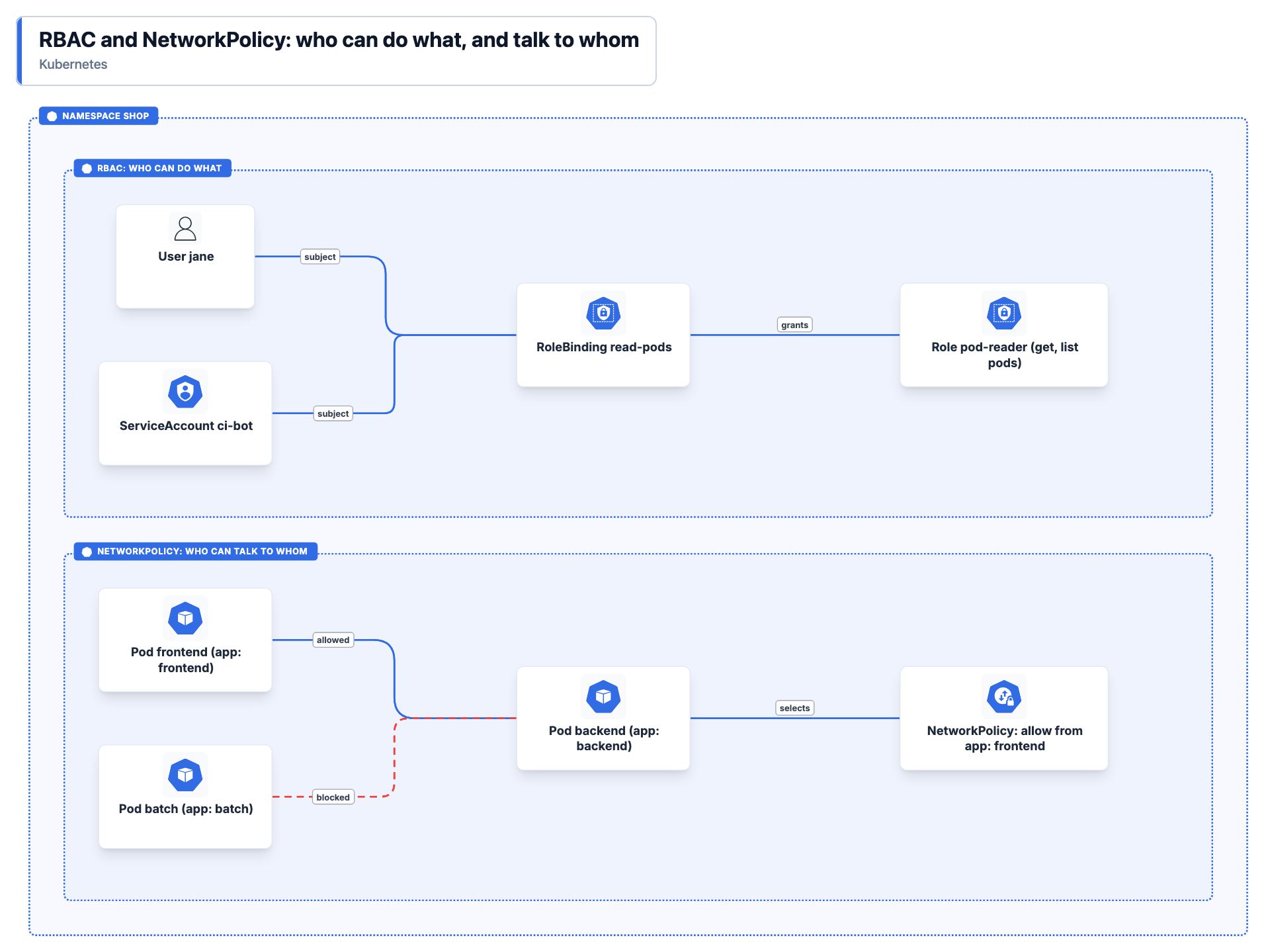
Two kinds of rules in one namespace. At the top, who can do what. A user, jane, and a ServiceAccount, ci bot, are the subjects of one RoleBinding. The binding grants them the Role pod reader, which allows get and list on Pods. Nothing else. At the bottom, who can talk to whom. A NetworkPolicy selects the backend Pod. It allows traffic from Pods labeled app equals frontend. The batch Pod's path is dashed. Blocked. In both cases, once rules apply, anything not allowed is denied.
Least privilege
One rule ties all this together. Least privilege. Give each person, Pod and ServiceAccount only the permissions it needs, and no more. Prefer a Role in one namespace over a ClusterRole for the whole cluster. Avoid wildcard rules, and keep the cluster-admin role for the very few who need it. For traffic, start with a policy that denies everything, then allow what each app needs. Like my snack drawer.
Recap
Let's recap. Authentication proves who you are. Authorization decides what you may do. Roles hold permissions in a namespace, ClusterRoles across the cluster, and bindings grant them. ServiceAccounts give Pods their own identity. NetworkPolicies control Pod traffic, if your network plugin supports them. And least privilege, everywhere.
Practice and what's next
That's security basics. Trust nobody. Not even the llama. Practice it with free Kubernetes practice questions, then lock down a namespace yourself in the hands-on labs at Gazeek Labs. Next up, the cloud-native world and what's next. See you there. More videos on the channel. Alpaca Mango. I'll be there. I'm always there. Mate.
Hands-on labs
Now try it on a real cluster
RBAC for a team: a real cluster built for you, checked as you go.
Open the lab
Gazeek Flash · free
Exam questions on your phone
Free questions on Running it well: quick-fire batches and timed exams, on the web or Android.