ConfigMaps and Secrets
Space Llama shows how ConfigMaps and Secrets keep configuration out of the container image, how a Pod reads them as environment variables or files, and why a Secret needs more than base64 to stay secret.





Diagrams in this video · 1Free in archhy
Now try it on a real cluster
The videos are free. Gazeek's hands-on labs give you a real Kubernetes cluster in your browser for every lab, with checks that tell you when you've got it right: the practice the CKA and CKAD exams need.
The diagrams, full size
Copy any of them into archhy, free, and change it for your own system.
After this lesson you can
- Explain why configuration belongs outside the container image
- Describe what a ConfigMap stores and how a Pod uses it
- Explain that Secrets are base64-encoded, not encrypted, by default
- Name ways to protect Secrets, including encryption at rest and RBAC
Transcript
ConfigMaps and Secrets
Space Llama here. This lesson is about configuration. Things like a database address, a feature switch, or a password. We'll keep them out of the image with ConfigMaps and Secrets. Then we'll see how a Pod reads them, and why a Secret isn't as secret as it sounds.
Keep configuration out of the image
A container image should be the same in testing and in production. What changes between them is configuration. The database address, the log level, the API keys. If you bake those into the image, you need a new image for every environment. So Kubernetes lets you store configuration as separate objects in the cluster. The Pod reads them when it starts. Same image, different settings.
ConfigMaps
A ConfigMap is an API object for non-confidential data, stored as key-value pairs. A key might be log level, with the value debug. Or a key might hold a whole config file. A Pod can read a ConfigMap as environment variables, or as files mounted in a volume. A volume is a directory the containers in a Pod can see. More on those next lesson. The ConfigMap and the Pod must live in the same namespace. Mounted files are updated when the ConfigMap changes. Environment variables are not, until the container restarts.
Secrets
A Secret is like a ConfigMap, but for small amounts of sensitive data. Passwords, tokens, keys. The stuff you'd rather not paste into a chat. You use it the same way, as environment variables or as files in a volume. Inside the Secret, each value is base64-encoded. That's an encoding, not encryption. Anyone who can read the Secret can decode it in one command.
Settings into a Pod
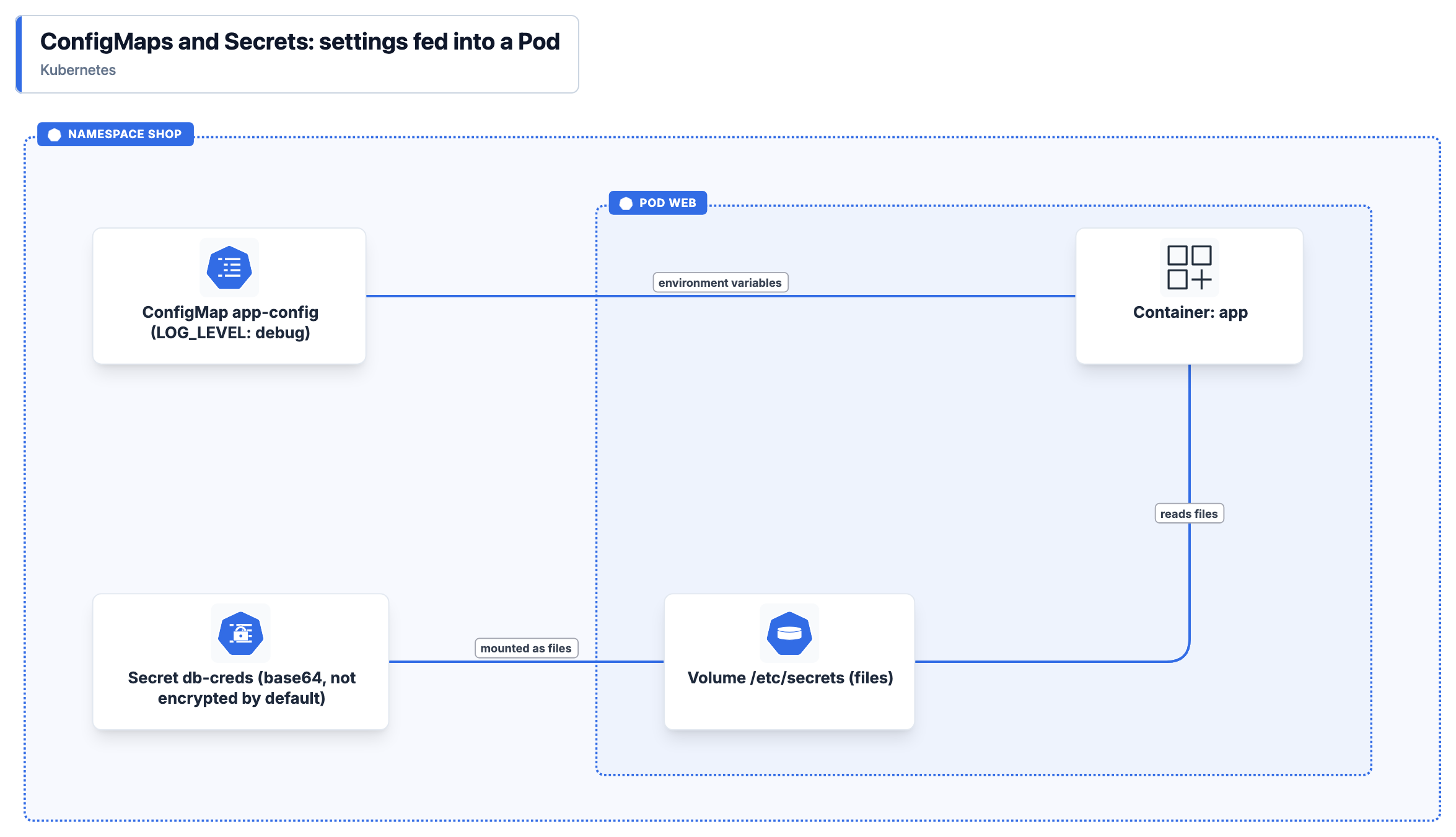
Here's one Pod getting its settings from both. At the top, a ConfigMap called app config. Its log level reaches the container as an environment variable. Below, a Secret called db creds. It's mounted into the Pod as a volume. Each key in the Secret becomes a file, and the app reads its password from that file. Note the label on the Secret. base64, not encrypted by default. It's a costume, not a lock.
What a Secret does, and doesn't, do
By default, Secrets are stored unencrypted in etcd, the cluster's database. Anyone with access to the API, or to etcd, can read them. And anyone who can create a Pod in a namespace can use that Pod to read the namespace's Secrets. So, three habits. First, turn on encryption at rest, so etcd holds Secrets encrypted. Second, use RBAC, role-based access control, to give read access to as few people as possible. Third, consider an external secret store, which keeps the real values outside the cluster. And never commit a Secret's manifest to Git. base64 fools nobody.
Recap
Let's recap. Keep configuration out of the image, so one image runs anywhere. ConfigMaps hold non-confidential settings as key-value pairs. Pods use them as environment variables, or as files in a volume. Secrets hold sensitive data, but by default they're only base64-encoded. Turn on encryption at rest, and restrict who can read Secrets with RBAC.
Practice and what's next
That's configuration. Your password is safe, as long as nobody knows base64. Practice it with free Kubernetes practice questions, then try it on a real cluster in the hands-on labs at Gazeek Labs. Next up, storage. Volumes, PersistentVolumes and claims. See you there.
Hands-on labs
Now try it on a real cluster
Configure the bakery: a real cluster built for you, checked as you go.
Open the lab
Gazeek Flash · free
Exam questions on your phone
Free questions on Configuration and storage: quick-fire batches and timed exams, on the web or Android.