Namespaces, labels and resources
Space Llama shows how namespaces divide a cluster, how labels and selectors group objects, how requests and limits size each container, and how a ResourceQuota caps a whole namespace.





Diagrams in this video · 1Free in archhy
Now try it on a real cluster
The videos are free. Gazeek's hands-on labs give you a real Kubernetes cluster in your browser for every lab, with checks that tell you when you've got it right: the practice the CKA and CKAD exams need.
The diagrams, full size
Copy any of them into archhy, free, and change it for your own system.
After this lesson you can
- Explain what a namespace is and name the ones a cluster starts with
- Use labels and selectors to group and find objects
- Tell resource requests and limits apart
- Describe how a ResourceQuota limits a namespace
Transcript
Namespaces, labels and resources
Space Llama here. One cluster, many teams, many apps. How do you keep it tidy? This lesson covers namespaces, labels and selectors. Then requests and limits, and quotas that stop one team eating the whole cluster.
Namespaces
A namespace divides one cluster into separate groups of resources. Names must be unique inside a namespace, but not across them. Two teams can both have a Deployment called web. A new cluster starts with a few. default is where your objects go if you don't say. kube-system holds the objects Kubernetes creates for itself. There's also kube-public and kube-node-lease. Some objects belong to the whole cluster, not a namespace. Nodes, PersistentVolumes and namespaces themselves. To pick one, add dash n and its name to a kubectl command.
Labels and selectors
A label is a key-value pair you attach to an object. Like app equals web, or tier equals frontend. Labels aren't unique. Many objects can carry the same one, and that's the point. A selector picks out objects by their labels. Equality-based selectors match exact values. Set-based selectors match a value from a list. That's how a Service finds its Pods, and how a Deployment knows which Pods are its own. On the command line, kubectl get pods dash l app equals web lists just those Pods.
Requests vs limits
Each container can say how much CPU and memory it wants. CPU is counted in cores, often in thousandths called millicores. Memory is counted in bytes, like mebibytes. A request is what the container needs. The scheduler only places a Pod on a node with room for its requests. A limit is the most it may use, and it's enforced. Go over the CPU limit and the container is throttled. Slowed down, not stopped. Go over the memory limit and it can be killed with an out-of-memory error. Like me at a buffet.
ResourceQuota
Requests and limits size one container. A ResourceQuota caps a whole namespace. It can limit the total CPU and memory requested, and the number of objects, like Pods or Services. If creating something would go over the quota, the API server rejects it. Once a quota covers CPU or memory, each new Pod must set requests or limits for it, or it may be rejected too. Give each team a namespace and a quota, and nobody hogs the cluster.
Two teams, one cluster
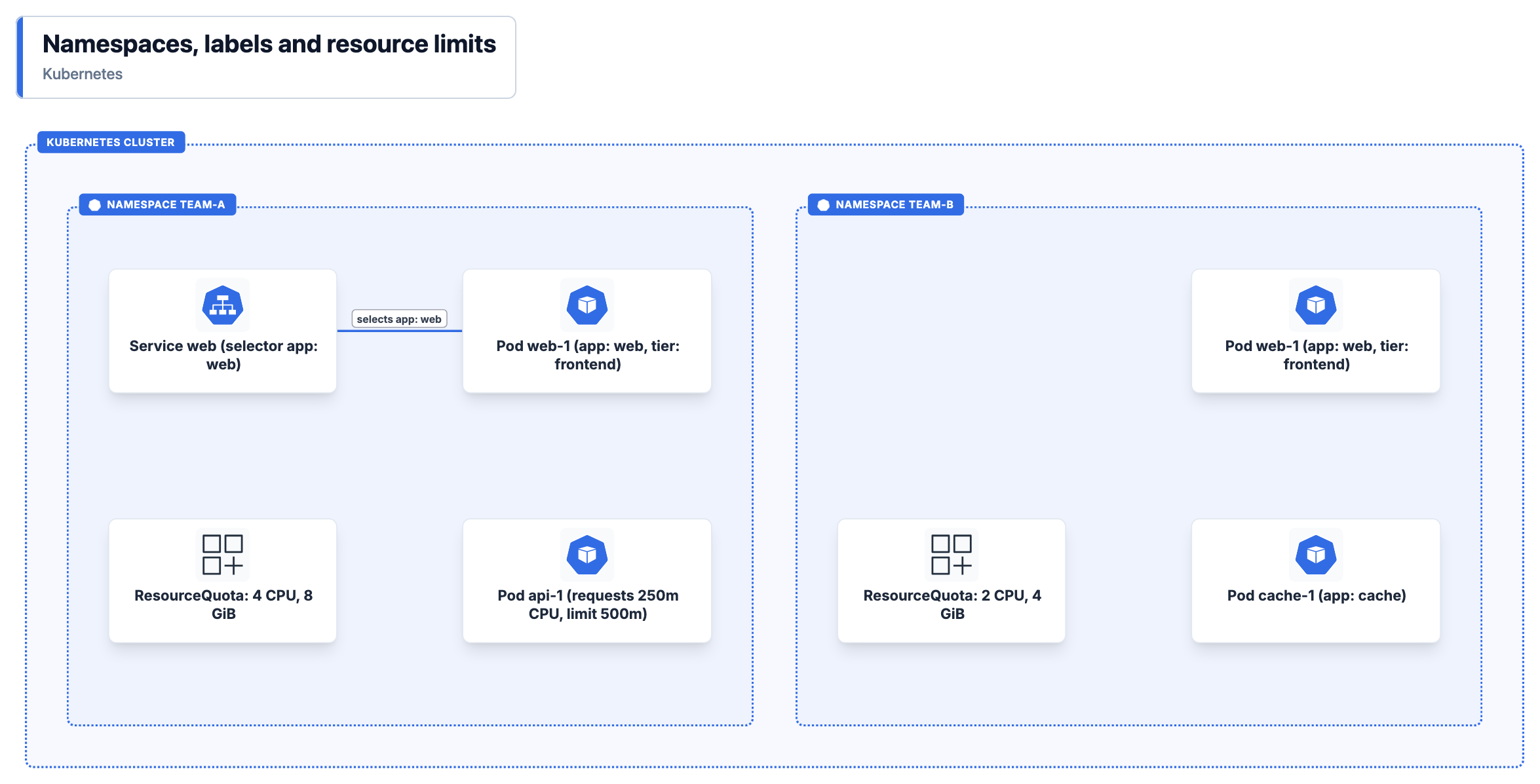
Here's one cluster, split into two namespaces, team a and team b. Both have a Pod called web one. That's fine. Names only need to be unique inside a namespace. The Pods carry labels, like app equals web, and tier equals frontend. In team a, a Service uses the selector app equals web to find its Pod. The api Pod requests 250 millicores of CPU, a quarter of a core, and may use at most 500. And each namespace has its own ResourceQuota, so neither team can eat the whole cluster.
Recap
Let's recap. Namespaces divide one cluster into groups, and names are unique within each one. Labels are key-value tags. Selectors find objects by those labels. Requests tell the scheduler what a container needs. Limits cap what it can use. CPU gets throttled, memory gets killed. And a ResourceQuota caps the total for a whole namespace.
Practice and what's next
That's a tidy cluster. Everything labeled, nothing hogging the hay. Practice it with free Kubernetes practice questions, then set requests and quotas yourself in the hands-on labs at Gazeek Labs. Next up, health checks and autoscaling. See you there.
Hands-on labs
Now try it on a real cluster
Quotas for team alpha: a real cluster built for you, checked as you go.
Open the lab
Gazeek Flash · free
Exam questions on your phone
Free questions on Running it well: quick-fire batches and timed exams, on the web or Android.