Health checks and autoscaling
Space Llama explains how liveness, readiness and startup probes tell Kubernetes whether a container is healthy, and how the Horizontal Pod Autoscaler and node autoscaling grow and shrink an application and its cluster.





Diagrams in this video · 1Free in archhy
Now try it on a real cluster
The videos are free. Gazeek's hands-on labs give you a real Kubernetes cluster in your browser for every lab, with checks that tell you when you've got it right: the practice the CKA and CKAD exams need.
The diagrams, full size
Copy any of them into archhy, free, and change it for your own system.
After this lesson you can
- Tell liveness, readiness and startup probes apart
- Name the ways a probe can check a container
- Explain how the Horizontal Pod Autoscaler scales a workload
- Describe how node autoscaling adds and removes nodes
Transcript
Health checks and autoscaling
Space Llama here. A running container isn't always a working one. This lesson covers probes, the health checks that tell Kubernetes what's really going on. Then autoscaling. More Pods when you're busy, more nodes when the Pods run out of room.
Probes
A probe is a health check the kubelet runs against a container, again and again. It can send an HTTP request, open a TCP connection, or run a command inside the container. It can also call a gRPC health check, if your app speaks gRPC. One failure isn't the end. After a set number of failures in a row, Kubernetes acts. What it does depends on which kind of probe failed. There are three.
Liveness, readiness and startup
A liveness probe asks, is this container stuck? If it fails, the kubelet restarts the container. That catches a deadlock, where the app is running but making no progress. A readiness probe asks, can this container take traffic right now? If not, the Pod is removed from the endpoints of any Service that selects it. No traffic, but no restart either. A startup probe is for slow starters. It holds off the other two probes until the app has started. Without it, a liveness probe might restart a slow app before it ever gets going. Rude.
Horizontal Pod Autoscaler
Now scaling. Horizontal means more Pods. Vertical would mean bigger Pods. The Horizontal Pod Autoscaler, or HPA, watches a metric, like average CPU use across the Pods. When the metric goes over your target, it raises the replica count on a Deployment or StatefulSet. When demand drops, it lowers it. You set a minimum and a maximum, so it never scales to zero by surprise, or to a thousand. For CPU and memory, the cluster needs a metrics source, usually the Metrics Server add-on. And the Pods need CPU requests, because utilization is measured against them.
Probes and autoscaling together
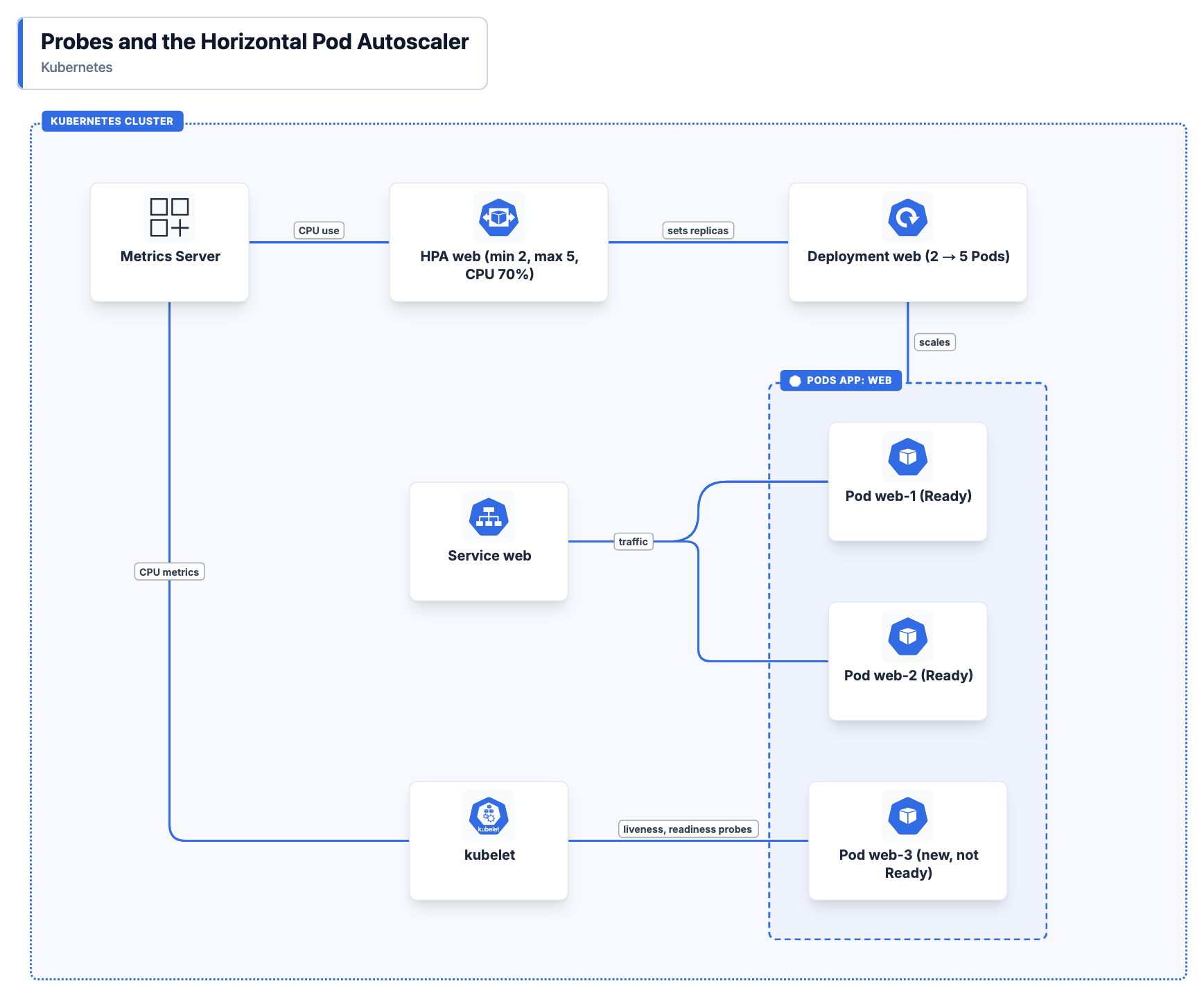
Here's how it fits together. Start at the top left, with the Metrics Server. It collects CPU use from the kubelets, and the HPA reads it. CPU is over the target, so the HPA raises the Deployment's replicas, from two toward five. A new Pod, web three, is starting. The kubelet runs its liveness and readiness probes. Until the readiness probe passes, the Service sends it no traffic. Web one and web two take the load. Once it's ready, it joins in. Nobody takes traffic before their coffee.
Scaling Pods vs scaling nodes
More Pods need somewhere to run. Eventually the nodes fill up. When Pods can't be scheduled because no node has room, a node autoscaler adds nodes. When nodes sit underused, it can move their Pods elsewhere and remove them, to save money. The HPA is built into Kubernetes. Node autoscaling is an add-on, like Cluster Autoscaler or Karpenter. Managed Kubernetes services usually offer one for you.
Recap
Let's recap. Probes are health checks the kubelet runs on each container. A failed liveness probe restarts the container. A failed readiness probe stops traffic to the Pod, without a restart. A startup probe holds the others back until a slow app has started. The Horizontal Pod Autoscaler adds and removes Pods. Node autoscaling adds and removes nodes.
Practice and what's next
That's health and scaling. Check often, grow when busy. Same as my hay supply. Practice it with free Kubernetes practice questions, then break a probe on purpose in the hands-on labs at Gazeek Labs. Next up, security basics. See you there.
Hands-on labs
Now try it on a real cluster
Health checks with probes: a real cluster built for you, checked as you go.
Open the lab
Gazeek Flash · free
Exam questions on your phone
Free questions on Running it well: quick-fire batches and timed exams, on the web or Android.