Why orchestration
Why running many containers on many machines needs an orchestrator, what Kubernetes does for you, and how desired state works.





Diagrams in this video · 1Free in archhy
Now try it on a real cluster
The videos are free. Gazeek's hands-on labs give you a real Kubernetes cluster in your browser for every lab, with checks that tell you when you've got it right: the practice the CKA and CKAD exams need.
The diagrams, full size
Copy any of them into archhy, free, and change it for your own system.
After this lesson you can
- Explain the problems of running many containers on many machines by hand
- List what Kubernetes does, from scheduling to service discovery
- Contrast giving step-by-step commands with declaring desired state
- Describe how controllers keep the actual state close to the desired state
Transcript
Why orchestration
Space Llama again. Last time, containers. One box, nicely packed. Today, we ask what happens when you have hundreds of them, on dozens of machines. We'll see why that needs an orchestrator, what Kubernetes does, and the big idea behind it. Desired state.
Many containers, many machines
Running one container by hand is easy. Running hundreds is not. Which machine should each container run on, and does it have room? What happens when a container crashes at three in the morning? Or the whole machine does? How do you handle more traffic, and then less again? How do you ship a new version without taking everything down? And how do containers find each other, when they keep moving around? Answering those by hand is a full-time job. Several, actually.
What Kubernetes does for you
An orchestrator answers them for you. Kubernetes is the one this course is about. Scheduling. It places each container on a machine with enough CPU and memory free. Self-healing. It restarts containers that fail, and replaces them when a machine dies. Scaling. It runs more copies when you need them, and fewer when you don't. Rollouts. It ships a new version gradually, and rolls back if something goes wrong. And service discovery and load balancing. It gives your app a stable name, and spreads traffic across the copies.
Step by step vs desired state
There are two ways to tell a system what to do. Imperative means step by step. Start this container. Stop that one. And you notice when something breaks. Declarative means you describe the end result, and leave the steps to the system. For example, I want three copies of this app running. That description is your desired state. Kubernetes works mostly this way. You write it down in a file, hand it over, and Kubernetes does the steps. Including the ones at three in the morning.
Controllers close the gap
So how does Kubernetes keep your desired state true? With controllers. A controller is a loop that watches part of the cluster. It compares the actual state with the desired state, and acts to close the gap. You asked for three copies, and one crashed? The controller notices two, and starts a third. Kubernetes has many controllers, each looking after one kind of thing. It's like a thermostat. You set the temperature. It switches the heating on and off to match. And the loop never stops. Kubernetes is, in a good way, relentless.
Three replicas, one failure
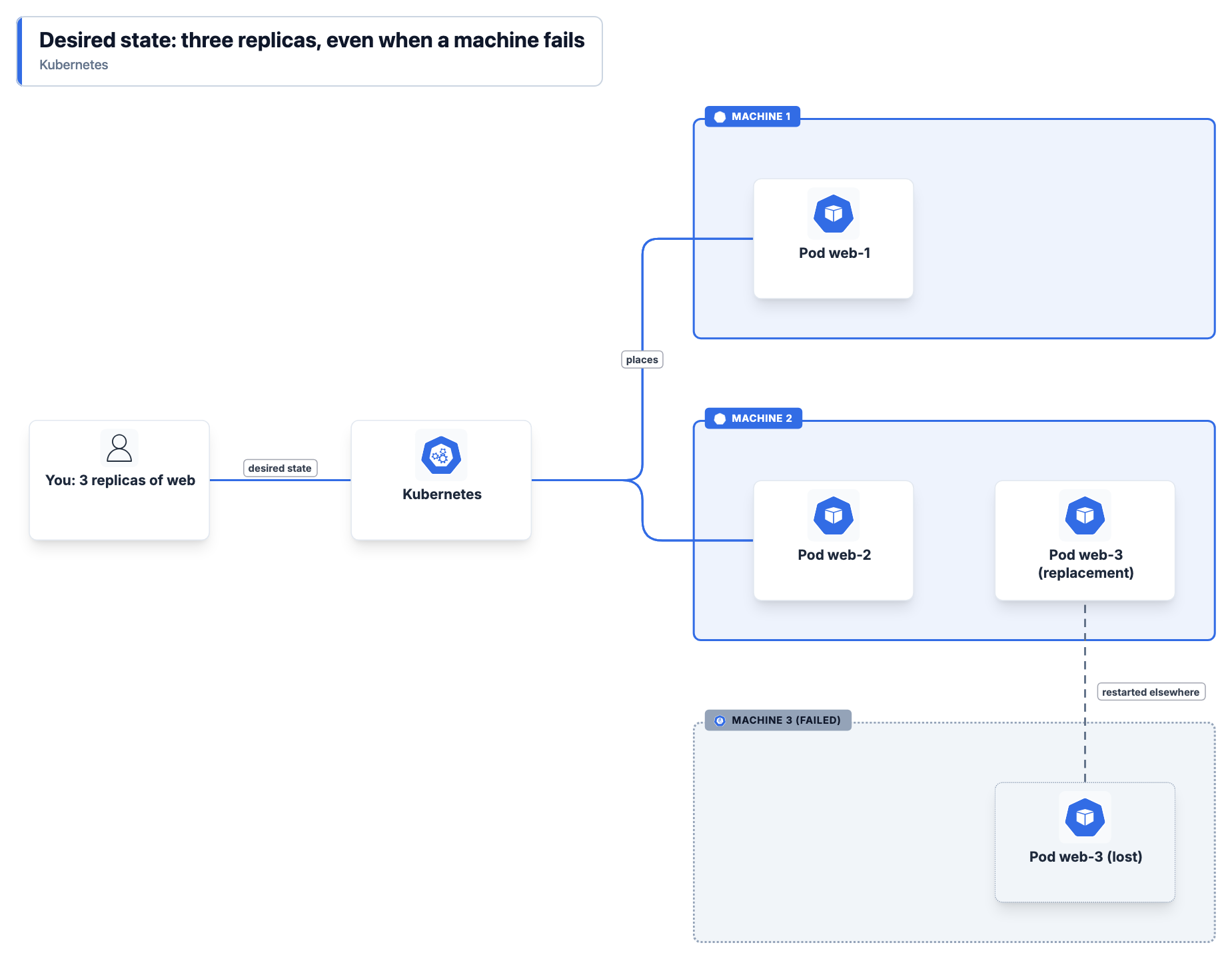
Let's watch that loop at work. On the left, you declare your desired state. Three replicas of web. Replicas just means copies. Kubernetes places them across three machines. Each copy runs in a Pod, its wrapper for containers. More on Pods later. Now machine three fails. Dotted lines. Very sad. Its copy of web is gone. A controller counts two, not three. So a replacement starts on machine two. Nobody was paged. Nobody woke up. Three copies again.
Recap
Let's recap. Many containers on many machines need an orchestrator. Kubernetes handles scheduling, self-healing, scaling and rollouts. It gives your app a stable name, and balances traffic across copies. You declare the desired state. Controllers keep matching the actual state to it. That's called reconciling.
Practice and what's next
That's orchestration. Somebody has to herd the containers. I prefer herding llamas. Practice the idea with free Kubernetes practice questions and hands-on labs at Gazeek Labs. Next lesson, Kubernetes in the cloud and on your laptop. See you there.
Hands-on labs
Now try it on a real cluster
A real Kubernetes cluster in your browser for every lab, checked as you go.
See the labs
Gazeek Flash · free
Exam questions on your phone
Free questions on Why Kubernetes: quick-fire batches and timed exams, on the web or Android.