Talking to the cluster: kubectl and YAML
How kubectl talks to the API server, what goes in a YAML manifest, and why declaring desired state with kubectl apply lets controllers do the rest.





Diagrams in this video · 1Free in archhy
Now try it on a real cluster
The videos are free. Gazeek's hands-on labs give you a real Kubernetes cluster in your browser for every lab, with checks that tell you when you've got it right: the practice the CKA and CKAD exams need.
The diagrams, full size
Copy any of them into archhy, free, and change it for your own system.
After this lesson you can
- Explain that kubectl talks to the cluster through the Kubernetes API
- Name the four main fields of a manifest, apiVersion, kind, metadata and spec
- Tell spec (desired state) from status (current state)
- Compare imperative commands with declarative configuration
- Describe how kubectl apply and controllers keep a cluster in its desired state
Transcript
Talking to the cluster: kubectl and YAML
Space Llama here. We've seen the cluster. Now, how do you talk to it? In this lesson, we'll meet kubectl, the command-line tool, and YAML, the files you write. Then the big idea. You don't tell Kubernetes what to do. You tell it what you want.
kubectl
kubectl is the command-line tool for Kubernetes. You type commands, and it turns them into requests. It talks to the control plane through the Kubernetes API, which means through the API server. It finds the cluster, and your credentials, in a file called a kubeconfig. By default it lives in a folder called dot kube, in your home directory. Try kubectl get pods to list Pods, kubectl describe pod for the details of one, and kubectl logs to read a container's output.
Objects and manifests
Everything you create in Kubernetes is an object. A Pod is an object. So is a Deployment. An object is a record of intent. Create one, and Kubernetes keeps working to make it true. Most objects have two parts. The spec is the state you want. The status is the state right now. You write objects in files called manifests, usually in YAML, a plain-text format of keys and values.
A manifest
Here's a short manifest. Nearly every manifest has these four fields. apiVersion says which version of the Kubernetes API to use. Here, apps slash v1. kind says what sort of object it is. This one's a Deployment, which keeps a set of Pods running. metadata names it. This one's called web. And spec is the desired state. Three replicas, meaning three copies of a Pod. The template says each Pod runs the nginx web server.
Imperative vs declarative
There are two ways to work. Imperative means telling Kubernetes each step. Create this. Now scale it to five. It's quick for experiments, but nothing records what you did. Except your memory. Good luck. Declarative means describing the result you want in files, then running kubectl apply. Run it again and again. Kubernetes works out what changed. And your files can live in Git, where teammates can review them.
Desired state and reconciliation
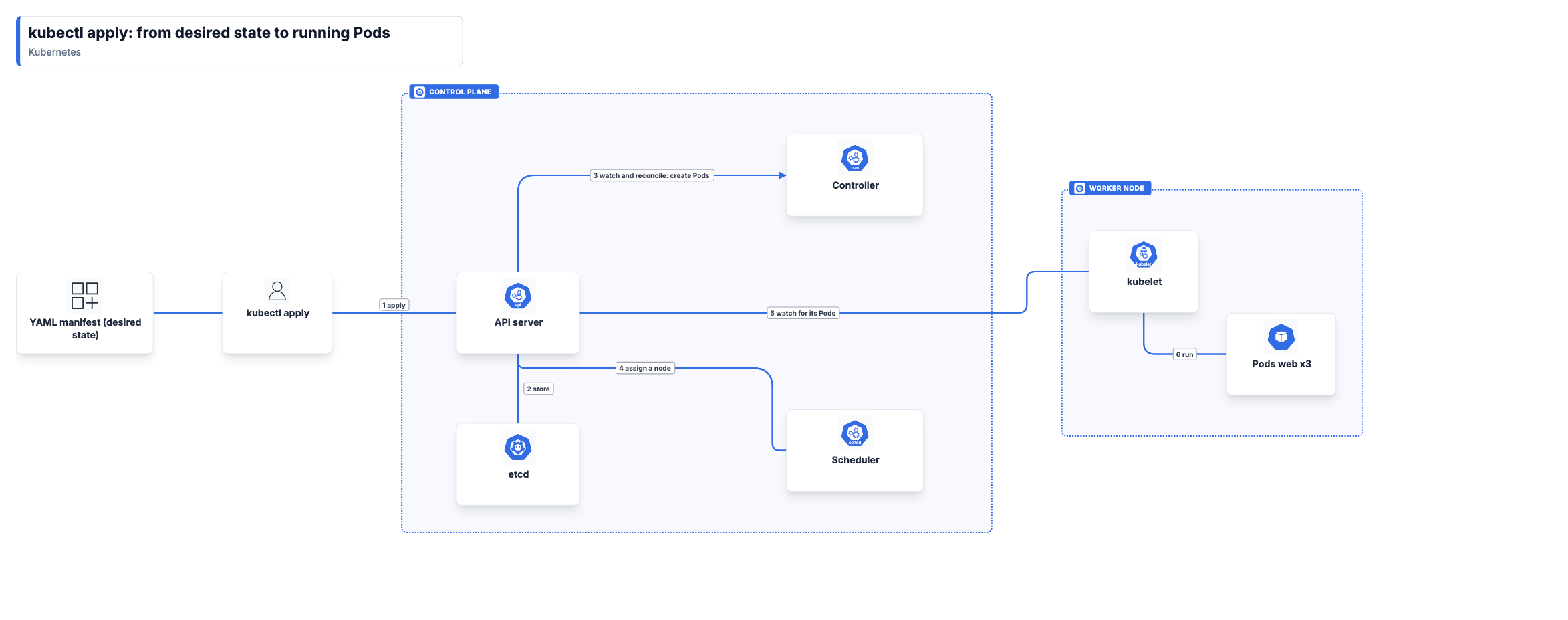
So what happens when you run kubectl apply? kubectl sends your manifest to the API server, which checks it and stores it in etcd. Then controllers take over. Each one compares the desired state with the current state. If you asked for three Pods and there are two, a controller asks for one more. The scheduler places it, and a kubelet runs it. This never stops. If a Pod dies later, the gap opens again, and the controllers close it. That loop is called reconciliation. It's the heart of Kubernetes.
What kubectl apply sets off
Here's kubectl apply, step by step. One. kubectl sends your manifest to the API server. Two. The API server stores it in etcd. Three. A controller watches, sees three Pods wanted and none there, and creates them. That's watch and reconcile. Four. The scheduler sees Pods with no node, and assigns one to each. Five. The kubelet on that node sees Pods assigned to it. Six. It runs them. Every line goes through the API server. Nobody takes a shortcut. Not even me.
Recap
Let's recap. kubectl talks to the cluster through the API server. A manifest has four main fields. apiVersion, kind, metadata and spec. The spec is the state you want. The status is the state right now. Declarative means you describe the result in files, and run kubectl apply. And controllers keep reconciling, so the cluster keeps matching what you asked for.
Practice and what's next
That's how you talk to a cluster. Politely, and in YAML. Try writing a manifest yourself. Gazeek Labs has free Kubernetes practice questions, and hands-on labs on a real cluster. Next up, Pods. The smallest thing Kubernetes runs. See you there. If you learned something, there's more on the channel. If you didn't, also the channel. Mate.
Hands-on labs
Now try it on a real cluster
Exam command-line readiness: a real cluster built for you, checked as you go.
Open the lab
Gazeek Flash · free
Exam questions on your phone
Free questions on Cluster architecture: quick-fire batches and timed exams, on the web or Android.