Storage: volumes, PVs and PVCs
Space Llama explains why files inside a container don't last, how volumes help, and how a PersistentVolumeClaim, a PersistentVolume and a StorageClass give a Pod storage that outlives it.
Now try it on a real cluster
The videos are free. Gazeek's hands-on labs give you a real Kubernetes cluster in your browser for every lab, with checks that tell you when you've got it right: the practice the CKA and CKAD exams need.
The diagrams, full size
Copy any of them into archhy, free, and change it for your own system.
- Drawing the picture…
 D1Container files don't lastAt 0:20 · Copy and edit in archhy (opens in a new tab)
- Drawing the picture…
 D2A Pod with persistent storageAt 2:05 · Copy and edit in archhy (opens in a new tab)
- Drawing the picture…
 D3When the claim is deletedAt 2:39 · Copy and edit in archhy (opens in a new tab)
After this lesson you can
- Explain why files written inside a container are lost when it restarts
- Tell ephemeral volumes and persistent volumes apart
- Describe how a PersistentVolumeClaim binds to a PersistentVolume
- Explain how a StorageClass provisions storage dynamically
Transcript
Storage: volumes, PVs and PVCs
Space Llama here. Today, storage. Where your data goes when a Pod goes. We'll see why container files don't last, and what volumes do about it. Then PersistentVolumes, PersistentVolumeClaims and StorageClasses, with a diagram to tie them together.
Container files don't last
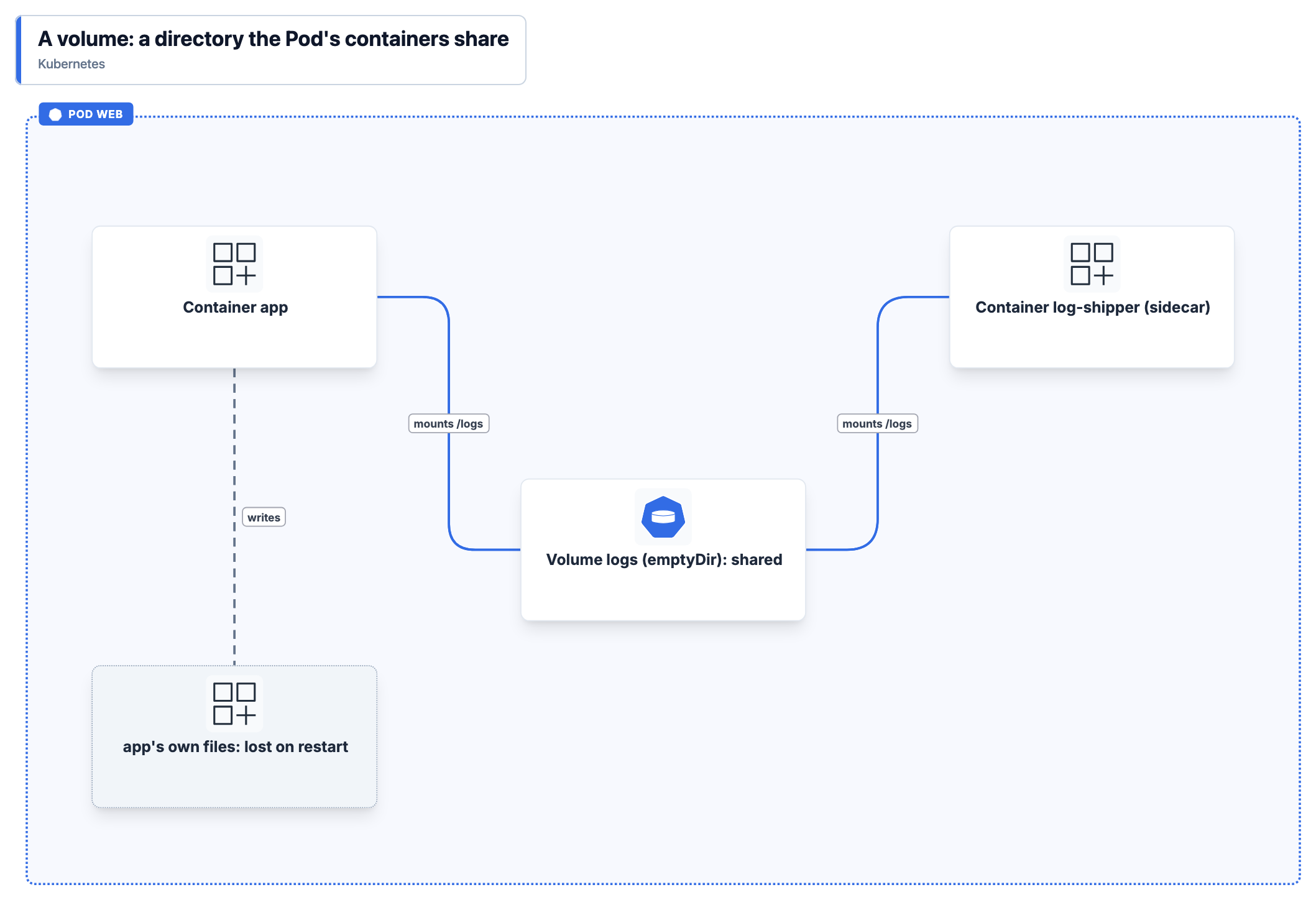
Files a container writes to its own file system are ephemeral. That means short-lived. If the container crashes, the kubelet restarts it with a clean state. The files are gone. A volume fixes part of that. It's a directory the containers in a Pod can see. You declare it in the Pod spec, then mount it into each container that needs it. Containers in the same Pod can share a volume, which is handy for sidecars.
Ephemeral vs persistent volumes
Volumes come in two kinds. An ephemeral volume lives as long as its Pod. It survives a container restart, but not the Pod being deleted. emptyDir is the classic one. An empty directory, made when the Pod lands on a node. Good for scratch space and caches. A persistent volume outlives any single Pod. It's backed by real storage, like a network disk or a cloud volume. And for that, Kubernetes has three objects. Let's meet them.
PV, PVC and StorageClass
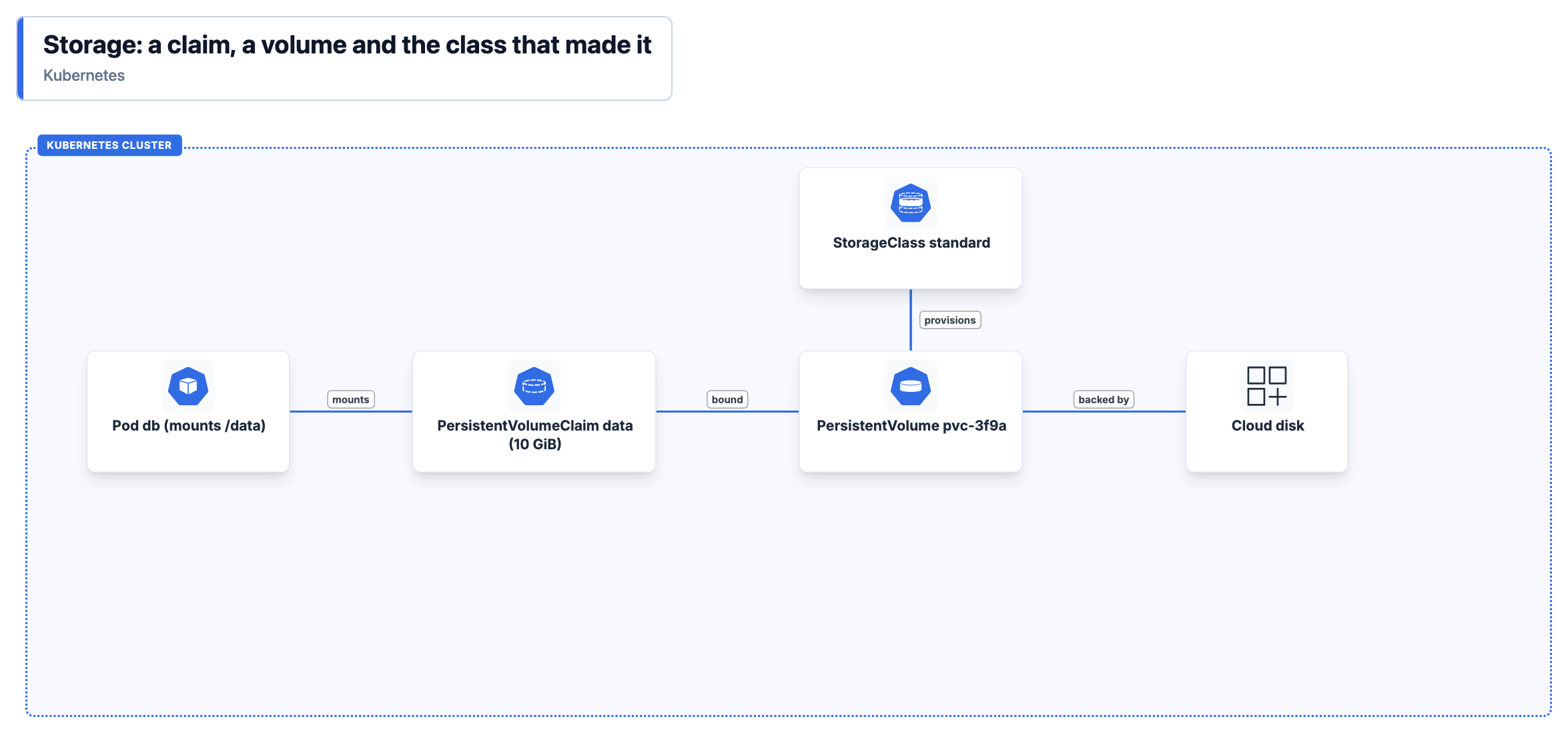
A PersistentVolume, or PV, is a piece of storage in the cluster. An administrator can create it, or a StorageClass can. A PersistentVolumeClaim, or PVC, is a request for storage, made by a user or an app. The claim asks for a size and an access mode, like ReadWriteOnce, which means one node can mount it read-write. Kubernetes finds a matching volume and binds the two together. One claim, one volume. A StorageClass describes a kind of storage on offer. Fast disks, cheap disks, whatever your cluster has. With dynamic provisioning, there's no volume waiting. The StorageClass creates one when the claim arrives.
A Pod with persistent storage
Here's how they connect. Start with the Pod. The Pod doesn't name a disk. It names a PersistentVolumeClaim, and mounts it as a volume. The claim asks for some storage, of a certain size and access mode, from a StorageClass. The StorageClass provisions a new PersistentVolume to match. That's dynamic provisioning. The claim and the volume are now bound together. If the Pod is deleted, the claim and the volume stay. A new Pod can use the same claim and find its data.
When the claim is deleted
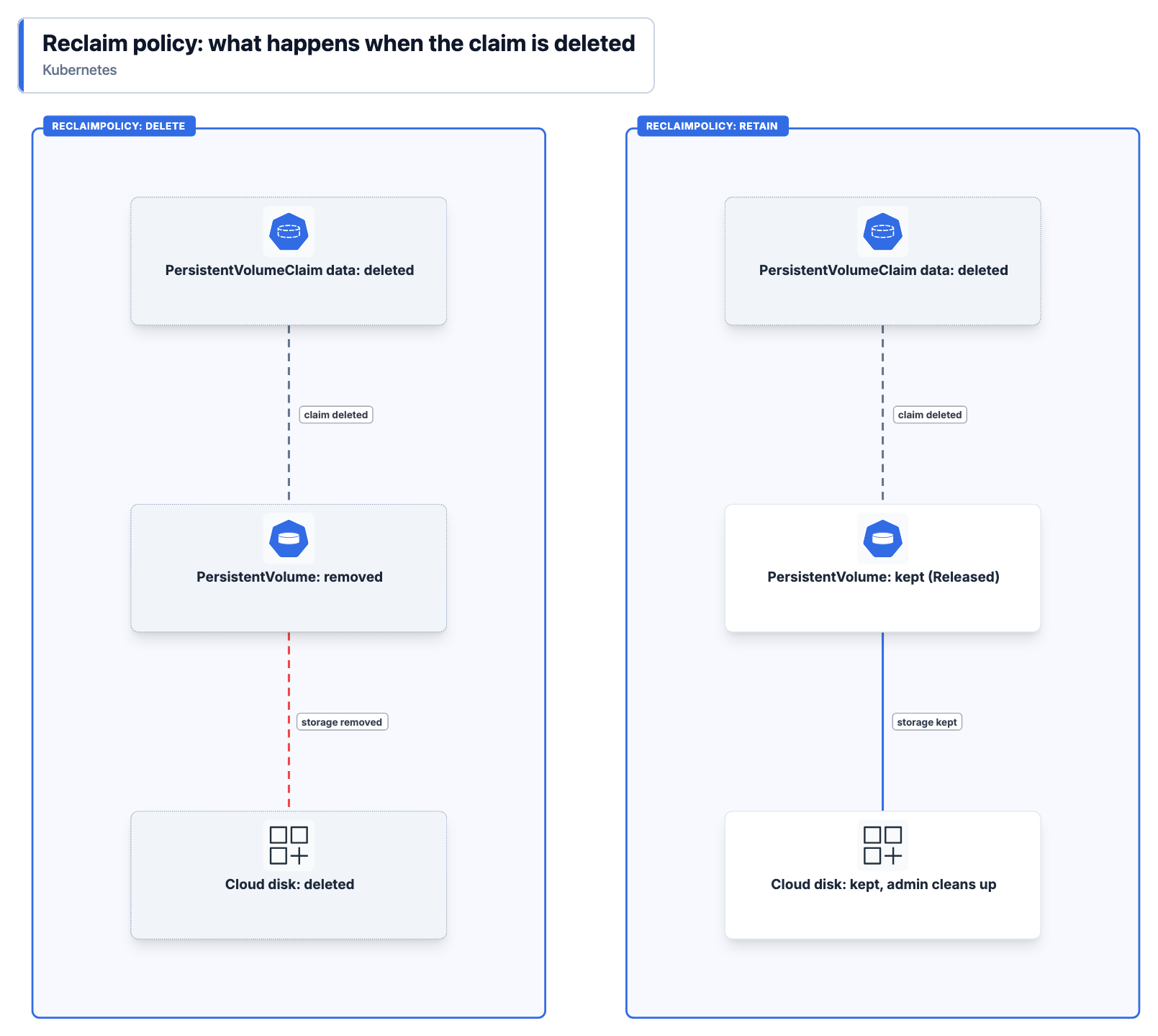
What happens when you delete the claim itself? The volume's reclaim policy decides. With Delete, the volume and its storage are removed. With Retain, the volume is kept, and an administrator cleans up by hand. Volumes made by dynamic provisioning default to Delete, so check the policy before storing anything precious.
Recap
Let's recap. Files inside a container are lost when it restarts. Volumes give a Pod directories that its containers can share. A PersistentVolumeClaim requests storage. A PersistentVolume supplies it, and the two bind one to one. A StorageClass provisions volumes on demand. And the reclaim policy decides whether the storage is kept or deleted.
Practice and what's next
That's storage. Your data now outlives your Pods. Mine outlives my snacks. Practice it with free Kubernetes practice questions, then claim some storage yourself in the hands-on labs at Gazeek Labs. Next up, namespaces, labels and resources. See you there. More videos on the channel. Alpaca Mango. I'll be there. I'm always there. Mate.
Hands-on labs
Now try it on a real cluster
Volumes by hand: PV, PVC and reclaim: a real cluster built for you, checked as you go.
Open the lab
Gazeek Flash · free
Exam questions on your phone
Free questions on Configuration and storage: quick-fire batches and timed exams, on the web or Android.