Inside a node
What runs on every worker node, the kubelet, the container runtime and kube-proxy, and how a node joins the cluster and reports its health.





Diagrams in this video · 1Free in archhy
Now try it on a real cluster
The videos are free. Gazeek's hands-on labs give you a real Kubernetes cluster in your browser for every lab, with checks that tell you when you've got it right: the practice the CKA and CKAD exams need.
The diagrams, full size
Copy any of them into archhy, free, and change it for your own system.
After this lesson you can
- Describe a node as a physical or virtual machine that runs Pods
- Explain what the kubelet does with the Pods it is given
- Describe the container runtime and the Container Runtime Interface (CRI)
- Explain what kube-proxy does for Service traffic
- Describe how nodes register and report that they are healthy
Transcript
Inside a node
Space Llama here. Last time we toured mission control. Today, we visit the crew. The worker nodes. We'll meet the three things every node runs. The kubelet, the container runtime and kube-proxy. Then we'll see how a node joins the cluster, and how it says it's still alive.
What a node is
A node is a machine that runs your Pods. It can be a physical server or a virtual machine. The control plane manages it. The node doesn't decide what to run. It's told. Each node runs the services that Pods need. There are three of them, and we'll take them one at a time. Every node has a name, and no two nodes in a cluster can share one.
The kubelet
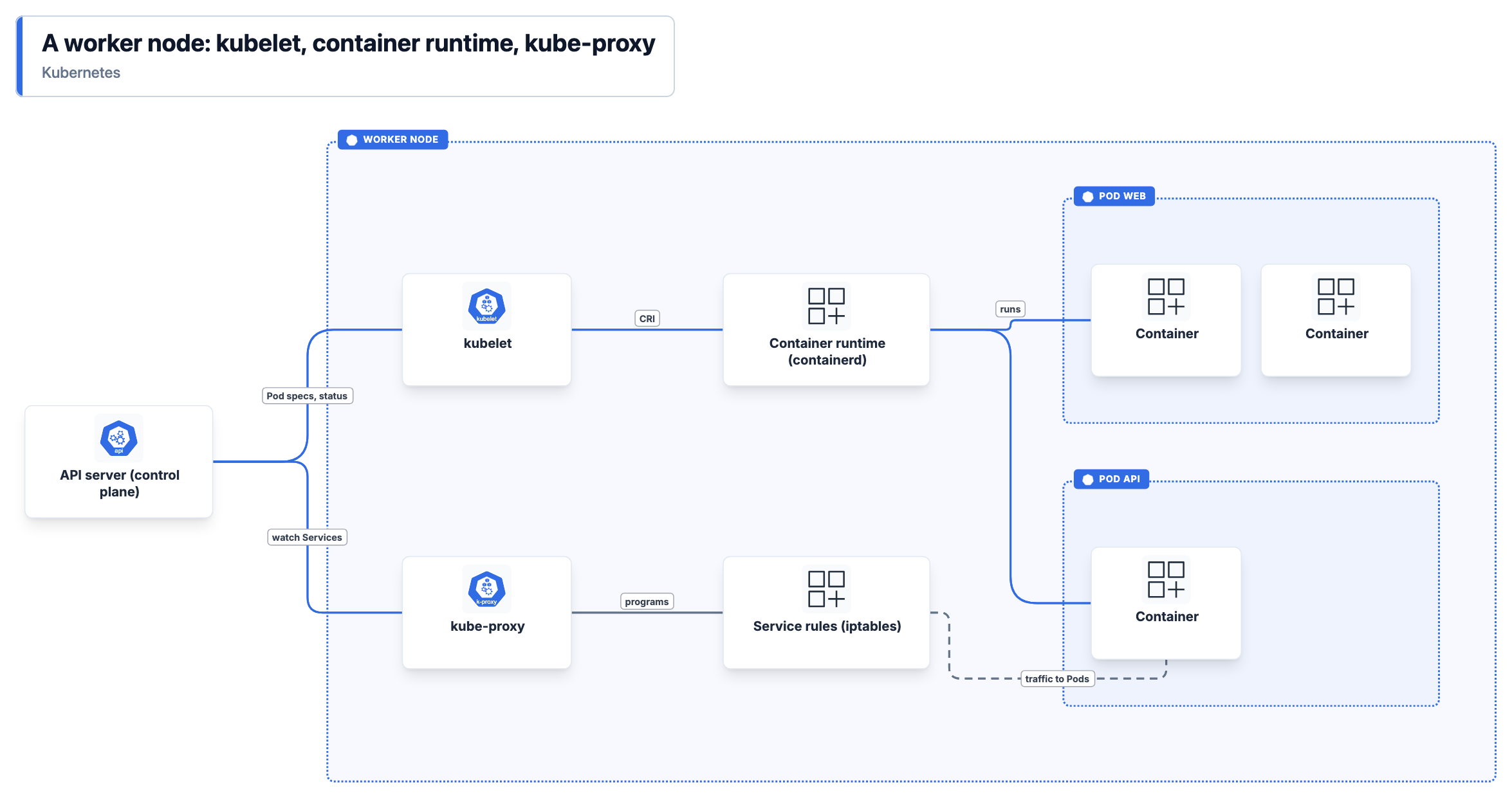
The kubelet is an agent that runs on every node. It gets descriptions of Pods from the API server. Each description is called a Pod spec. It says which containers to run, and how. The kubelet makes sure the containers in those Pods are running and healthy. It only looks after containers that Kubernetes created. Anything else on the machine is not its problem. And it reports back to the control plane, so the cluster knows what's actually going on.
The container runtime
The kubelet doesn't run containers itself. It asks the container runtime. The runtime pulls images, starts and stops containers, and manages their life cycle. containerd and CRI-O are two common examples. Kubernetes talks to runtimes through the Container Runtime Interface, or CRI. It's a standard plug, so the runtime is swappable. Kubernetes once had a built-in adapter for Docker Engine, called dockershim. It has been removed. Your container images are fine, though. They follow a shared standard, so any CRI runtime can run them.
kube-proxy
The third piece is kube-proxy, a network proxy that runs on each node. A Service gives a group of Pods one stable address. We'll cover Services properly in a later lesson. kube-proxy maintains network rules on the node, so traffic sent to a Service ends up at one of its Pods. Some network plugins do that job themselves. In those clusters, you may not need kube-proxy at all.
Inside one node
Let's open up one node. The kubelet watches the API server for Pods assigned to this node, and reports their status back. It talks to the container runtime, here containerd, through CRI. The runtime runs the containers in each Pod. Below, kube-proxy watches the API server for Services. It programs network rules on the node, often with iptables, so Service traffic lands on a Pod. Three parts, one machine. The control plane decides. The node does.
Joining the cluster vs staying healthy
How does a node join? Usually the kubelet registers it with the API server itself. The control plane checks the node is healthy before scheduling any Pods onto it. After that, the kubelet sends regular heartbeats, small updates that say, still here. The node controller in the control plane watches those heartbeats. If a node goes quiet for too long, its Pods are evicted, and controllers replace them on other nodes. No llama left behind.
Recap
Let's recap. A node is a physical or virtual machine that runs Pods. The kubelet runs the Pods it's given, and reports back. The container runtime runs the containers. Kubernetes talks to it through the Container Runtime Interface. kube-proxy helps Service traffic reach the right Pods. And heartbeats tell the control plane each node is still alive.
Practice and what's next
That's a node, inside and out. Hardworking crew. Practice it with the free Kubernetes questions and hands-on labs at Gazeek Labs. Next lesson, Talking to the cluster, with kubectl and YAML. See you there.
Hands-on labs
Now try it on a real cluster
Join a compute node with kubeadm: a real cluster built for you, checked as you go.
Open the lab
Gazeek Flash · free
Exam questions on your phone
Free questions on Cluster architecture: quick-fire batches and timed exams, on the web or Android.