Containers in five minutes
What a container image, a container and a registry are, how containers differ from virtual machines, and why one container should do one job.





Diagrams in this video · 1Free in archhy
Now try it on a real cluster
The videos are free. Gazeek's hands-on labs give you a real Kubernetes cluster in your browser for every lab, with checks that tell you when you've got it right: the practice the CKA and CKAD exams need.
The diagrams, full size
Copy any of them into archhy, free, and change it for your own system.
After this lesson you can
- Tell a container image, a container and a registry apart
- Compare containers with virtual machines
- Explain why containers run the same everywhere and start fast
- Describe why a container should run one main process and stay unchanged
Transcript
Containers in five minutes
Space Llama here. Before Kubernetes, we need the thing it runs. Containers. In this lesson, we'll meet images, containers and registries. We'll compare containers with virtual machines, and see why people like them so much. Five minutes. I've timed it. Roughly.
Image, container, registry
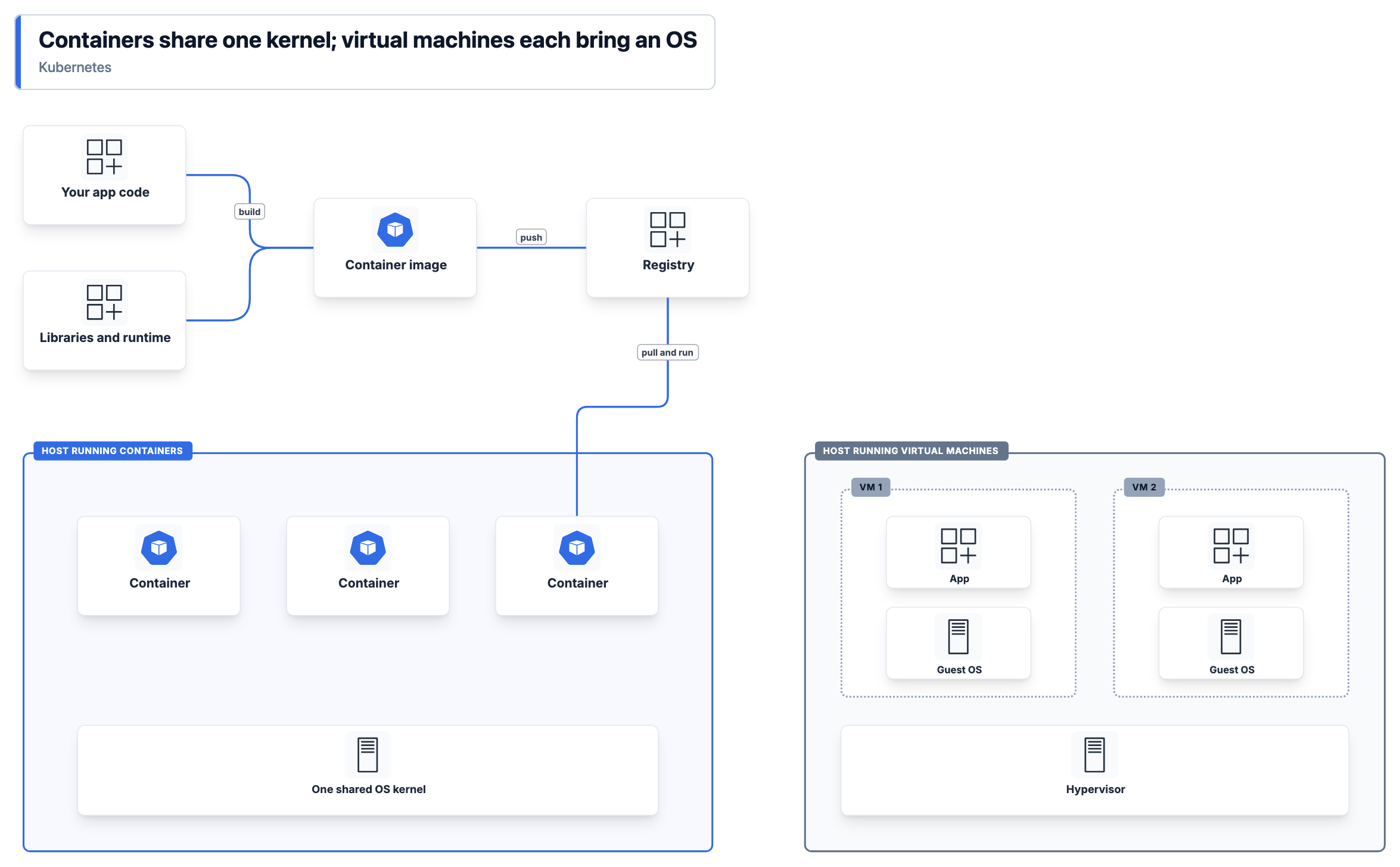
Three words to learn. A container image is a package. It holds your application and everything it depends on. Libraries, runtime, default settings. A container is a running copy of an image. One image can start many containers. A registry is where images are stored and shared. You push an image to it, and machines pull it down to run it. You build an image once, from a short file of instructions, and then run it anywhere. Kubernetes doesn't build images. It pulls them from a registry and runs them. Think of the image as a recipe card, and the container as the actual meal.
Virtual machines vs containers
You may know virtual machines. Each one runs a full operating system of its own. That makes them large, and slower to start. But each one is strongly isolated. Containers are lighter. They share the operating system kernel of the machine they run on. The kernel is the core of the operating system. Sharing it is what makes containers small. So they start in seconds, and you can pack many onto one machine. The isolation between them is lighter, though. Containers share more than virtual machines do.
Containers and VMs, side by side
Here's the whole picture. Top left, your app code and its libraries. Build them together, and you get a container image. Push the image to a registry. Any machine can pull it from there and run it. On the left host, three containers run side by side, on one shared operating system kernel. On the right host, each virtual machine carries its own guest operating system. A hypervisor, the software that runs virtual machines, sits underneath. Same job, very different weight. That's why containers start in seconds.
Why containers caught on
Why did containers catch on? First, a container runs the same everywhere. Your laptop, a test server, production. The dependencies travel with it. No more, it worked on my machine. Well, fewer of those. Second, the application is decoupled from the host. The machine underneath doesn't need your libraries installed. Third, containers are small and fast to start. And because an image never changes, copying a container, or replacing a broken one, is easy.
Good container habits
A few good habits. Give each container one main process. A web server in one, a database in another. Containers are meant to be stateless and immutable. Immutable means unchanging. So don't change the code inside a running container. Build a new image, and start new containers from it. And keep important data outside the container. When it's replaced, anything stored inside it goes too.
Recap
Let's recap. An image packages your application and its dependencies. A container is a running copy of it. Registries store and share images. Containers share the host's kernel, so they're light and start fast. Run one main process in each, don't change them while they run, and keep data outside.
Practice and what's next
That's containers. Small boxes, carefully packed. Try some free Kubernetes practice questions and hands-on labs at Gazeek Labs. Next lesson, Why orchestration. What happens when you have hundreds of these boxes. See you there.
Hands-on labs
Now try it on a real cluster
A real Kubernetes cluster in your browser for every lab, checked as you go.
See the labs
Gazeek Flash · free
Exam questions on your phone
Free questions on Why Kubernetes: quick-fire batches and timed exams, on the web or Android.