Channels: promoting images
How HCP Packer channels give image versions friendly names like dev and production, so that promoting or rolling back an image means moving a name, not editing code.





Diagrams in this video · 2Free in archhy
The diagrams, full size
Copy any of them into archhy, free, and change it for your own system.
After this lesson you can
- Explain what an HCP Packer channel is and why consumers use it
- Describe promotion and rollback as moving a channel between versions
- Describe the built-in latest channel and restricted channels
- Explain when consumers pick up a channel change
Transcript
Channels: promoting images
Space Llama here. Last time, HCP Packer, our registry on the HashiCorp Cloud Platform, learned what every build made. Today, we give those versions names people can actually use. Channels. And with channels comes the best trick in this course: promotion.
What a channel is
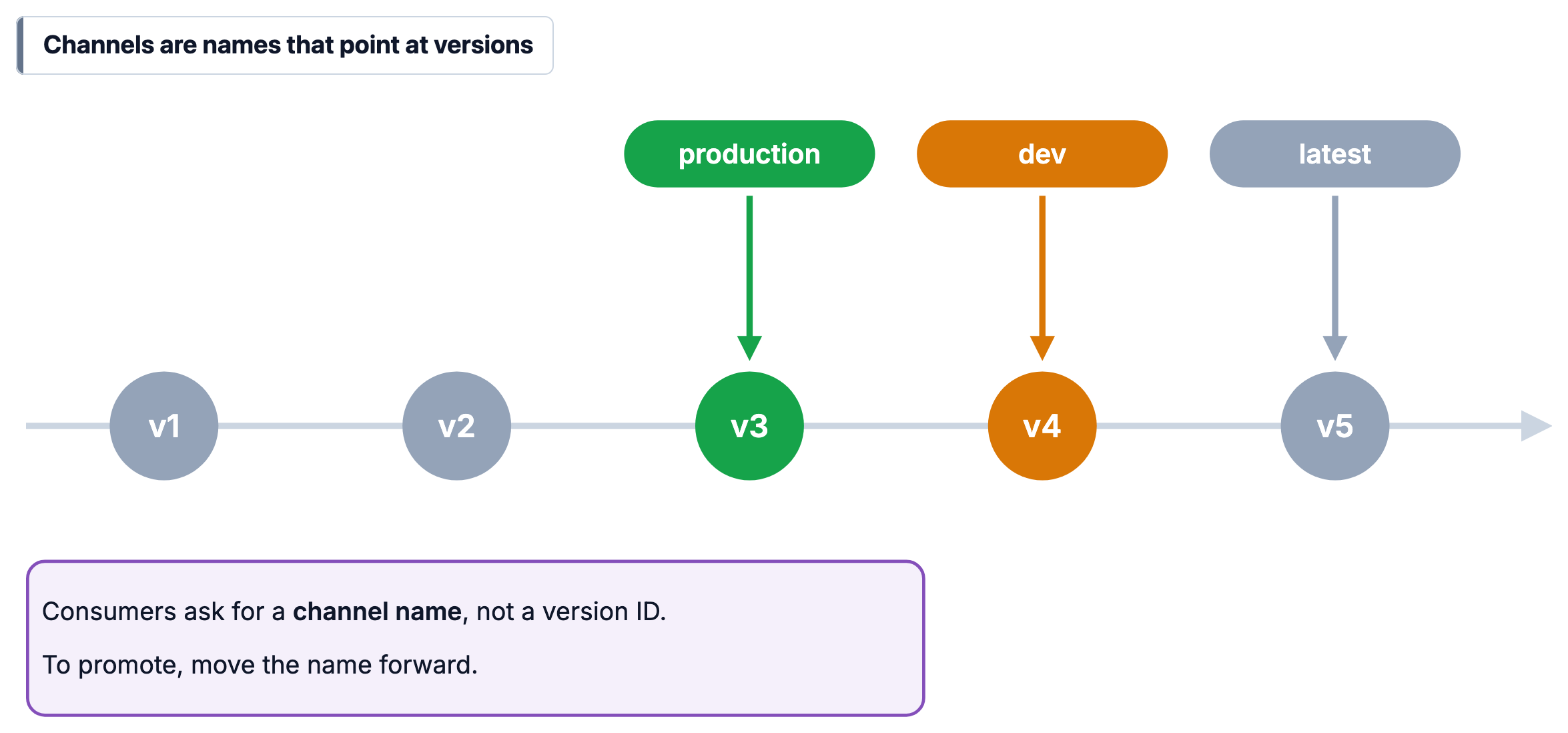
A channel is a human-readable name, like dev or production, that points at one version in a bucket. Consumers, a Terraform configuration or another Packer template, ask for the channel by name. They never hard-code a version. So when the team moves the channel to a different version, the consumers follow it, without anyone editing their code. Think of it as a bookmark. The book keeps growing, but the bookmark shows everyone where to read.
Channels point at versions
Here are five versions of one image, oldest on the left. Production points at version three. It's been tested, and it's what real servers run. Dev points at version four. That one is being tested right now. Versions one and two have no channel at all. They're still in the registry, just not in use. And latest points at version five, the newest. HCP Packer moves latest by itself, to the newest version that hasn't been revoked. You can't point latest anywhere else, and it's restricted by default. So production stays a deliberate choice. Once version four passes its tests, someone moves production forward to it. That's promotion.
Promote and roll back
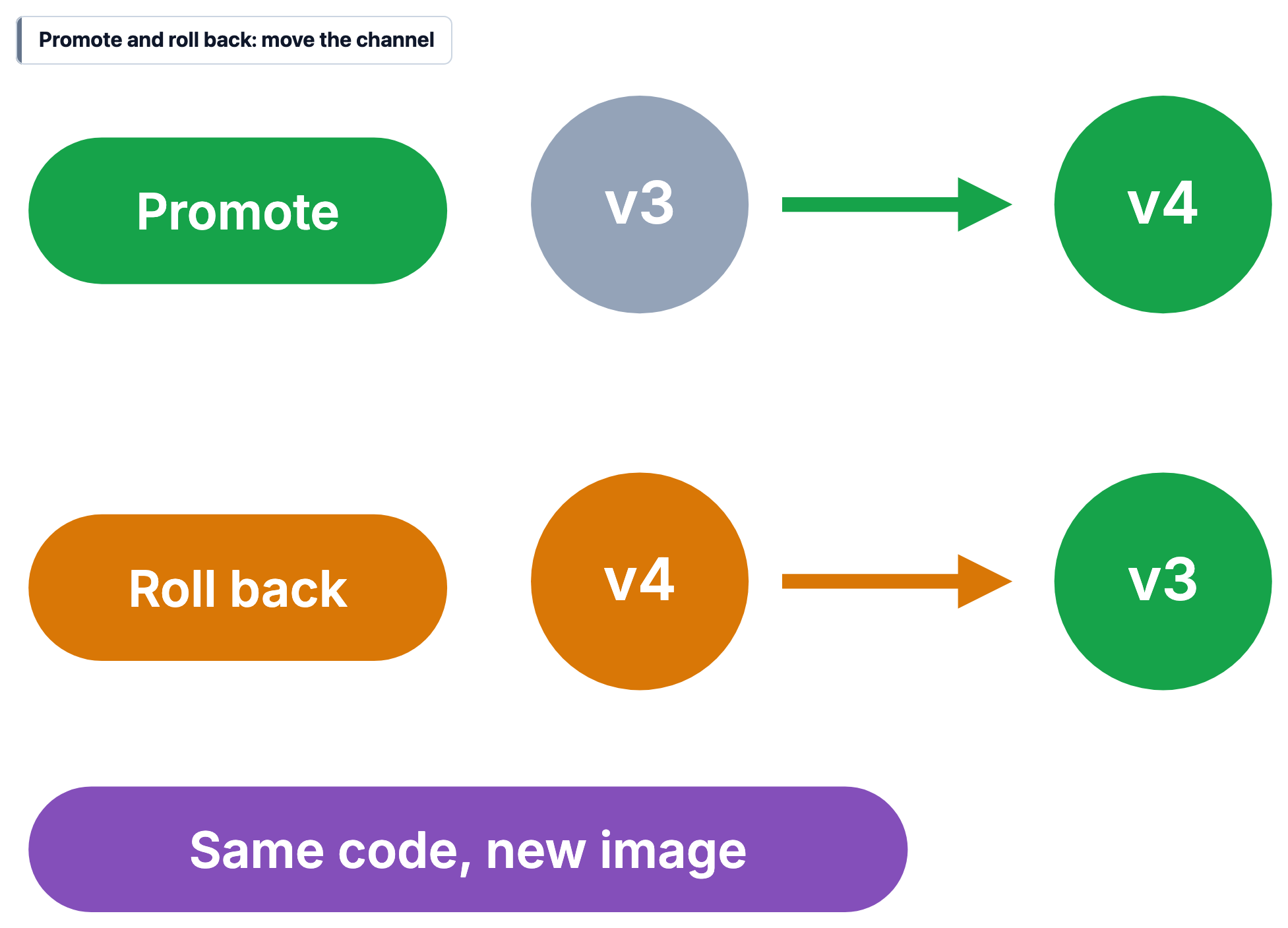
Promotion is just reassigning the channel to a newer, tested version. Rollback is the same move in reverse. Version four misbehaving? Point production back at version three. Rolling back is one small change, which is a lovely thing to know at three in the morning. Either way, nobody edits Terraform or a template. The name stays the same, only the version behind it changes. HCP Packer keeps each channel's assignment history for up to a year, so you can look back at every move. How many entries depends on your edition.
Channels in a pipeline
Most teams line channels up like stages. Every new build lands in dev. Automated tests run against it there. If they pass, the version moves to staging, where it meets real applications. And when someone approves it, production moves too. Each move is a small, reviewable step. And each step can be automated, which is exactly what Part 7 does.
Good to know
A restricted channel is hidden from people with only the viewer role. Handy for images still under test. Moving a channel doesn't trigger builds or Terraform runs by itself. Consumers get the new version the next time they run. And Packer templates can follow channels too. A web image can build on whatever version the base image's production channel points at.
Recap
Let's recap. A channel is a friendly name that points at one version. Consumers ask for the channel, never a version ID. Promote by moving the channel forward, roll back by moving it back. No code changes. And the latest channel moves by itself, to the newest version that isn't revoked.
Practice and what's next
That's channels. Same name, better image, nobody touched the code. Next lesson, Revocation. What to do when a golden image turns out to be not so golden. See you there.

Gazeek Flash · free
Exam questions on your phone
Free questions on HCP Packer, the image registry: quick-fire batches and timed exams, on the web or Android.