The VCS workflow: infrastructure by pull request
How a workspace linked to a Git branch turns pull requests into speculative plans for review and merges into real runs, and how the CLI and API workflows compare.





Diagrams in this video · 2Free in archhy
The diagrams, full size
Copy any of them into archhy, free, and change it for your own system.
After this lesson you can
- Describe how a VCS-driven workspace starts runs from Git
- Explain what a speculative plan is and why reviewers need it
- Follow a change from pull request to apply
- Compare the CLI, VCS and API workflows
Transcript
The VCS workflow: infrastructure by pull request
Space Llama here. We've got workspaces, projects and teams. Now, how does a change actually get in? The answer, for most teams, is a pull request. Today, infrastructure by pull request, and the three ways to start a run.
A workspace follows a branch
In the VCS workflow, named for your version control system, each workspace is linked to one branch of a Git repository. Often, main. When you create the workspace, HCP Terraform, on the HashiCorp Cloud Platform, registers webhooks with your Git provider, so it hears about every change. Merge or commit to that branch, and a run is queued automatically. Changes on other branches are ignored. You can also choose which folders trigger runs, so a fix to the README doesn't plan your whole network. By default, the plan then waits. Someone with permission clicks Confirm and Apply, unless you've turned on auto-apply. One catch. A brand new VCS workspace needs its first run started by hand.
Infrastructure by pull request
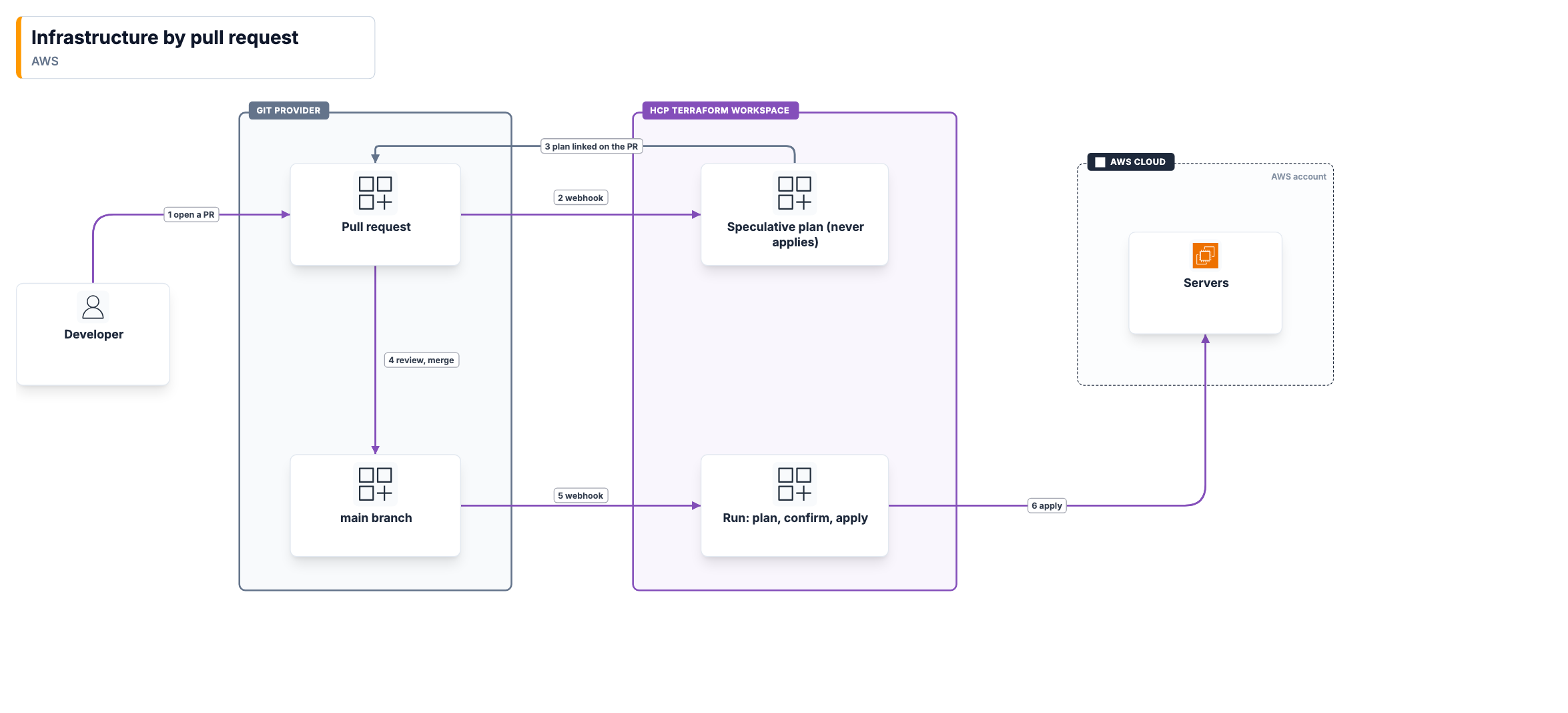
Here's a change, start to finish. One. A developer opens a pull request against main. Two. The Git provider's webhook tells HCP Terraform, and it runs a speculative plan with the code in that pull request. A speculative plan is plan only. It shows what would change, and it can never be applied. Three. HCP Terraform links the plan on the pull request, and runs it again whenever the pull request is updated. Four. Reviewers read the code and the plan side by side, then merge. Nobody approves a change blind. Five. The merge lands on main, and a second webhook starts a real run. Six. After confirmation, Terraform applies, and the servers in AWS change. The commit is recorded with the run. Each run is locked to its own commit and variable values. Push more code mid-run, and it only affects the next run.
Three ways to start a run
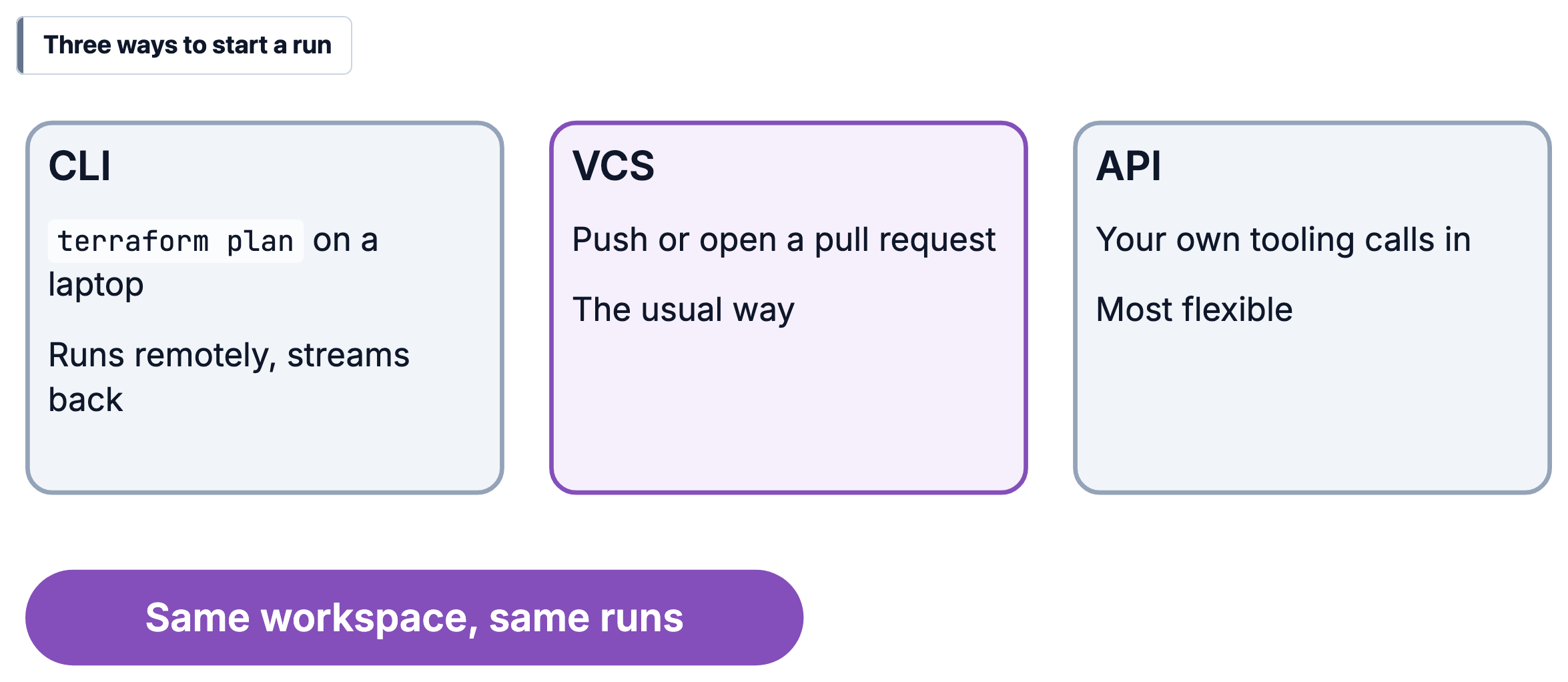
HCP Terraform has three workflows for starting runs. The CLI workflow, for the command-line interface. You add a cloud block to your configuration, log in with terraform login, and run terraform plan as usual. The plan runs remotely, using the workspace's variables, and streams back to your terminal. No secrets copied to your laptop. The VCS workflow, which we just saw, is the primary one. Git drives everything. And the API workflow. Your own pipeline uploads the configuration and starts runs. More flexible, but you build the tooling.
Laptop apply vs pull request
Why bother? Compare the two. Apply from a laptop, and the code might not even be committed. Nobody else sees the plan, and every laptop needs credentials. Apply by pull request, and every run is tied to a commit. The plan is reviewed before anything changes. And the secrets stay in the workspace. It's a bit slower. It's a lot less exciting. In infrastructure, boring is the goal.
Recap
Let's recap. A VCS-driven workspace follows one branch, through webhooks. Pull requests get speculative plans, linked right on the pull request. Merges start real runs, which wait for confirmation. And you can also start runs from the CLI, or from your own tools through the API.
Practice and what's next
That's infrastructure by pull request. Review first, apply second. To practice, try the free practice questions at Gazeek Labs. Next lesson, Modules and the private registry. See you there.

Gazeek Flash · free
Exam questions on your phone
Free questions on Terraform for teams: quick-fire batches and timed exams, on the web or Android.