Providers, resources and the graph
Terraform core knows nothing about clouds; providers turn resources into API calls, and Terraform orders the work from the dependencies it finds in your code.





Diagrams in this video · 2Free in archhy
The diagrams, full size
Copy any of them into archhy, free, and change it for your own system.
After this lesson you can
- Describe a resource block and what it represents
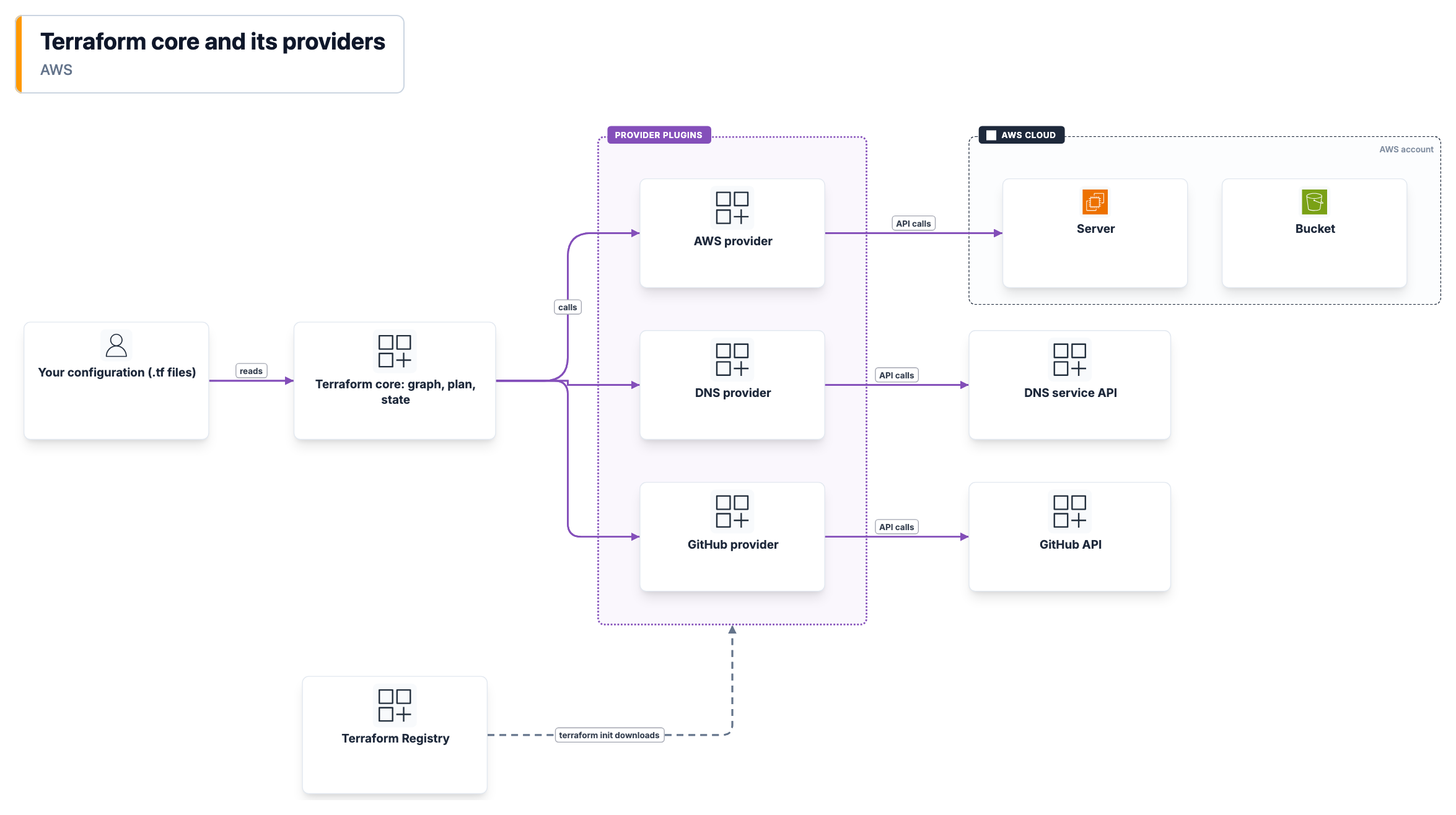
- Explain the split between Terraform core and provider plugins
- Say where providers come from and when terraform init downloads them
- Explain how references build the dependency graph and what runs in parallel
Transcript
Providers, resources and the graph
Space Llama here. Welcome to part two, Terraform fundamentals. Here's a surprise. Terraform itself knows nothing about clouds. Not one thing. Today, how it manages them anyway. Resources, providers, and the graph.
Resources: the things you want
You write Terraform in files ending in dot t f, in a language called HCL, the HashiCorp Configuration Language. The main building block is the resource. A resource block describes infrastructure objects. A server. A storage bucket. A DNS record, from the Domain Name System. Even a GitHub repository. Each block has a type, like aws instance, and a name you choose, like web. Inside the block are arguments. The image to use, the size of the server, its tags. Together, the type and the name give each resource an address, like aws instance dot web.
Terraform core and its providers
Here's how Terraform is put together. On the left, your configuration. Terraform core reads it. Core builds the graph, makes the plan and keeps the state. But core doesn't speak to any cloud. That's the job of providers, plugins that sit beside it. The AWS provider turns your resources into AWS API calls. Here, a server and a bucket. A DNS provider talks to a DNS service. A GitHub provider talks to GitHub. HashiCorp and the community have written thousands of providers, published on the Terraform Registry. When you run terraform init, Terraform downloads the providers your configuration needs. Same core, same workflow, any platform with an API. That's the trick. It also means one configuration can use several providers at once. A server in AWS, and its DNS name somewhere else.
Choosing and pinning providers
How does Terraform know which providers to fetch? You tell it, in a required providers block. Each one has a source address, like hashicorp slash aws, which says where it lives in the registry. Add a version constraint too, so a new major version can't surprise you on a Monday morning. terraform init then writes the exact versions it chose into a lock file, dot terraform dot lock dot h c l. A provider block sets things like the region to work in.
The dependency graph
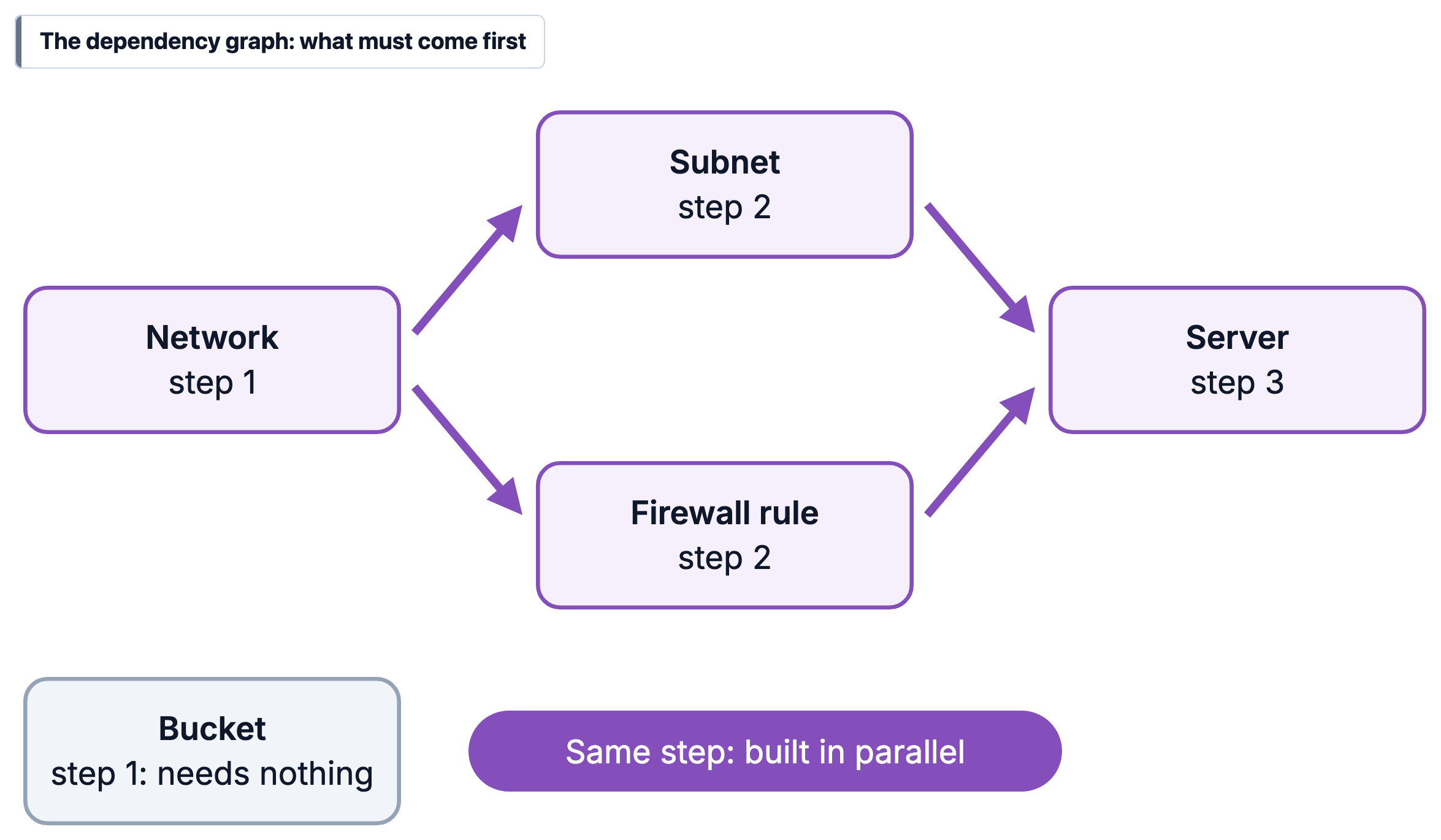
Before it changes anything, Terraform works out the order. If the server refers to the subnet, the subnet must exist first. That reference is a dependency. Terraform turns all those dependencies into a graph. Here, the network comes first. Then the subnet and the firewall rule, side by side. Then the server. The bucket needs nothing, so it starts straight away. Anything whose dependencies are done can run in parallel, up to ten at a time by default. For a dependency Terraform can't see in the code, add depends on, and name it yourself.
Recap
Let's recap. Resources describe the infrastructure you want. Providers turn them into API calls. terraform init downloads the providers from the registry. And Terraform builds a dependency graph, so things happen in the right order, in parallel where they can.
Practice and what's next
That's what's under Terraform's hood. Or helmet. Next lesson, Write, plan, apply. Four commands, and one of them will save you a lot of trouble. See you there.

Gazeek Flash · free
Exam questions on your phone
Free questions on Terraform fundamentals: quick-fire batches and timed exams, on the web or Android.