Inputs, outputs and data sources
Variables make one configuration reusable, outputs hand values on, locals tidy repetition, and data sources read things that already exist, such as an image ID.





Diagrams in this video · 2Free in archhy
The diagrams, full size
Copy any of them into archhy, free, and change it for your own system.
After this lesson you can
- Declare an input variable and set its value in three ways
- Explain what outputs are for and when to mark one sensitive
- Use locals to name a repeated value once
- Explain how a data source reads existing infrastructure without creating it
Transcript
Inputs, outputs and data sources
Space Llama here. Our code works. But every value is typed straight into it. Today, we make it flexible. Variables in, outputs out, locals to tidy up, and data sources to look things up.
Input variables
An input variable is a parameter for your configuration. Like an argument to a function. You declare it with a variable block. Give it a type, a description, and maybe a default. Then use it anywhere as var dot, and the name. Values can come from a dot t f vars file, the dash var flag, or environment variables starting with T F underscore var. Same code, different values. Small in development, large in production. Types catch mistakes early. A string, a number, a true or false, or a list. Give the wrong kind, and Terraform says so before it changes anything.
Inputs, outputs and data sources
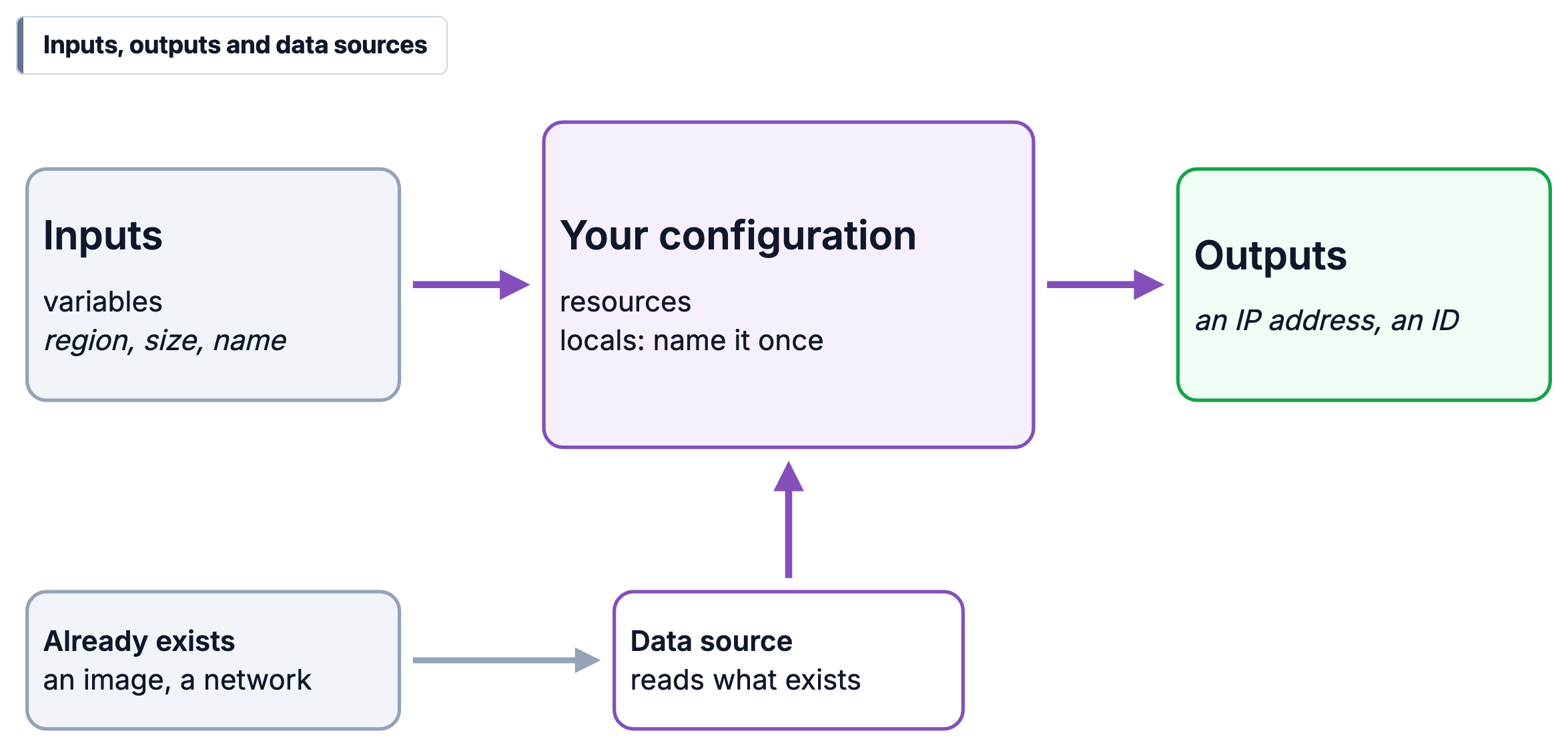
Here's the shape of it. On the left, inputs. Variables like the region, the size and the name. In the middle, your configuration. The resources, plus locals. A local gives a name to a value you'd otherwise repeat. Write it once, use it everywhere. On the right, outputs. Values the configuration hands back, like an IP address or an ID. And at the bottom, a data source. It reads something that already exists, made somewhere else. A common one looks up an image ID, so your server launches from the right image. Inputs, outputs, locals and data sources. Together, they turn a one-off file into something you can reuse.
A value in, a value out
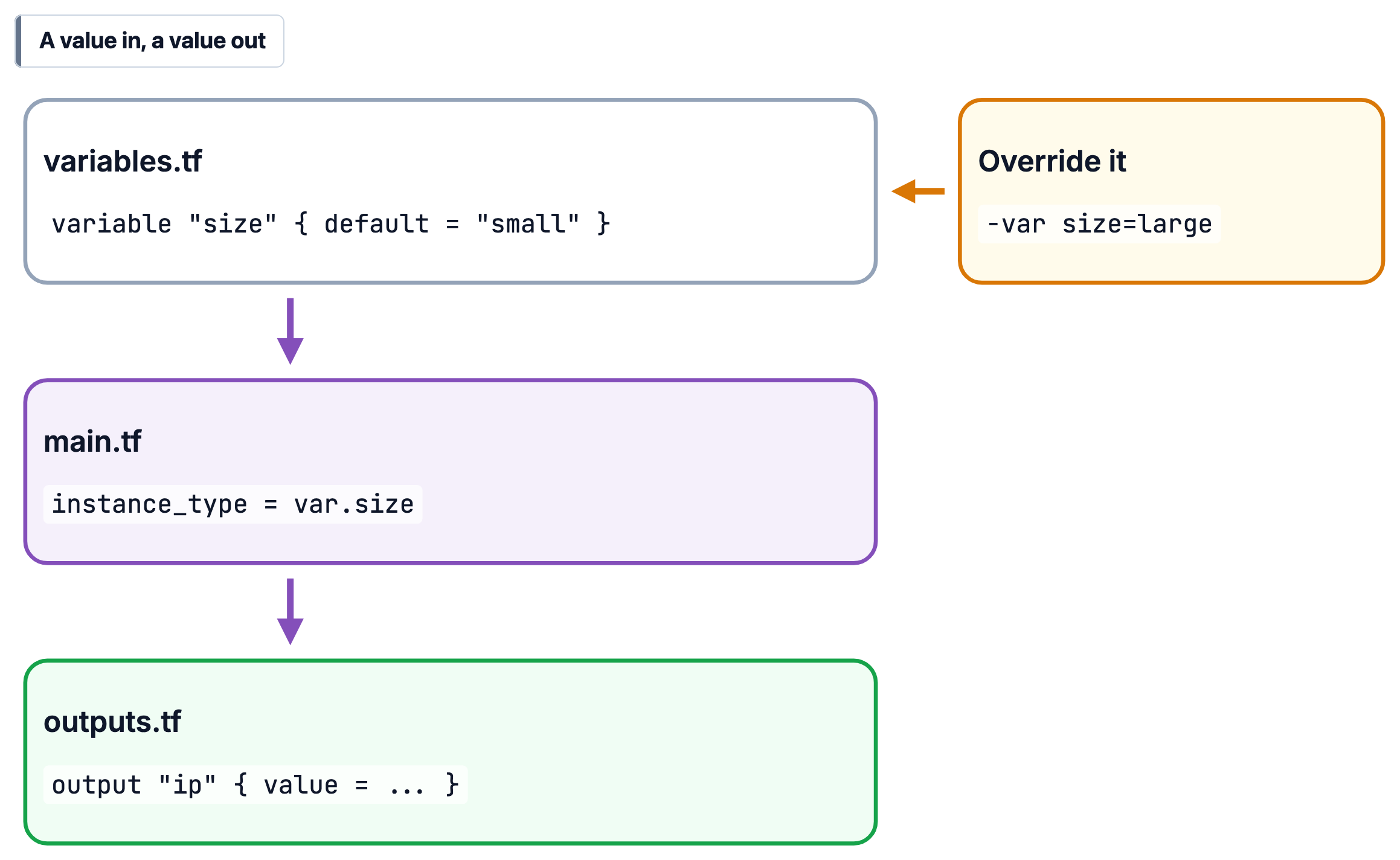
Here's one value's journey. variables dot t f declares size, with a default of small. main dot t f uses var dot size. And outputs dot t f hands the IP address back. On the command line, dash var size equals large overrides the default. Outputs are printed after apply, and other configurations can read them. If an output holds a secret, mark it sensitive, and Terraform hides it in the command output. It's still stored in state, one more reason to guard the state.
Locals tidy repetition
Back to locals for a moment. Say every resource needs the same tags, or a name built from the project and the environment. Write it once in a locals block, then use local dot, and the name, wherever you need it. Unlike a variable, nobody outside can set a local. It's a tidy name, used inside.
Data sources
A data source reads information. It doesn't create anything. Use one when something already exists. A network another team built, or the latest approved image. You write a data block, then refer to it as data, dot, type, dot, name. Later in the course, a data source reads images from HCP Packer, on the HashiCorp Cloud Platform. Keep that in your pocket.
Recap
Let's recap. Variables make one configuration reusable. Outputs hand values back, and on to other configurations. Locals give repeated values one name. And data sources read things that already exist, without creating anything.
Practice and what's next
That's part two done. You can now write, plan and apply real, reusable Terraform. Next lesson starts part three, Remote state and where runs happen. Terraform, meet your team. See you there. If you learned something, there's more on the channel. If you didn't, also the channel. Mate.

Gazeek Flash · free
Exam questions on your phone
Free questions on Terraform fundamentals: quick-fire batches and timed exams, on the web or Android.