Write, plan, apply
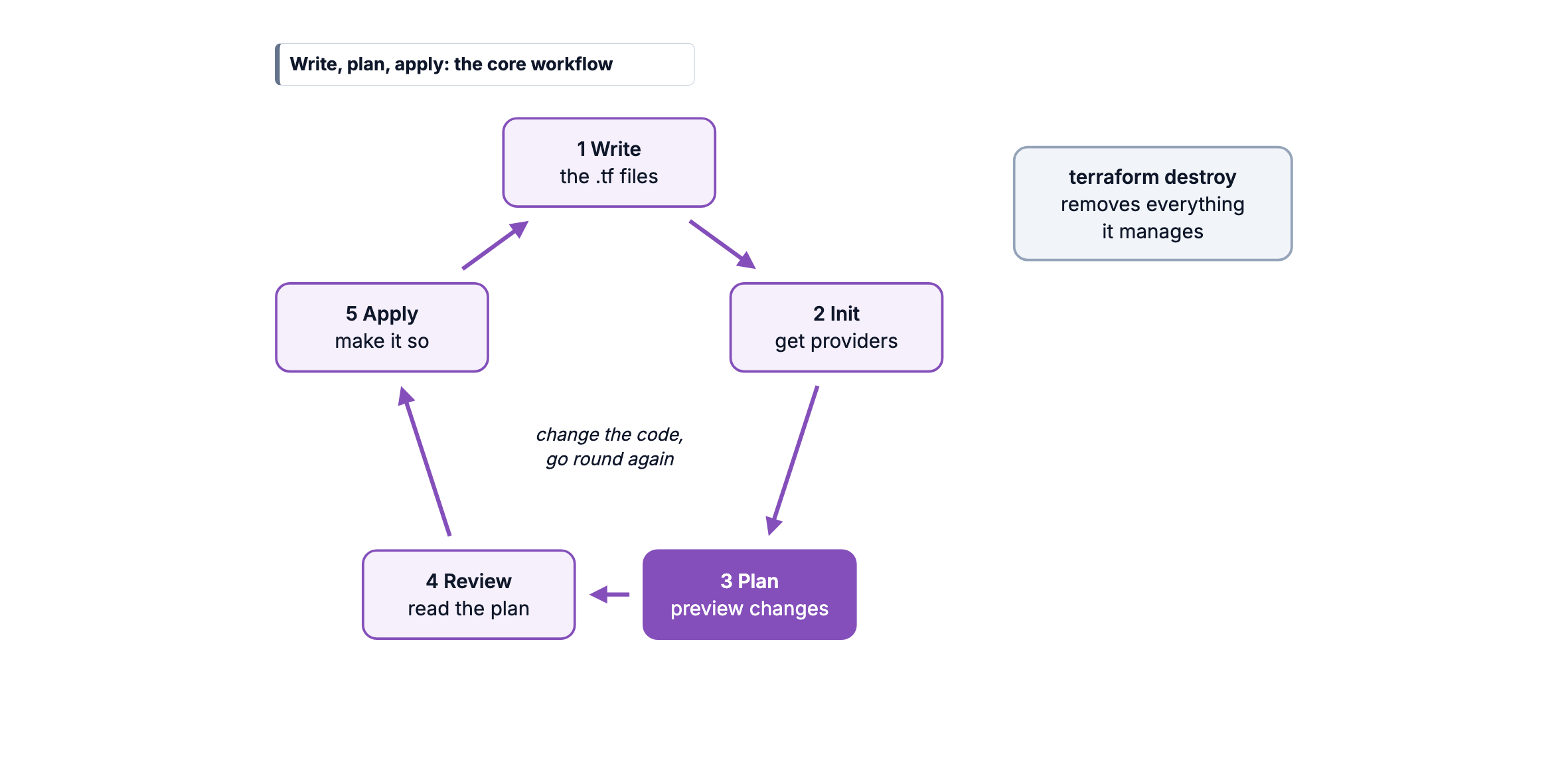
The core Terraform workflow, where init fetches providers, plan shows exactly what will change, apply makes it so and destroy cleans up, with the plan as the safety net.





Diagrams in this video · 2Free in archhy
The diagrams, full size
Copy any of them into archhy, free, and change it for your own system.
After this lesson you can
- Describe the write, init, plan, review and apply loop
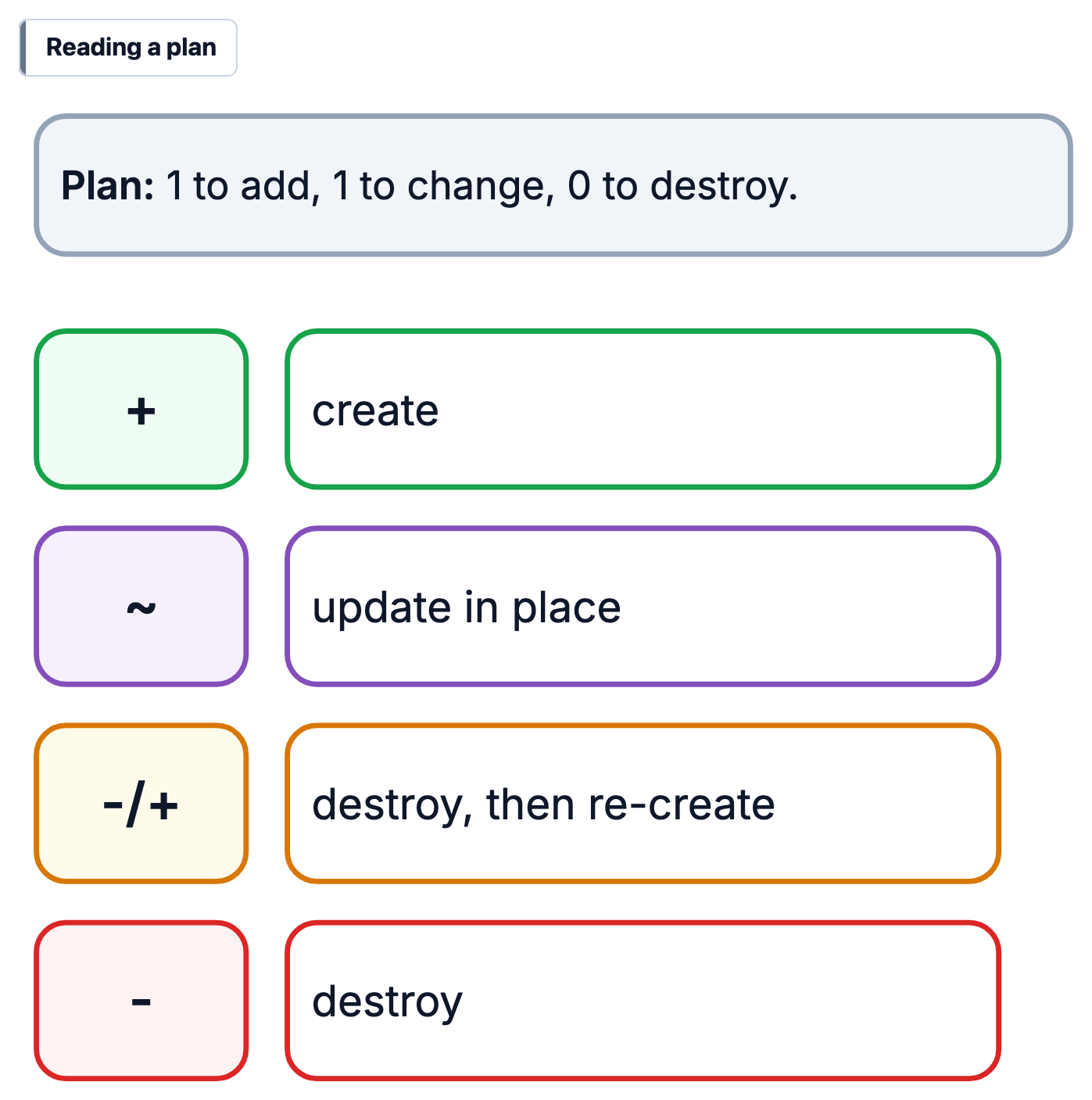
- Read the symbols and summary line of a plan
- Explain how apply asks for approval or applies a saved plan
- Say what terraform destroy does
Transcript
Write, plan, apply
Space Llama here. Last time, what Terraform is made of. Today, how you actually use it. A handful of commands, and one of them is your safety net. The idea is the same on any cloud. Our examples use AWS, but the commands don't care.
Write, then init
First, write. You describe what you want in your dot t f files. Then run terraform init. It prepares the working directory and downloads the providers your configuration needs. Run it once when you start, and again when you add a provider or a module. It's safe to run more than once.
The core workflow
Here's the whole loop. One, write. Two, init. Three, plan. Terraform compares what you want with what exists, and shows exactly what it will change. Four, review. A human reads the plan. Yes, actually reads it. Is that what you meant? Is anything being destroyed? Five, apply. Terraform makes the changes, in the right order. Then you change the code and go round again. That's everyday Terraform. And when you're done for good, terraform destroy removes everything that configuration manages.
Plan vs apply
Plan and apply sound similar. They are very different. Plan is read-only. It reads the real infrastructure, compares it with your code, and proposes changes. Run it as often as you like. Apply is the one that acts. It makes the changes, and records the result in the state. Think of plan as the dress rehearsal, and apply as opening night.
Reading a plan
The plan is your safety net. Every change starts with a symbol. A plus means create. A tilde means update in place. Minus plus means replace. Terraform destroys the object, then creates a new one. Some changes can only happen that way. A minus means destroy. Read those twice. At the end, a summary. Here, one to add, one to change, zero to destroy.
Apply makes it real
terraform apply makes it real. By default, it shows the plan again and waits for you to type yes. You can also save a plan with terraform plan dash out, and apply exactly that file later. That's how teams make sure what was reviewed is exactly what gets applied. Apply works through the changes in dependency order. If something fails, it stops and reports it. What already succeeded stays done; nothing is rolled back.
Cleaning up with destroy
Finally, terraform destroy. It removes every object that this configuration manages. It shows you a plan first, full of minus signs, and asks you to confirm. It's handy for test and practice environments, where nothing should be left running, or costing money, overnight. In production, you'll rarely run it. And when you do, you'll read that plan very slowly.
Recap
Let's recap. Write your code, then init to download the providers. Plan shows exactly what will change. Read it. Then apply makes it so. And destroy removes everything the configuration manages.
Practice and what's next
That's the workflow. Write, plan, apply, repeat. Next lesson, State, Terraform's memory. How does it know what it built? See you there.

Gazeek Flash · free
Exam questions on your phone
Free questions on Terraform fundamentals: quick-fire batches and timed exams, on the web or Android.