State: Terraform's memory
State maps each resource in your code to the real object, so Terraform knows what exists and what to change; a local state file is fine alone and risky in a team, which is why teams share and lock it.





Diagrams in this video · 2Free in archhy
The diagrams, full size
Copy any of them into archhy, free, and change it for your own system.
After this lesson you can
- Explain what the state records and why Terraform needs it
- Describe how plan uses configuration, state and the real world
- Explain why two people with two local state files is dangerous
- Describe state locking and why remote state is recommended for teams
Transcript
State: Terraform's memory
Space Llama here. Quick question. How does Terraform know which server is yours? It remembers. Today, Terraform's memory. The state. It's the least glamorous part of Terraform, and the one that causes the most trouble when it's ignored.
What state is
After an apply, Terraform writes down what it manages. That record is the state. It maps each resource in your code to the real object in the world. This block, that server. By default, it's a JSON file called terraform dot t f state, in your working directory. Don't edit it by hand. The terraform state commands exist for that.
The state triangle
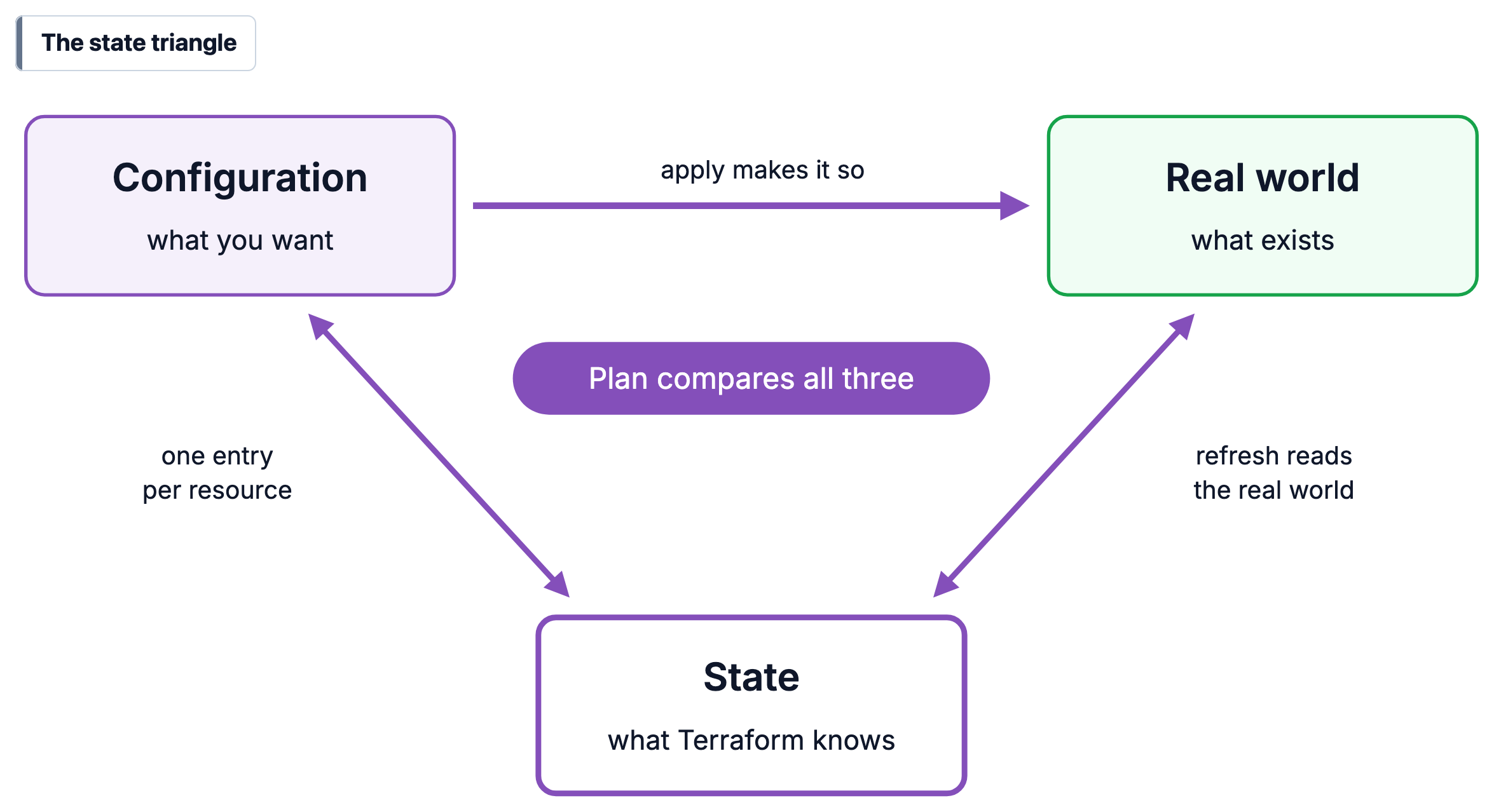
Here's the idea in one picture. Three corners. Top left, your configuration. What you want. Top right, the real world. What actually exists. At the bottom, the state. What Terraform knows, one entry per resource. When you plan, Terraform refreshes first. It reads the real objects to get an up-to-date picture. The state file itself only changes on apply. Then it compares your configuration with that, and the differences become the plan. Apply makes the real world match, and writes the new state. Round we go.
Looking inside state
You can look inside the state without opening the file. terraform state list shows the address of every resource Terraform manages. terraform state show, with an address, prints everything Terraform knows about that one resource. Its ID, its settings, its attributes. It's the quickest way to answer, what exactly did we build?
State in a team
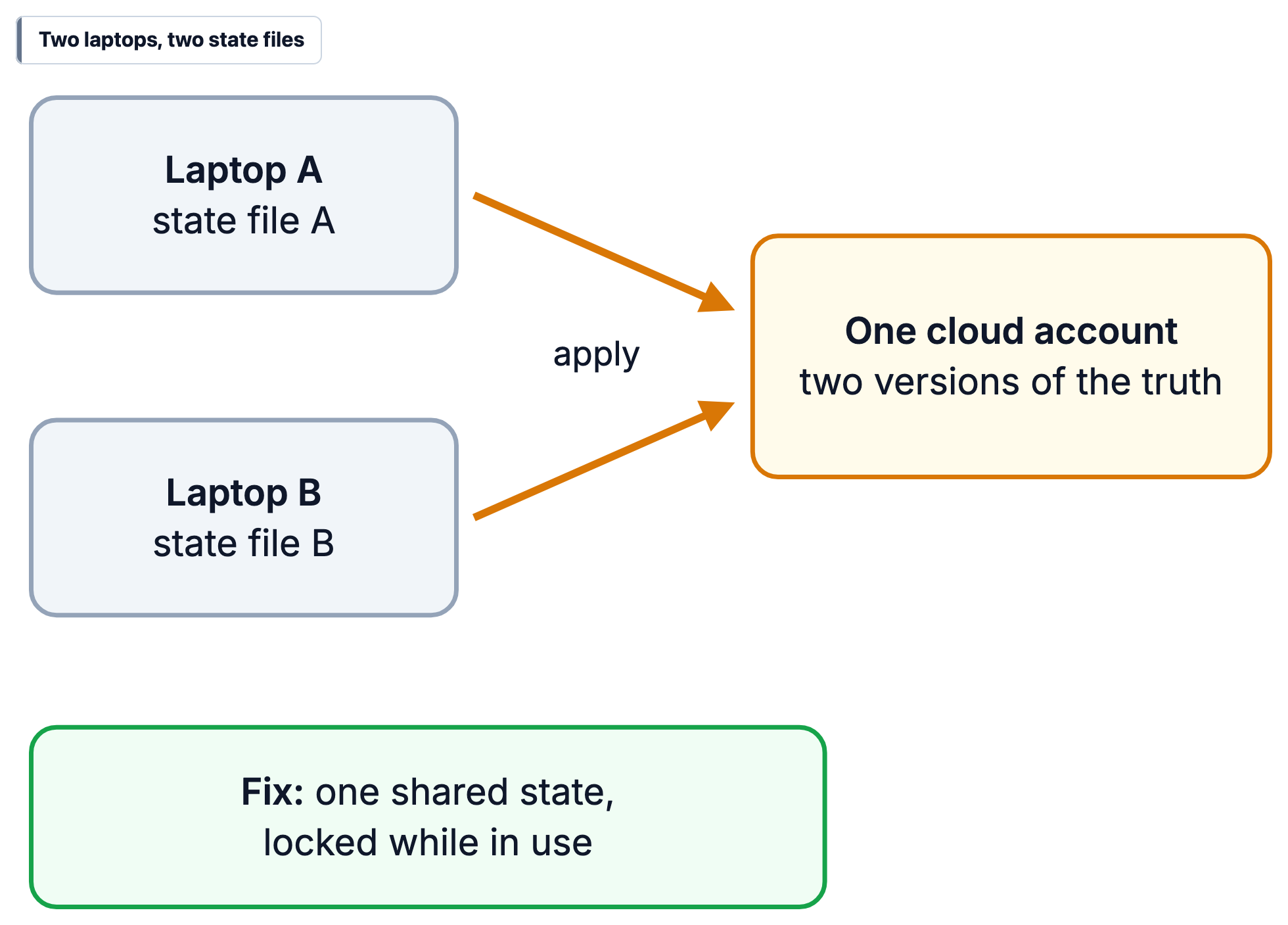
A local state file is fine while you work alone. Now two people apply from two laptops. Each has their own state file. Each thinks it knows what exists. At best, a confusing plan. At worst, one undoes the other's work. State can also contain secrets, like passwords. So it shouldn't sit in Git, or on a laptop that might get lost. The recommended fix is remote state. One shared copy that everyone uses.
Where shared state lives
Where the state lives is decided by a backend. The default is the local backend. A file on your machine. Teams pick a remote backend instead: cloud storage like Amazon S3, the Simple Storage Service, or HCP Terraform, on the HashiCorp Cloud Platform. You set it in the terraform block of your configuration, run terraform init, and the state moves there. Part three is all about this, so we'll leave it there for now.
Locking
Shared state needs one more thing. A lock. When an operation could write state, Terraform locks it first, if the backend supports locking. A second run can't write at the same time. There's a force unlock command for stuck locks. The docs say be very careful with it. So, be very careful. OpenTofu keeps state the same way, so all of this applies there too.
Recap
Let's recap. State maps each resource in your code to a real object. Plan compares your configuration with the state, refreshed from the real world. Alone, a local file is fine. In a team, use one shared, locked remote state.
Practice and what's next
That's state. Terraform's memory, and the thing to guard most carefully. Next lesson, Inputs, outputs and data sources. Making one configuration fit many places. See you there.

Gazeek Flash · free
Exam questions on your phone
Free questions on Terraform fundamentals: quick-fire batches and timed exams, on the web or Android.