Remote state and where runs happen
Why a team moves Terraform state off the laptop into a shared, locked backend, and how HCP Terraform goes further by running Terraform for you in single-use virtual machines.





Diagrams in this video · 2Free in archhy
The diagrams, full size
Copy any of them into archhy, free, and change it for your own system.
After this lesson you can
- Explain why a local state file breaks down in a team
- Describe what a remote backend adds, sharing and locking
- Describe how HCP Terraform runs plans and applies remotely
- Tell CLI workspaces apart from HCP Terraform workspaces
Transcript
Remote state and where runs happen
G'day. Space Llama here, and welcome to Terraform for teams. So far, Terraform has lived on one laptop. Yours. With one state file, also yours. Today we move that state somewhere the whole team can reach, and then we let HCP Terraform, on the HashiCorp Cloud Platform, run Terraform for us.
The trouble with a local state file
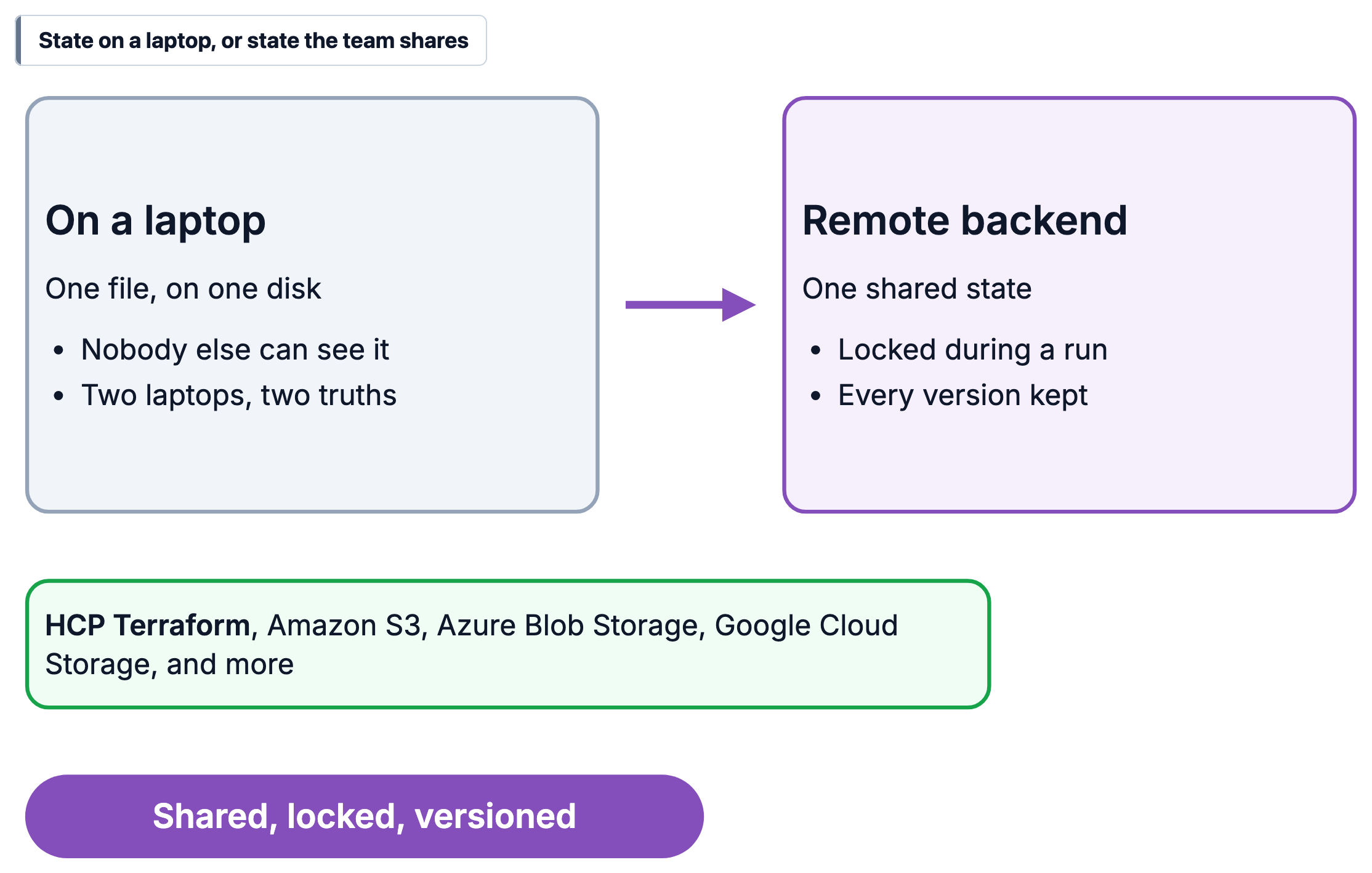
By default, Terraform keeps state in a file called terraform dot tfstate, in your working directory. Alone, that's fine. In a team, everyone needs the latest copy before they run anything. And nobody else may run Terraform at the same time. Otherwise two people change the same things, from two different pictures of the world. Two laptops, two truths. That's how infrastructure gets weird.
Remote state
With remote state, Terraform writes the state to a shared data store instead of a local file. That can be HCP Terraform, Azure Blob Storage, Google Cloud Storage, an S3 bucket in Amazon's Simple Storage Service, and more. You set it up once, in the configuration's root module, and everyone on the team reads the same state. Backends that support it also lock the state. While one run might write, nobody else can start one. Locking happens automatically. You don't have to remember. Which is good, because people forget. Remote state has a bonus, too. Other configurations can read your outputs, like a network's subnet IDs, with the terraform remote state data source.
A remote run in HCP Terraform
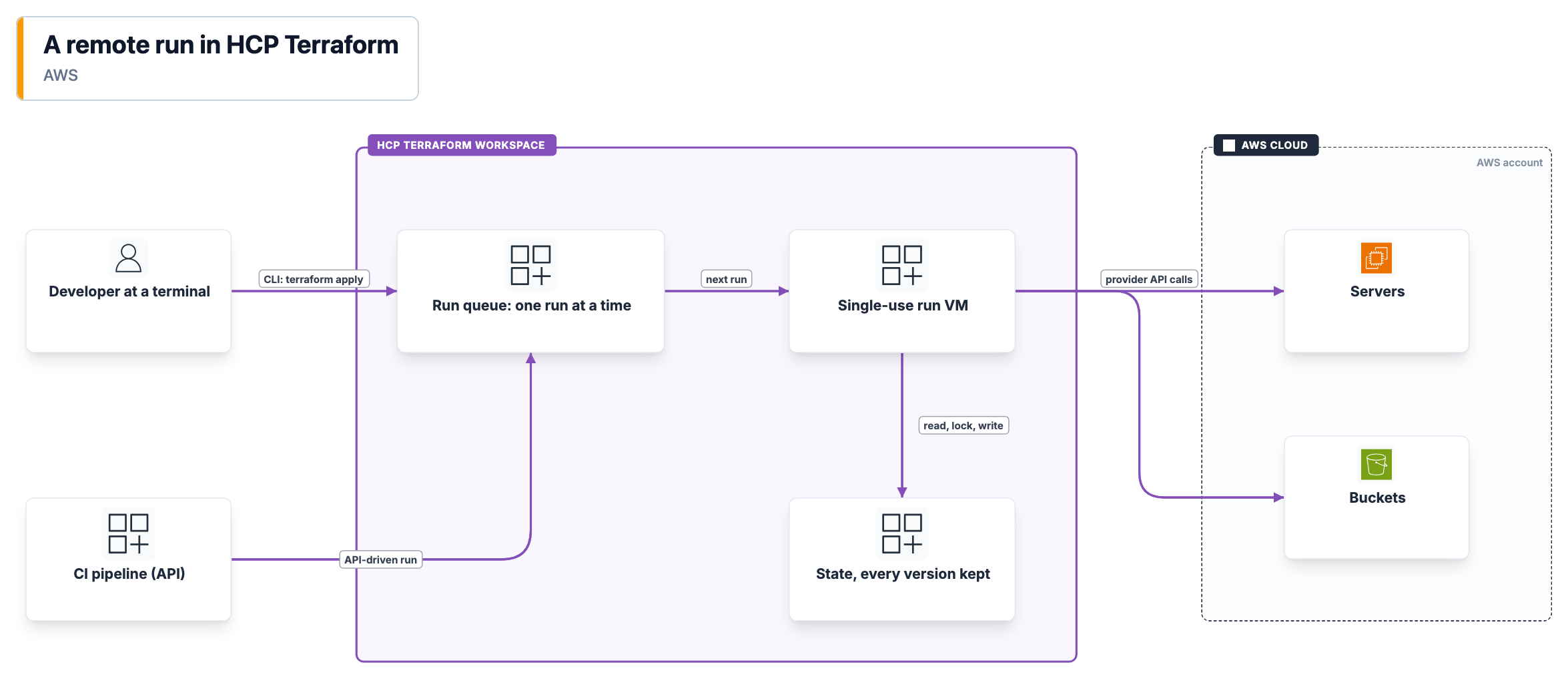
HCP Terraform goes one step further. It doesn't just store your state. It runs Terraform for you. On the left, a developer types terraform apply. Below, a CI pipeline, that's continuous integration, starts a run through the API. Either way, the run joins the workspace's queue. A workspace processes its runs in order, one at a time. That queue is a stronger kind of locking. A new run can't start while another waits for approval. Plan-only runs are the exception: they change nothing. When a run's turn comes, HCP Terraform starts a single-use Linux virtual machine, just for that run. The run VM reads the state, makes its plan, and after approval calls the provider APIs that change your AWS account. Then it writes the new state, keeping the old versions, and the VM is thrown away. From the terminal it feels local. The output streams back to you, but the work happens in HCP Terraform.
Two things called workspaces
One warning, because the name is used twice. In the Terraform CLI, the command-line interface, workspaces let one configuration keep several state files in the same backend. Every configuration starts in one called default. The docs say they're not meant for setups that need separate credentials or access controls. HCP Terraform workspaces are a different, bigger idea. Each one holds its own configuration, variables, state, permissions and run history. Same word, different thing. We'll open one up properly next lesson.
Recap
Let's recap. A local state file works alone, and breaks down in a team. A remote backend shares the state, and locks it while a run writes. HCP Terraform also runs Terraform for you, queued per workspace, each run in a fresh, single-use virtual machine.
Practice and what's next
That's remote state and remote runs. Your laptop can finally relax. To practice, try the free practice questions at Gazeek Labs. Next lesson, Organizations, projects and workspaces. See you there.

Gazeek Flash · free
Exam questions on your phone
Free questions on Terraform for teams: quick-fire batches and timed exams, on the web or Android.