Networking: VPC, Route 53, CloudFront, hybrid connections
How Amazon VPC, Route 53, CloudFront, Global Accelerator and the hybrid connection services move traffic to, through and out of your AWS network.





The diagrams, full size
Copy any of them into archhy, free, and change it for your own system.
After this lesson you can
- Describe a VPC with public and private subnets, route tables, an internet gateway and a NAT gateway
- Explain what Amazon Route 53 does, including routing policies and health checks
- Compare Amazon CloudFront and AWS Global Accelerator for reaching users worldwide
- Choose between Site-to-Site VPN, Client VPN, Direct Connect and Transit Gateway for hybrid and multi-VPC networks
- Explain why VPC endpoints and AWS PrivateLink keep traffic off the internet
Transcript
Networking: VPC, Route 53, CloudFront, hybrid connections
Space Llama here, and today we're doing networking. Don't panic. It's mostly roads and signposts. We'll build a VPC, then look at Route 53, CloudFront and Global Accelerator. Then we'll connect your own data center to AWS, a few different ways.
Amazon VPC
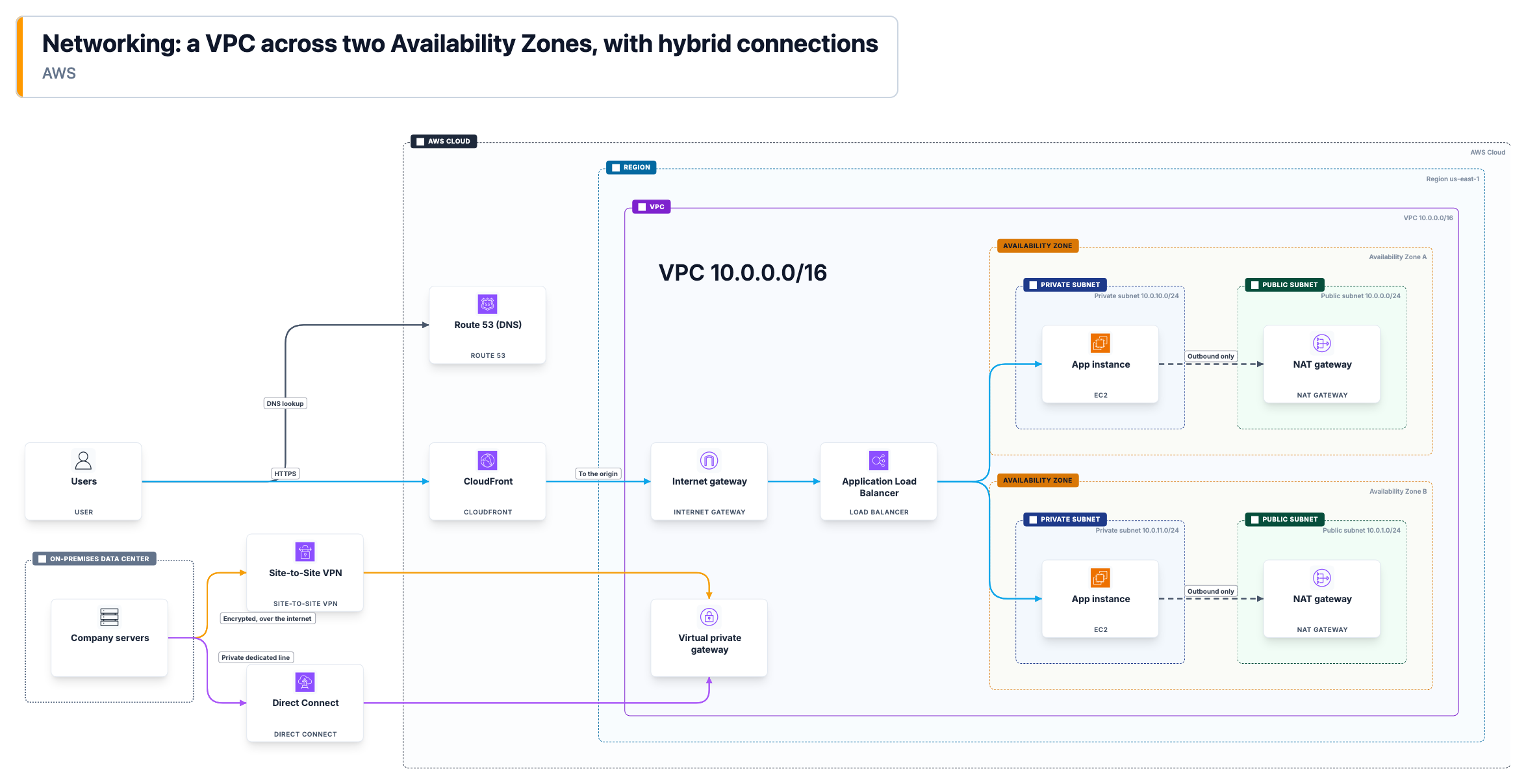
Amazon VPC, or Virtual Private Cloud, is your own private network in a Region. You split it into subnets, and each subnet lives in one Availability Zone. A public subnet has a route to an internet gateway, the VPC's door to the internet. A private subnet has no such route. Its instances reach out through a NAT gateway instead. The NAT gateway sits in a public subnet and lets traffic out, but not in. And route tables decide where traffic goes. Every subnet is associated with one.
Diagram
Here's the whole picture. At the top, Route 53 answers DNS questions, and CloudFront serves content from the edge. Below them is a Region, with a VPC inside it. Its address range is ten dot zero dot zero dot zero slash sixteen. The VPC spans two Availability Zones. Each zone has a public subnet with a NAT gateway, and a private subnet behind it. The internet gateway connects the VPC to the internet. Off to the side is an on-premises data center. It connects to the VPC two ways: a Site-to-Site VPN, and AWS Direct Connect.
Amazon Route 53
Route 53 is AWS's managed DNS service. It turns names into addresses, and it can register domains too. Routing policies choose which answer to give. Weighted splits traffic by percentage. Latency sends users to the fastest Region. Failover switches to a backup. Geolocation answers by where the user is. Health checks watch your endpoints, so Route 53 can steer around anything that's failing.
CloudFront and Global Accelerator
Amazon CloudFront is a content delivery network. It caches copies of your content at edge locations. Users get it from somewhere close, so pages load faster wherever they are. AWS Global Accelerator is different. It puts user traffic onto the AWS global network early, at the nearest edge. It gives you static IP addresses for your application, and it doesn't cache anything. So, cached web content suggests CloudFront. Faster, steadier paths to your app suggest Global Accelerator.
Connecting your own network
AWS Site-to-Site VPN joins your data center to your VPC with an encrypted tunnel over the internet. It's quick to set up. AWS Client VPN is for individual people, connecting securely from their laptops. AWS Direct Connect is a private, dedicated connection that doesn't use the public internet. It takes longer to set up, but performance is more consistent. And AWS Transit Gateway is a hub. It connects many VPCs and your on-premises networks in one place.
VPC endpoints and PrivateLink
VPC endpoints let your private instances reach AWS services without going over the internet. Gateway endpoints are for Amazon S3 and DynamoDB. AWS PrivateLink powers the other kind, interface endpoints. It can also share your own services privately with other VPCs.
Recap
Quick recap. A VPC has subnets, route tables, an internet gateway and NAT gateways. Route 53 does DNS, with routing policies and health checks. CloudFront caches at the edge. Global Accelerator speeds up the path. VPNs, Direct Connect and Transit Gateway connect your other networks. And endpoints keep traffic to AWS services private.
Practice and what's next
That's networking. Not so scary after all. Practice Cloud Technology and Services questions in Gazeek Flash's AWS app. It's free on the web and on Android, at flash.gazeek.com. Next up, analytics and application integration. See you there.

Gazeek Flash · free
Exam questions on your phone
Free questions on Cloud Technology and Services: quick-fire batches and timed exams, on the web or Android.