Compute: EC2, Auto Scaling and load balancing
Amazon EC2 instances, AMIs and instance families, how Elastic Load Balancing and EC2 Auto Scaling scale an app out across Availability Zones, and the simpler paths of Elastic Beanstalk and Lightsail.





The diagrams, full size
Copy any of them into archhy, free, and change it for your own system.
After this lesson you can
- Describe Amazon EC2 instances and Amazon Machine Images
- Match a workload to an EC2 instance family
- Compare vertical and horizontal scaling
- Explain how Elastic Load Balancing and Amazon EC2 Auto Scaling work together
- Identify when AWS Elastic Beanstalk or Amazon Lightsail fits
Transcript
Compute: EC2, Auto Scaling and load balancing
G'day mate. Space Llama here. Today, compute, the part of the cloud that does the actual work. We'll look at Amazon EC2, its instance families, and the images it boots from. Then scaling, load balancers and Auto Scaling, with a diagram. And two easier ways to run an app: Elastic Beanstalk and Lightsail.
Amazon EC2
Amazon Elastic Compute Cloud, or EC2, gives you virtual servers. AWS calls them instances. Every instance is launched from an Amazon Machine Image, or AMI. An AMI is a template with the operating system, and often your software, already on it. You pick an instance type, which sets the CPU, memory, storage and network performance. EC2 is infrastructure as a service. You manage the operating system, its patches, and everything above it.
Instance families
Instance types come in families, each tuned for a kind of work. General purpose is balanced. Good for web servers and code repositories. Compute optimized has lots of fast processing, for batch jobs, game servers and scientific modeling. Memory optimized is for processing large datasets in memory, like in-memory databases. Storage optimized gives fast reads and writes to very large datasets on local storage. Think data warehousing. Accelerated computing adds hardware like GPUs, for machine learning and graphics.
Vertical vs horizontal scaling
When your app gets busy, you can scale two ways. Vertical scaling, or scaling up, makes one instance bigger. You change it to a larger instance type. But there's a biggest size, and the change usually means a stop and a restart. Horizontal scaling, or scaling out, adds more instances instead. A load balancer spreads the work across them. It's elastic, and if one instance fails, the others carry on. The cloud likes this one.
Elastic Load Balancing
Elastic Load Balancing gives your app one front door, and spreads traffic across many targets. It runs health checks, and stops sending traffic to targets that fail them. The Application Load Balancer handles web traffic, HTTP and HTTPS. It can route by URL path or host name. The Network Load Balancer handles TCP and UDP. It copes with huge traffic at very low latency. The Gateway Load Balancer is for third-party virtual appliances, like firewalls that inspect your traffic.
Amazon EC2 Auto Scaling
Amazon EC2 Auto Scaling adds and removes instances for you, automatically. In an Auto Scaling group, you set a minimum, a desired and a maximum number of instances. It scales out when demand rises, for example when average CPU use gets high. Then it scales back in when things are quiet. It also replaces instances that fail health checks, so you keep the capacity you asked for.
Diagram
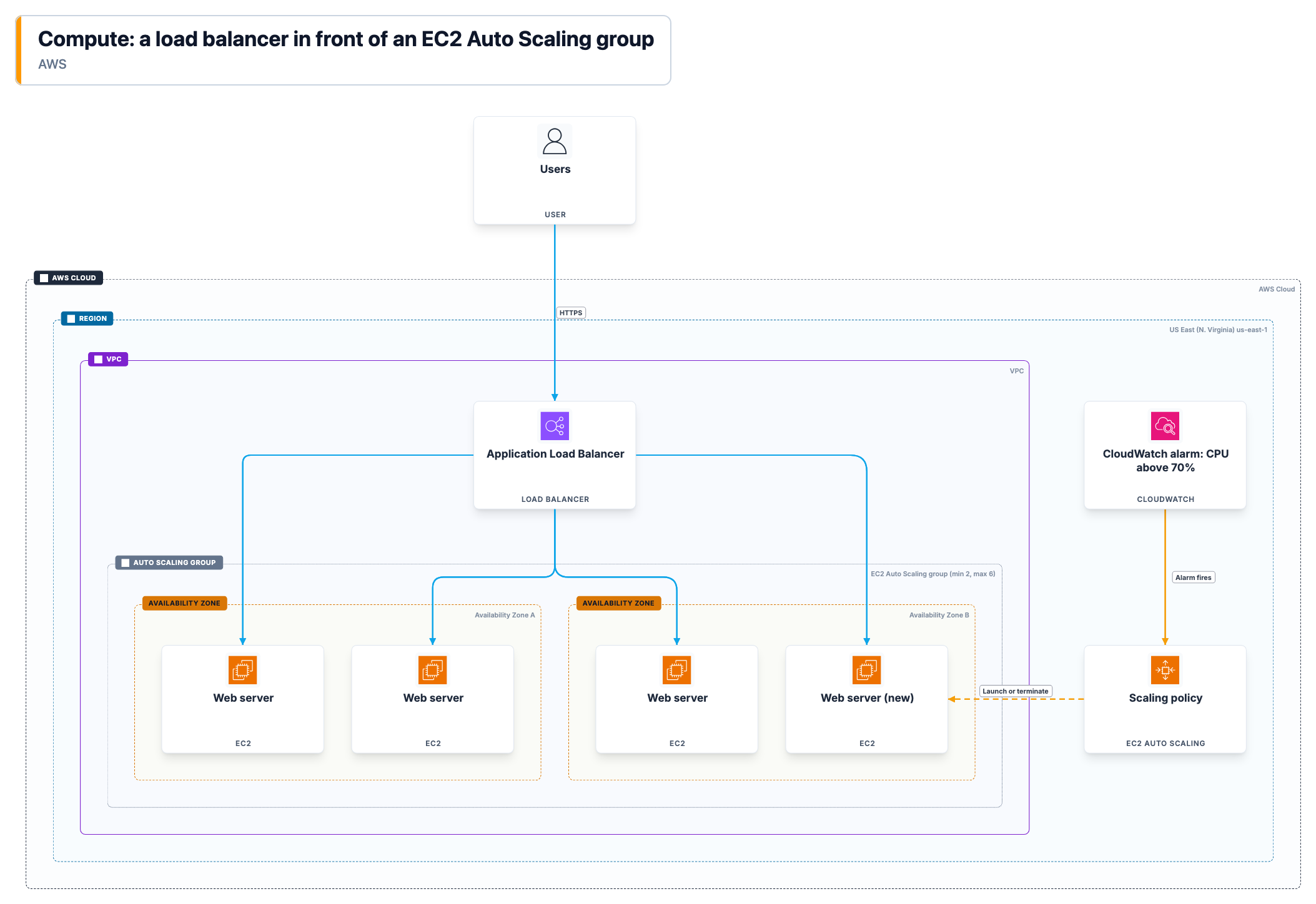
Here's how it fits together. Users on the internet send requests to an Application Load Balancer. The load balancer passes each request to a healthy EC2 instance. Those instances live in an Auto Scaling group that spans two Availability Zones. There are instances in each zone. If one zone has a bad day, the other keeps serving. When traffic grows, Auto Scaling adds instances, and the load balancer starts using them.
Easier ways to run apps
Don't want to wire all that up yourself? Fair enough. With AWS Elastic Beanstalk, you upload your code. It handles provisioning, load balancing, scaling and monitoring. It's still EC2 underneath, and you still control those resources if you want to. Amazon Lightsail is the simplest way to start, with easy virtual private servers. Each plan bundles compute, storage and data transfer at a predictable monthly price. Nice for small websites and blogs.
Recap
Let's recap. EC2 instances are virtual servers, launched from AMIs. Pick the instance family that fits the workload. Scale up by making an instance bigger, or out by adding more. Load balancers spread traffic, and Auto Scaling adjusts the number of instances. And Elastic Beanstalk and Lightsail keep things simple.
Practice and what's next
That's compute. Lots of servers, and you didn't have to rack a single one. Practice Cloud Technology and Services questions in Gazeek Flash's AWS app. It's free on the web and on Android, at flash.gazeek.com. Next up, containers and serverless. See you there.

Gazeek Flash · free
Exam questions on your phone
Free questions on Cloud Technology and Services: quick-fire batches and timed exams, on the web or Android.