Putting it together: a three-tier web app on AWS
A request's journey through a highly available three-tier web app on AWS, and where security groups, IAM roles and monitoring fit in.





The diagrams, full size
Copy any of them into archhy, free, and change it for your own system.
After this lesson you can
- Describe the presentation, application and data tiers of a web application
- Trace a request through Route 53, CloudFront, a load balancer, EC2 and the database tier
- Explain how two Availability Zones, Auto Scaling and RDS Multi-AZ keep the app available
- Identify where security groups, IAM roles and CloudWatch fit in the architecture
- Describe a serverless alternative built from Lambda, API Gateway and DynamoDB
Transcript
Putting it together: a three-tier web app on AWS
Space Llama here. We've collected a lot of parts. Time to build something. In this lesson, we'll put services from earlier lessons together into a three-tier web app. We'll follow a request through it, then see how it stays up, stays secure, and gets watched.
Three tiers
A three-tier app splits the work into layers. The presentation tier is what users see and touch. Web pages, images, the front end. The application tier runs the business logic. It takes an order, checks stock, works out the price. The data tier stores information, in databases and caches. Splitting them means each tier can scale, and fail, on its own.
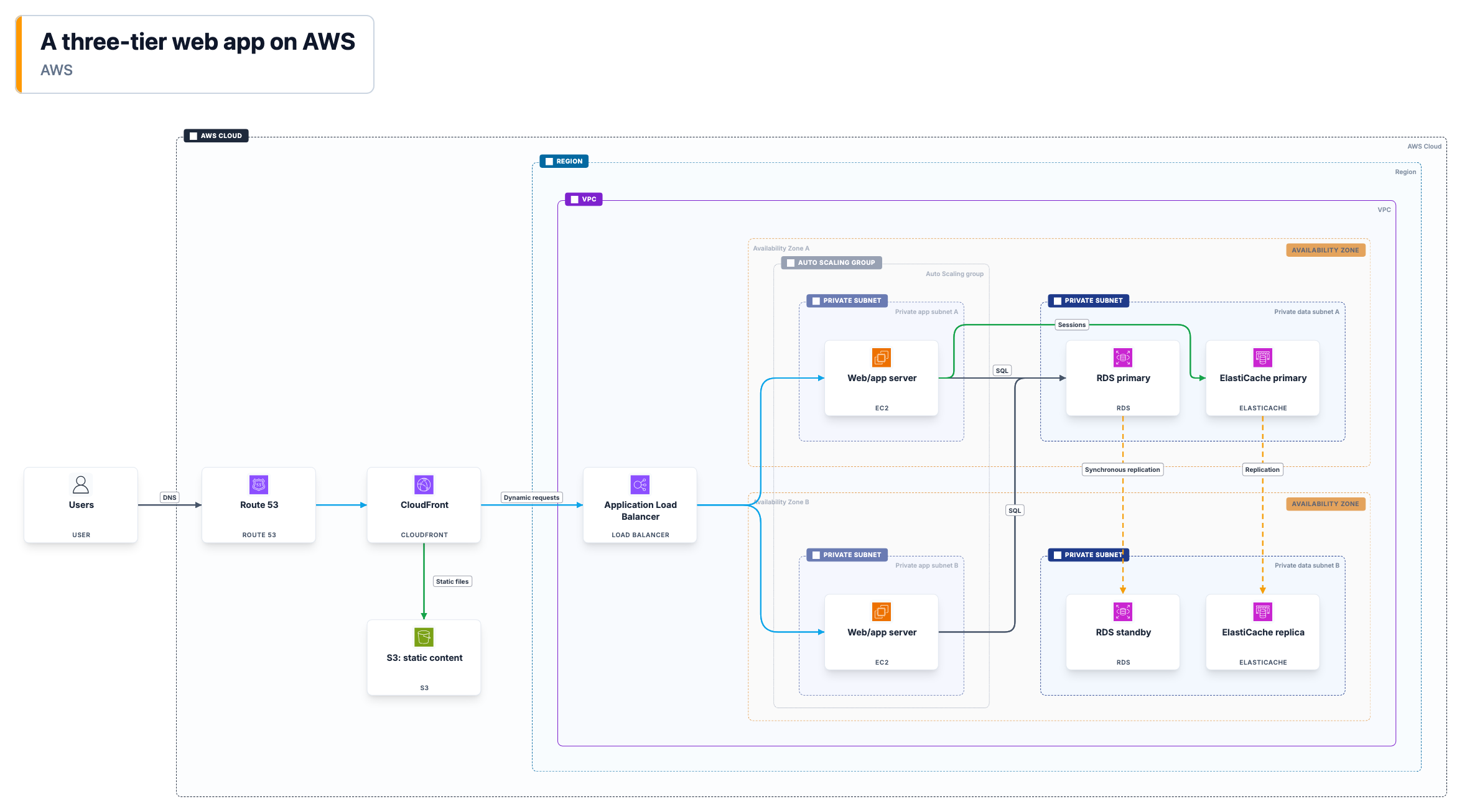
Diagram
Let's follow a request, from the top. A user types your domain name. Route 53 answers, pointing them at CloudFront. CloudFront serves static content, like images and scripts, from an S3 bucket, cached at the edge. Dynamic requests go on to an Application Load Balancer. The load balancer sends each request to a healthy EC2 instance. Those instances are in an Auto Scaling group, in private subnets across two Availability Zones. That's the application tier. Below them is the data tier. The instances check Amazon ElastiCache first, for data they've fetched recently. If it isn't there, they ask Amazon RDS. The primary database is in one zone, with a standby in the other. The answer travels back up the same path to the user.
Staying available
Now, what happens when things go wrong. Everything is spread across two Availability Zones, so losing one zone doesn't take the app down. The load balancer health checks each instance, and stops sending traffic to unhealthy ones. Auto Scaling replaces failed instances, and adds more when traffic grows. And if the primary database fails, RDS fails over to the standby automatically.
Security at every tier
Security groups are chained, tier to tier. The load balancer accepts web traffic from the internet. The instances accept traffic only from the load balancer. The database accepts traffic only from the instances. The instances and the database sit in private subnets, with no direct route in from the internet. The instances use an IAM role to reach other AWS services, so no access keys are stored on them. And AWS WAF can filter bad requests at CloudFront or the load balancer.
Watching it run
Amazon CloudWatch collects metrics and logs from every tier, and raises alarms. Those alarms can tell Auto Scaling to add instances before users notice. And AWS CloudTrail records who changed what, in case someone gets creative on a Friday afternoon.
The serverless version
There's another way to build the same app. The static site stays in S3, behind CloudFront. Amazon API Gateway and AWS Lambda replace the load balancer and instances. Amazon DynamoDB replaces the relational database. There are no servers to patch or scale. You pay for what runs.
Recap
Recap. A three-tier app has presentation, application and data tiers. A request flows from Route 53 to CloudFront, the load balancer, EC2, then ElastiCache and RDS. Two Availability Zones keep it highly available. Chained security groups and IAM roles keep it secure. And CloudWatch watches every tier.
Practice and what's next
That's the Cloud Technology and Services domain done. Well done, honestly. Practice Cloud Technology and Services questions in Gazeek Flash's AWS app. It's free on the web and on Android, at flash.gazeek.com. Next, we talk money, with pricing models. On-Demand, Savings Plans, Reserved and Spot. More videos on the channel. Alpaca Mango. I'll be there. I'm always there. Mate.

Gazeek Flash · free
Exam questions on your phone
Free questions on Cloud Technology and Services: quick-fire batches and timed exams, on the web or Android.