AWS global infrastructure: Regions, Availability Zones and edge locations
How AWS Regions, Availability Zones, edge locations, Local Zones, Wavelength Zones and AWS Outposts fit together, and how to choose a Region.





Diagrams in this video · 1Free in archhy
The diagrams, full size
Copy any of them into archhy, free, and change it for your own system.
After this lesson you can
- Describe the relationship between Regions, Availability Zones and data centers
- Choose a Region using compliance, proximity, service availability and pricing
- Explain why deploying across multiple Availability Zones improves availability
- Identify what edge locations, Local Zones, Wavelength Zones and AWS Outposts are for
Transcript
AWS global infrastructure: Regions, Availability Zones and edge locations
The cloud has to live somewhere. Today we find out where. In this lesson, we'll cover Regions, and how to choose one. Then Availability Zones, edge locations, and three ways AWS gets even closer to you. Those are Local Zones, Wavelength Zones and AWS Outposts.
Regions
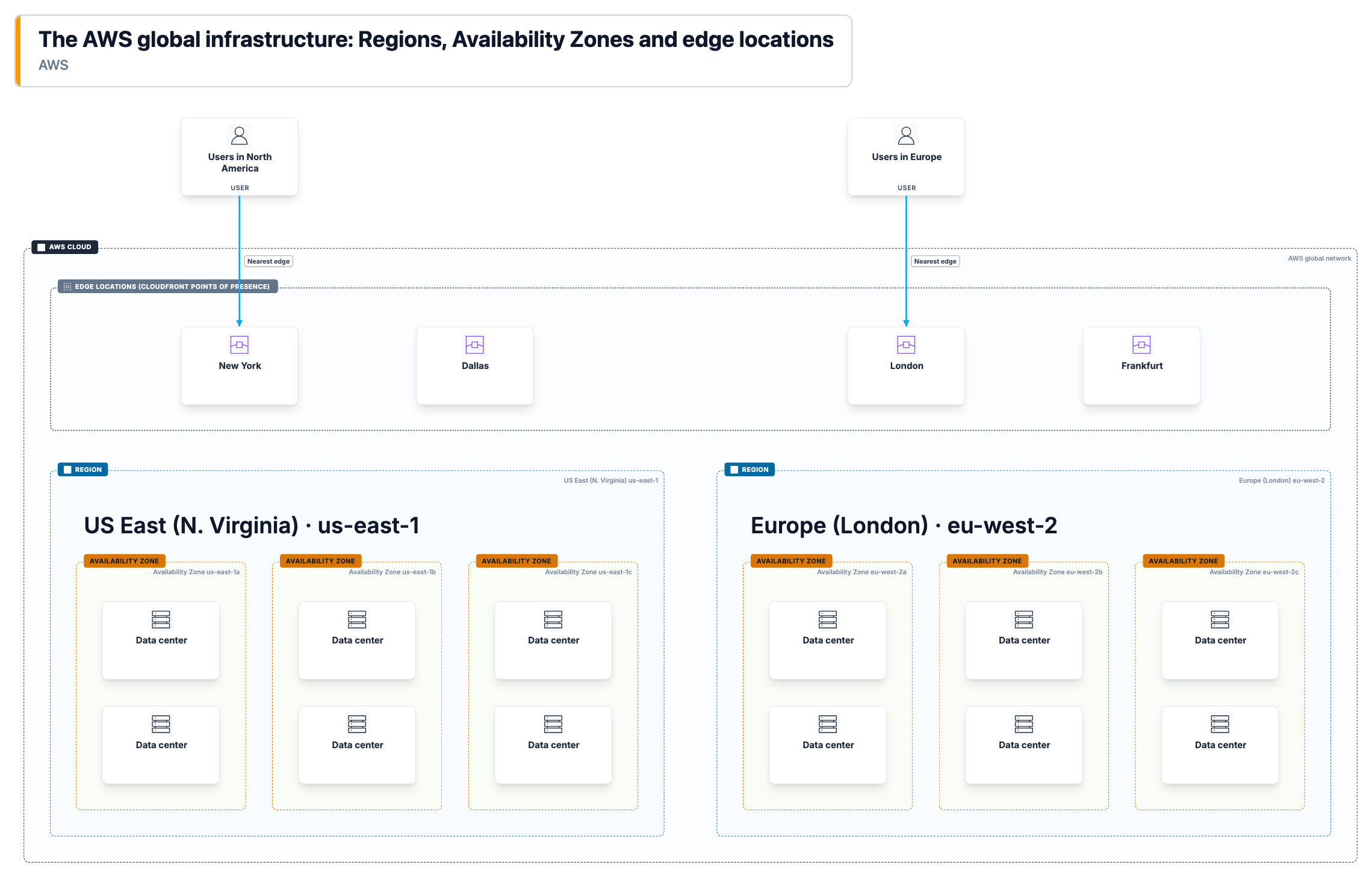
A Region is a physical location in the world where AWS runs data centers. London is one. Northern Virginia is another. Each Region contains multiple Availability Zones. We'll get to those in a moment. Regions are isolated from each other. A problem in one shouldn't spread to another. Most services are Regional, so you pick a Region before you build anything.
How to choose a Region
So which Region? There are four things to weigh. First, compliance and data residency. Some laws say data must stay in a certain country. That decides it before anything else. Second, proximity to your users. Closer means lower latency, so pages load faster. Third, service availability. Not every service is in every Region, especially new ones. Fourth, pricing. The same service can cost different amounts in different Regions.
Availability Zones
An Availability Zone is one or more discrete data centers inside a Region. Each has redundant power, networking and connectivity, isolated from the other zones. So a flood or a power cut in one zone shouldn't take out its neighbors. The zones in a Region are joined by high-bandwidth, low-latency links. That's what makes the classic advice work. Deploy across more than one zone for high availability. If one zone goes down, your application keeps running in the others.
Diagram
Here's the picture. On one side is US East, Northern Virginia, known as us-east-1. On the other is Europe, London, known as eu-west-2. Inside each Region are three Availability Zones. Each zone is drawn as one or more data centers. Notice the zones are separate boxes. They share a Region, but not a building, and not a power supply. Around the outside are edge locations. They sit near the users, not inside the Regions. With CloudFront in front, a user's request goes to a nearby edge location first. It answers from its cache, or fetches from the Region.
Edge locations
There are many more edge locations than Regions, spread across cities worldwide. Amazon CloudFront, the content delivery network, caches copies of your content there. Users get it from nearby. Amazon Route 53, the DNS service, answers name lookups from edge locations too. If an exam question says cache content close to users, the answer usually involves CloudFront and edge locations.
Getting even closer
Sometimes a Region still isn't close enough. Local Zones put compute, storage and other services near big cities, for very low latency to users there. Wavelength Zones put AWS compute and storage inside telecom providers' 5G networks. Think mobile apps and connected devices. And AWS Outposts brings AWS hardware and services into your own data center, for workloads that must stay on premises.
Recap
Let's recap. Regions are isolated geographic areas, each with multiple Availability Zones. Choose a Region by compliance, proximity, service availability and price. Use multiple Availability Zones for high availability. Edge locations serve CloudFront and Route 53, close to users. And Local Zones, Wavelength Zones and Outposts get AWS even closer. That's closer to cities, to 5G networks, or right into your own building.
Practice and what's next
That's the planet covered. Not bad for one lesson. The exam guide files this topic under Cloud Technology and Services. Practice that domain's questions in Gazeek Flash. The AWS app is free on the web and on Android, at flash.gazeek.com. Next lesson, Deployment models and migration. That's the seven Rs, and the Cloud Adoption Framework. See you there.

Gazeek Flash · free
Exam questions on your phone
Free questions on Cloud Technology and Services: quick-fire batches and timed exams, on the web or Android.