IAM: users, groups, roles and policies
Space Llama explains AWS Identity and Access Management, from protecting the root user to IAM users, groups, roles and JSON policies, least privilege, MFA and credential reports.





Diagrams in this video · 1Free in archhy
The diagrams, full size
Copy any of them into archhy, free, and change it for your own system.
After this lesson you can
- Explain what the root user is and how to protect it
- Tell IAM users, groups and roles apart
- Describe identity-based and resource-based policies written in JSON
- Apply least privilege, MFA and a password policy
- Use an IAM credential report to review credentials
Transcript
IAM: users, groups, roles and policies
This lesson is about IAM. That's AWS Identity and Access Management. It decides who can sign in to your account, and what they can do once they're in. We'll cover the root user, then IAM users, groups and roles. Then policies, least privilege and good sign-in habits. And a diagram to tie it together.
The root user
When you create an AWS account, you get the root user. It signs in with the account's email address. It has full access to everything in the account, and you can't limit it with IAM policies. A few tasks only the root user can do. Closing the account, changing the root user's email address or password, and restoring an admin who's locked themselves out are examples. So turn on multi-factor authentication for it, then lock it away. Use it for those rare tasks, and nothing else. And never create access keys for the root user. They'd be the keys to everything.
Users, groups and roles
For daily work, you create identities in IAM. An IAM user represents one person or one application. IAM users have long-term credentials. A password for the console, or access keys for code. A group is a collection of users who need the same permissions. You attach permissions to the group, not to each person. Groups hold users only. You can't put a group inside a group. A role has permissions too, but no long-term credentials. A user, an AWS service or another account assumes the role and gets temporary credentials.
Policies are JSON documents
Permissions come from policies. A policy is a JSON document. Each statement names an effect, allow or deny, plus the actions and the resources it covers. Identity-based policies are attached to users, groups or roles. They say what that identity can do. Resource-based policies are attached to a resource, like an Amazon S3 bucket policy. They say who can use that resource. By default, everything is denied unless a policy allows it. And if any policy explicitly denies an action, that deny always wins.
Least privilege, strong sign-in
Now some habits AWS expects you to know. Least privilege. Grant only the permissions a job needs, and add more when it needs them. Require multi-factor authentication for people signing in. A password alone isn't enough. Passwords are for the AWS Management Console. Access keys are for code and the command line. Never share either, and never put access keys in your code. Set a password policy for IAM users, with a minimum length and complexity rules. And download a credential report now and then. It lists every user and the state of their credentials.
Diagram
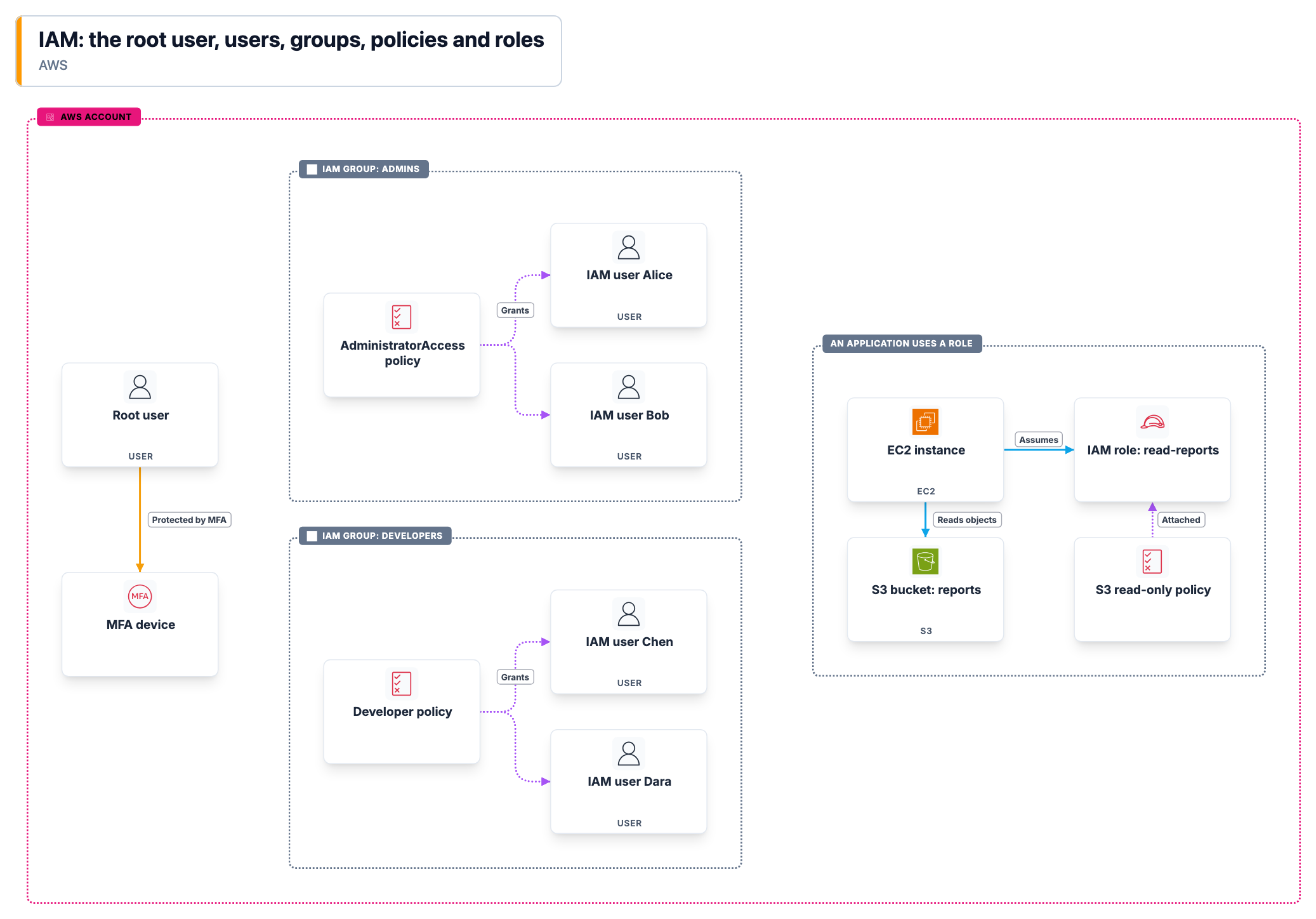
Here's IAM in one picture. The outer box is the AWS account. The root user sits off to the side, locked away. Inside are two IAM groups, Admins and Developers. Each group holds its users, and each group has policies attached. The users get their permissions from the group, not one by one. On the right, there's an EC2 instance that needs to read an S3 bucket. It doesn't get access keys. It assumes an IAM role. The role's policy allows reading that bucket, and the instance gets temporary credentials automatically. No keys stored on the server, nothing long-lived to leak.
Recap
To recap. Protect the root user with MFA, and use it only when you must. Users are people or applications, groups share permissions, and roles give temporary access. Policies are JSON, everything starts denied, and an explicit deny wins. Use least privilege and MFA everywhere. And review access with credential reports.
Practice and what's next
That's IAM. More boxes than you'd hope, but they all make sense. Practice Security and Compliance questions in Gazeek Flash to lock it in. The AWS app is free on the web and on Android, at flash.gazeek.com. Next up, Access management in practice. See you there.

Gazeek Flash · free
Exam questions on your phone
Free questions on Security and Compliance: quick-fire batches and timed exams, on the web or Android.