Storage: S3, EBS, EFS and friends
Object storage with Amazon S3 and its storage classes, block storage with Amazon EBS and instance store, shared file systems with Amazon EFS and Amazon FSx, and hybrid storage and backup with AWS Storage Gateway and AWS Backup.





The diagrams, full size
Copy any of them into archhy, free, and change it for your own system.
After this lesson you can
- Describe Amazon S3 buckets and objects, and choose an S3 storage class
- Explain how S3 lifecycle rules move objects to cheaper classes
- Compare Amazon EBS volumes with instance store
- Identify when to use Amazon EFS or Amazon FSx
- Describe what AWS Storage Gateway and AWS Backup do
Transcript
Storage: S3, EBS, EFS and friends
G'day mate. Space Llama here. Today, storage. Where all your stuff lives. We'll cover Amazon S3 and its storage classes, then EBS and instance store. Then shared file systems with EFS and FSx, a diagram, and finally hybrid storage and backup.
Amazon S3
Amazon Simple Storage Service, or S3, is object storage. Each object is your data, like a photo or a log file, plus some metadata about it. Objects live in buckets, and you can store as much as you like. By default, bucket names are globally unique, across every AWS account. Someone has already taken the good ones. Or opt into your account regional namespace: names only your account can create, ending in your account ID and Region. S3 is designed for eleven nines of durability. Your data is very hard to lose. People use it for backups, websites, media and data lakes.
S3 storage classes
Storage classes trade storage cost against how you access your data. S3 Standard is the default, for data you use often. It keeps copies across several Availability Zones. S3 Intelligent-Tiering watches how each object is used, and moves it to a cheaper tier when it goes quiet. S3 Standard Infrequent Access costs less to store, but you pay to retrieve. It's still fast when you need it. S3 One Zone Infrequent Access keeps data in just one Availability Zone. Use it for data you could re-create.
Archiving with S3 Glacier
For archives, there are three S3 Glacier storage classes. S3 Glacier Instant Retrieval is for data you rarely touch, but still need in milliseconds. S3 Glacier Flexible Retrieval is cheaper. Getting data back takes from minutes to hours. S3 Glacier Deep Archive is the lowest-cost storage in S3. Retrieval takes hours, so it suits long-term records. You don't move objects by hand. Lifecycle rules move objects to a cheaper class after a set time, or delete them when they expire.
Block storage for EC2
Amazon Elastic Block Store, or EBS, gives your EC2 instances persistent volumes. Think hard drives. The data stays when you stop the instance. Extra volumes can even outlive it, though the root volume is deleted on termination by default. A volume lives in one Availability Zone, and attaches to instances in that same zone. Snapshots are point-in-time backups of a volume, stored in S3. Restore one in another zone, or copy it to another Region. Instance store is different. It's disk on the host itself, so it's very fast. But it's temporary. The data is gone when the instance stops or terminates. Use it for caches and scratch data.
Shared file systems
Amazon Elastic File System, or EFS, is a shared file system for Linux workloads. Many instances can use the same files at once, from several Availability Zones. It grows and shrinks automatically as you add and remove files. No disks to size. Amazon FSx gives you fully managed, popular file systems. FSx for Windows File Server provides Windows file shares. FSx for Lustre is built for high-performance computing and machine learning. There's also FSx for NetApp ONTAP and FSx for OpenZFS.
Diagram
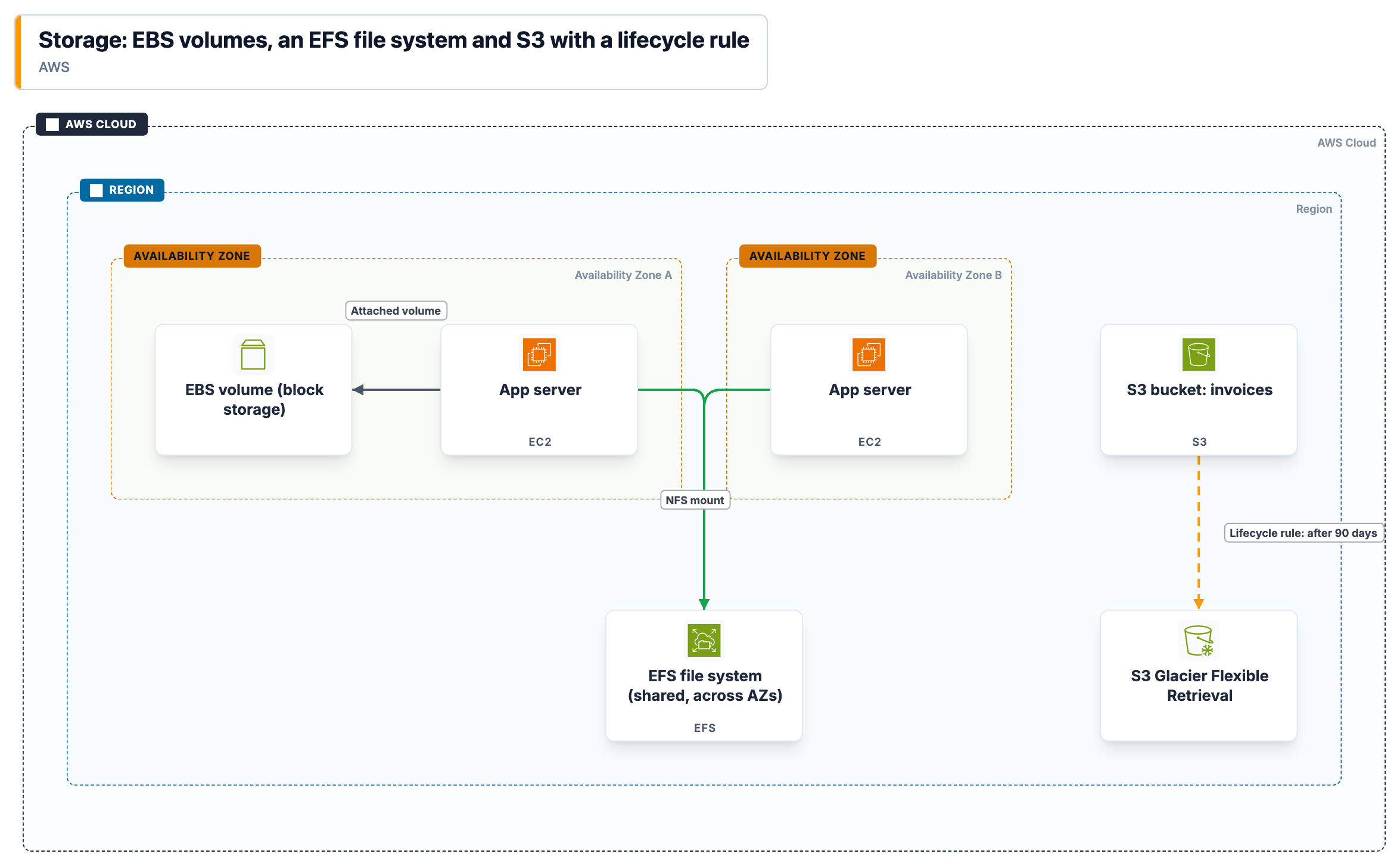
Here's how they compare. First, an EC2 instance with an EBS volume attached. Both sit in the same Availability Zone. Next, EC2 instances in two Availability Zones, all sharing one EFS file system. Last, an S3 bucket. Its lifecycle rule moves older objects to S3 Glacier.
Hybrid storage and backup
AWS Storage Gateway is hybrid storage. It gives your on-premises apps access to storage in AWS. There are file, volume and tape gateways. The tape gateway swaps physical tapes for virtual ones in AWS. AWS Backup manages your backups in one place. You write a backup plan with a schedule and how long to keep things. It covers services like EC2, EBS, RDS, DynamoDB, EFS and FSx.
Recap
Let's recap. S3 stores objects in buckets. Storage classes and lifecycle rules keep costs down as data cools off. EBS is block storage for one instance, in one Availability Zone. Instance store is fast but temporary. EFS and FSx are shared file systems. And Storage Gateway connects on-premises to AWS storage, while AWS Backup looks after your backups.
Practice and what's next
That's storage. Everything has a place, even the stuff nobody looks at. Practice Cloud Technology and Services questions in Gazeek Flash's AWS app. It's free on the web and on Android, at flash.gazeek.com. Next up, databases. See you there.

Gazeek Flash · free
Exam questions on your phone
Free questions on Cloud Technology and Services: quick-fire batches and timed exams, on the web or Android.