Kubernetes cluster architecture, explained
A deeper tour of a Kubernetes cluster, drawn in archhy. The control plane, the worker nodes and the cloud services around them, how they talk, how a node joins, and what GKE, EKS or AKS runs for you.





Diagrams in this video · 10Free in archhy
Space Llama's narration for this lesson is being recorded. Until then it plays with captions only.
Now try it on a real cluster
The videos are free. Gazeek's hands-on labs give you a real Kubernetes cluster in your browser for every lab, with checks that tell you when you've got it right: the practice the CKA and CKAD exams need.
The diagrams, full size
Copy any of them into archhy, free, and change it for your own system.
- Drawing the picture…
 D1Two halvesAt 0:17 · Copy and edit in archhy (opens in a new tab)
- Drawing the picture…
 D2The whole clusterAt 0:38 · Copy and edit in archhy (opens in a new tab)
- Drawing the picture…
 D3The API server, the only doorAt 1:22 · Copy and edit in archhy (opens in a new tab)
- Drawing the picture…
 D4etcd: the cluster's stateAt 1:52 · Copy and edit in archhy (opens in a new tab)
- Drawing the picture…
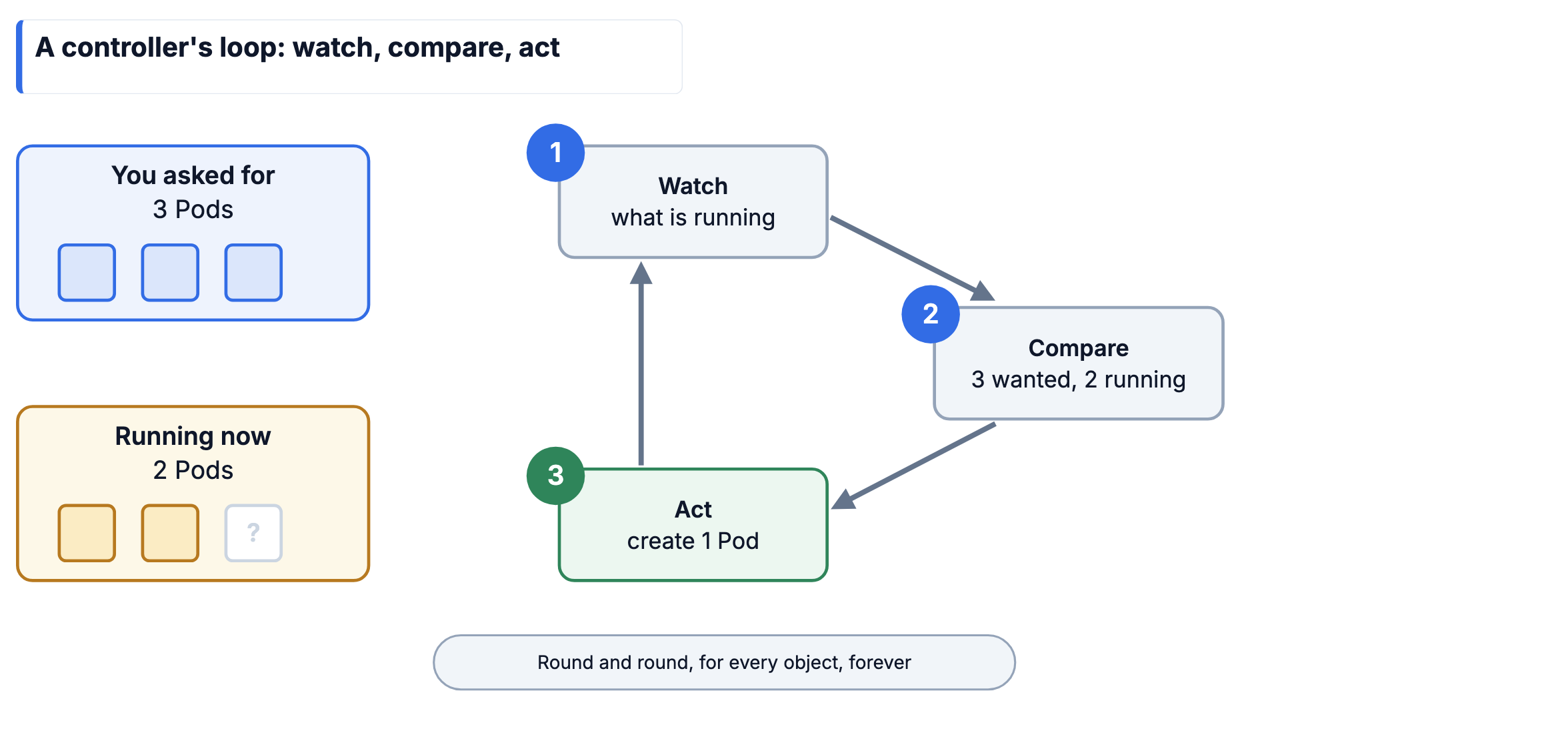 D5The scheduler and the controllersAt 2:32 · Copy and edit in archhy (opens in a new tab)
- Drawing the picture…
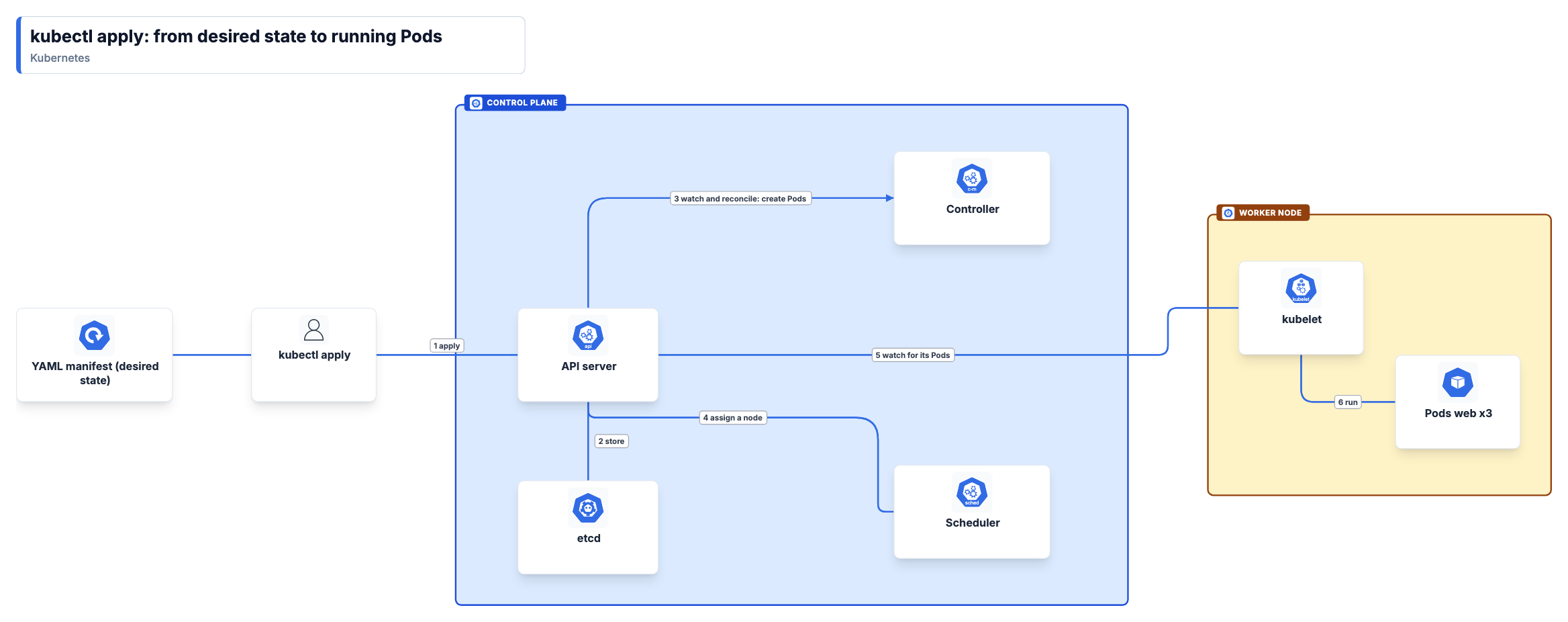 D6How the halves work togetherAt 3:10 · Copy and edit in archhy (opens in a new tab)
- Drawing the picture…
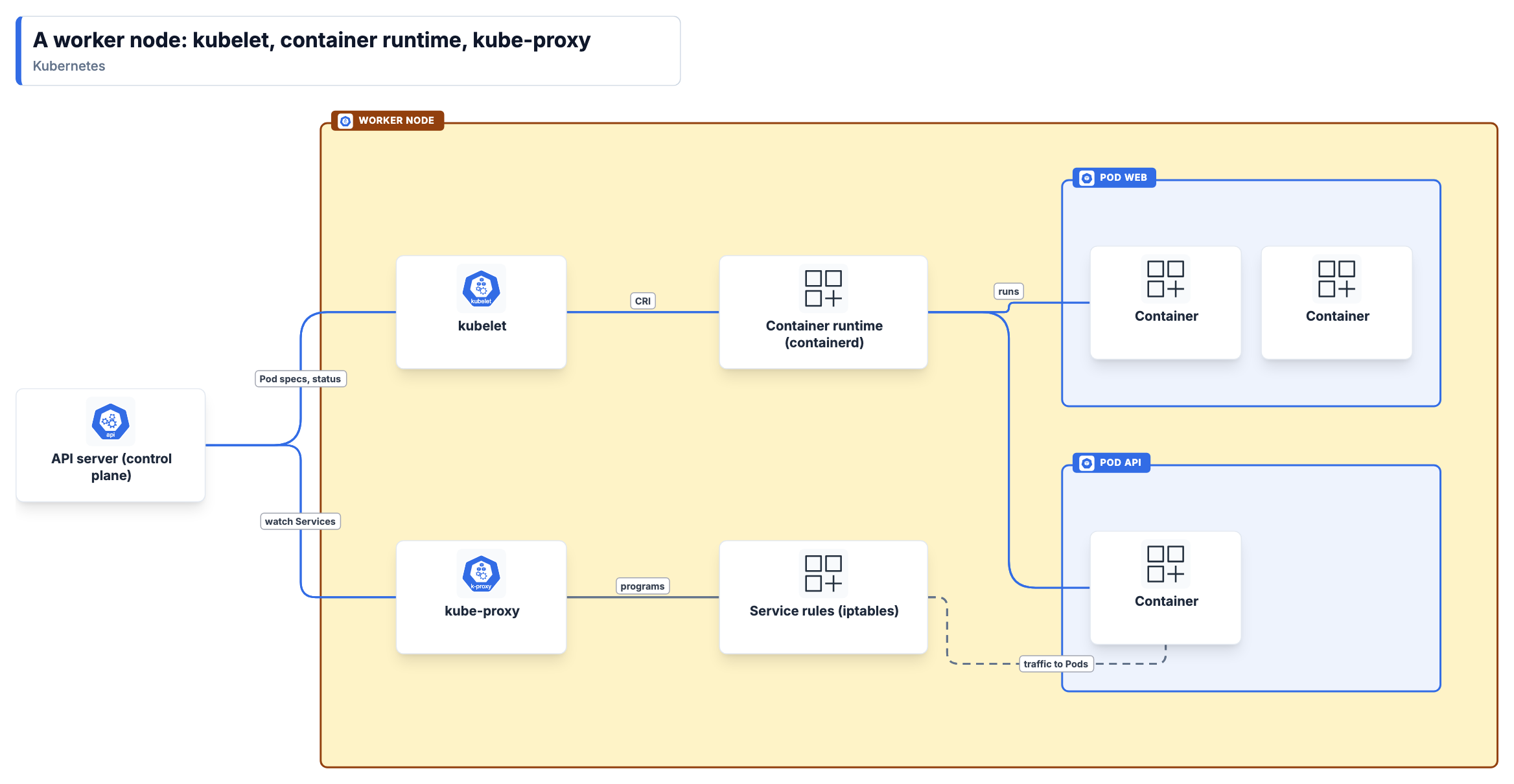 D7Inside a worker nodeAt 4:09 · Copy and edit in archhy (opens in a new tab)
- Drawing the picture…
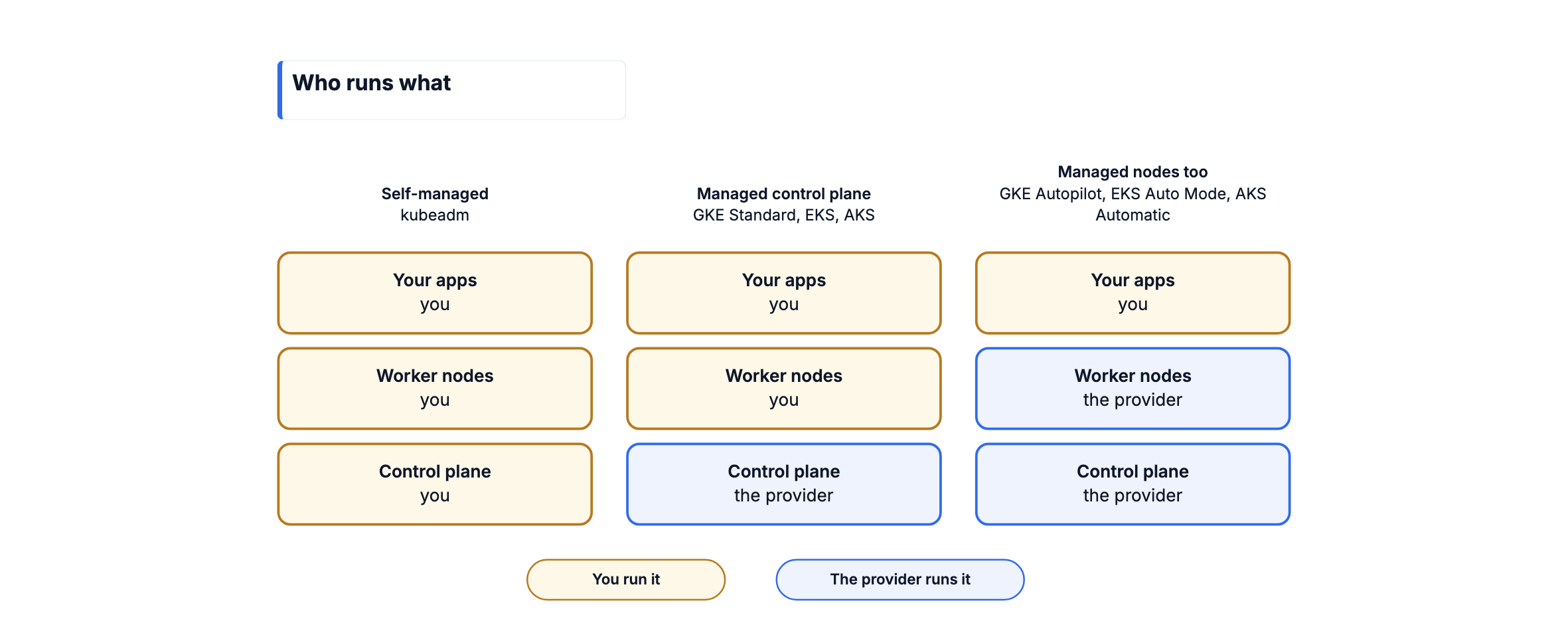 D8Who runs whatAt 4:42 · Copy and edit in archhy (opens in a new tab)
- Drawing the picture…
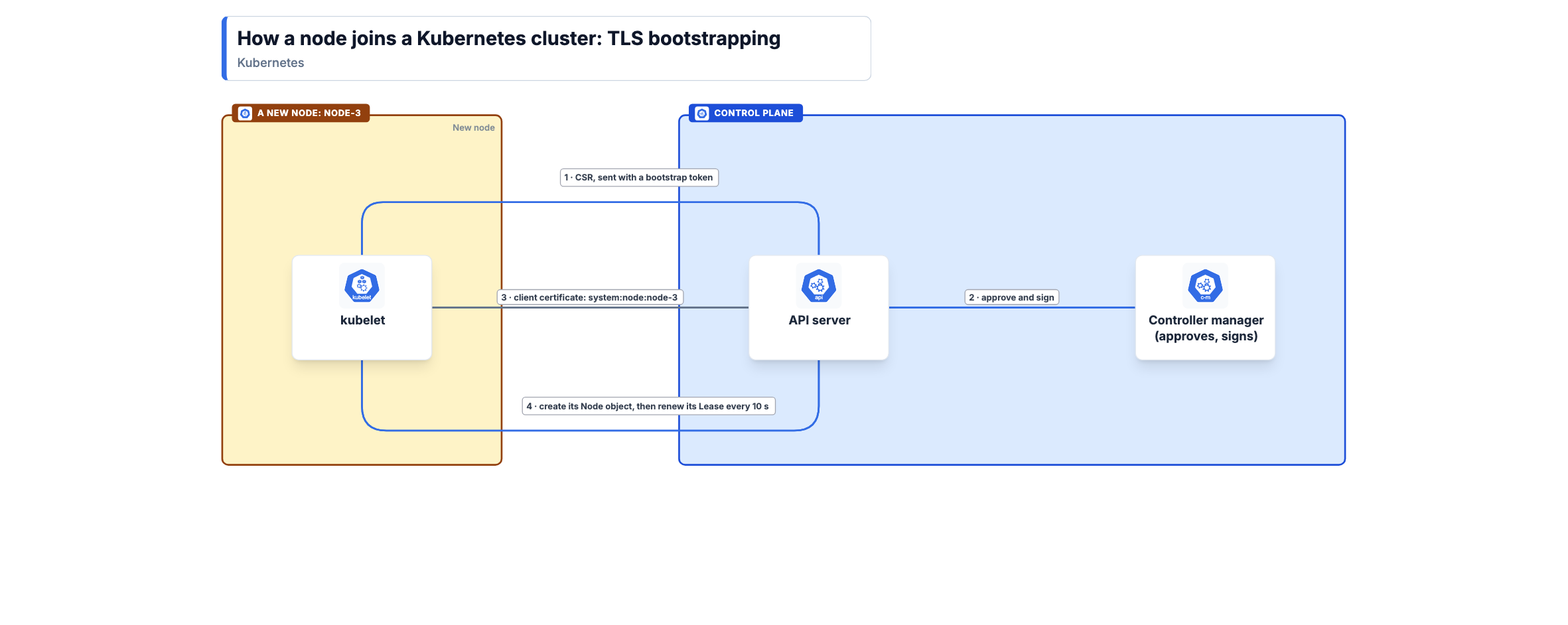 D9How a node joinsAt 5:15 · Copy and edit in archhy (opens in a new tab)
- Drawing the picture…
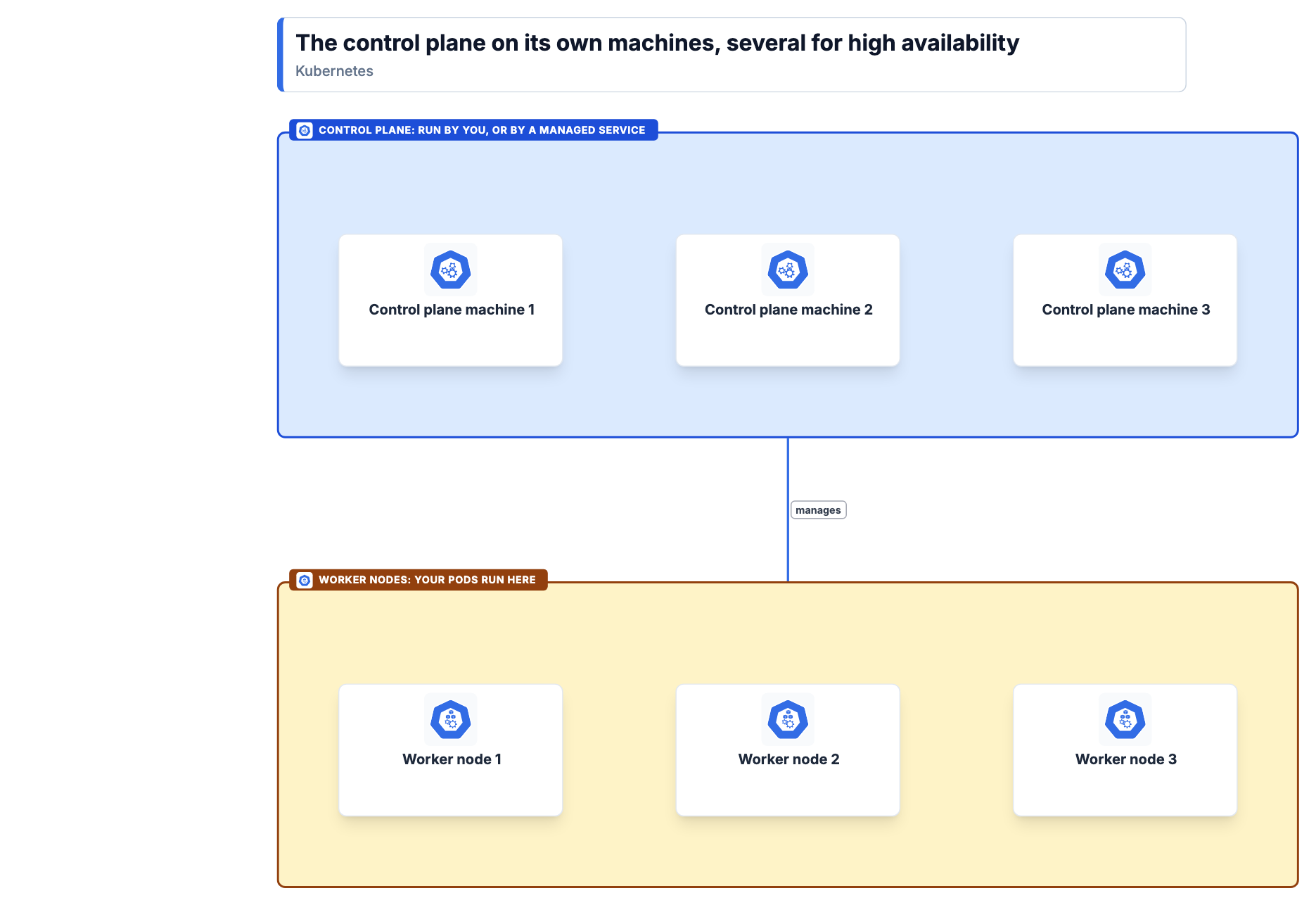 D10A highly available control planeAt 6:00 · Copy and edit in archhy (opens in a new tab)
After this lesson you can
- Explain what each control plane component does, and why everything goes through the API server
- Explain what runs on every worker node
- Follow a node joining the cluster, from bootstrap token to heartbeat
- Say who runs what on a self-managed cluster and on a managed service
Transcript
Kubernetes cluster architecture, explained
Space Llama here, with Architecture Ideas. Last time, Kubernetes architecture in five minutes. This time, we go one level deeper. The control plane, the worker nodes, the cloud services around them, and how a new node earns its place in the cluster.
Two halves
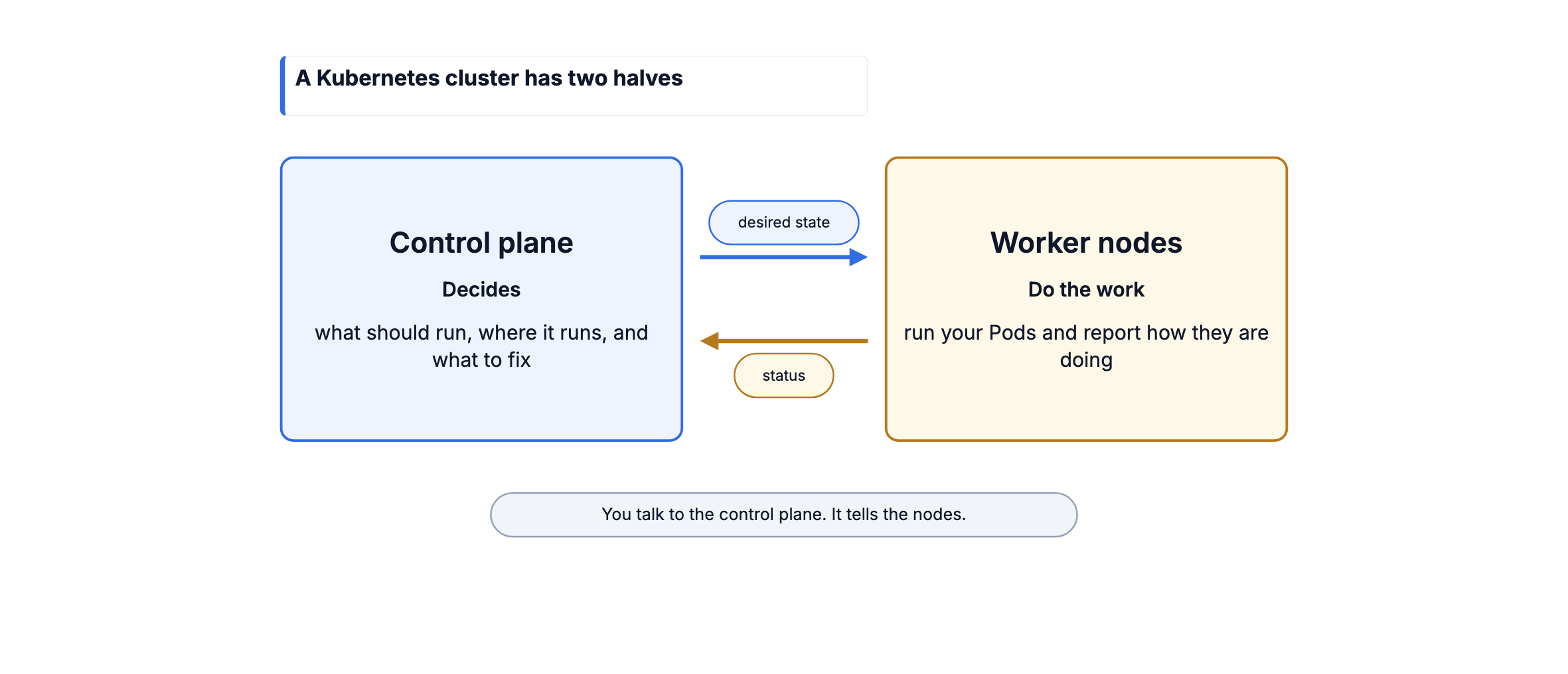
First, the simple picture. A cluster has two halves. The control plane decides: what should run, where it runs, and what to fix. The worker nodes do the work. They run your Pods, and report how they're doing. You talk to the control plane, and it tells the nodes.
The whole cluster
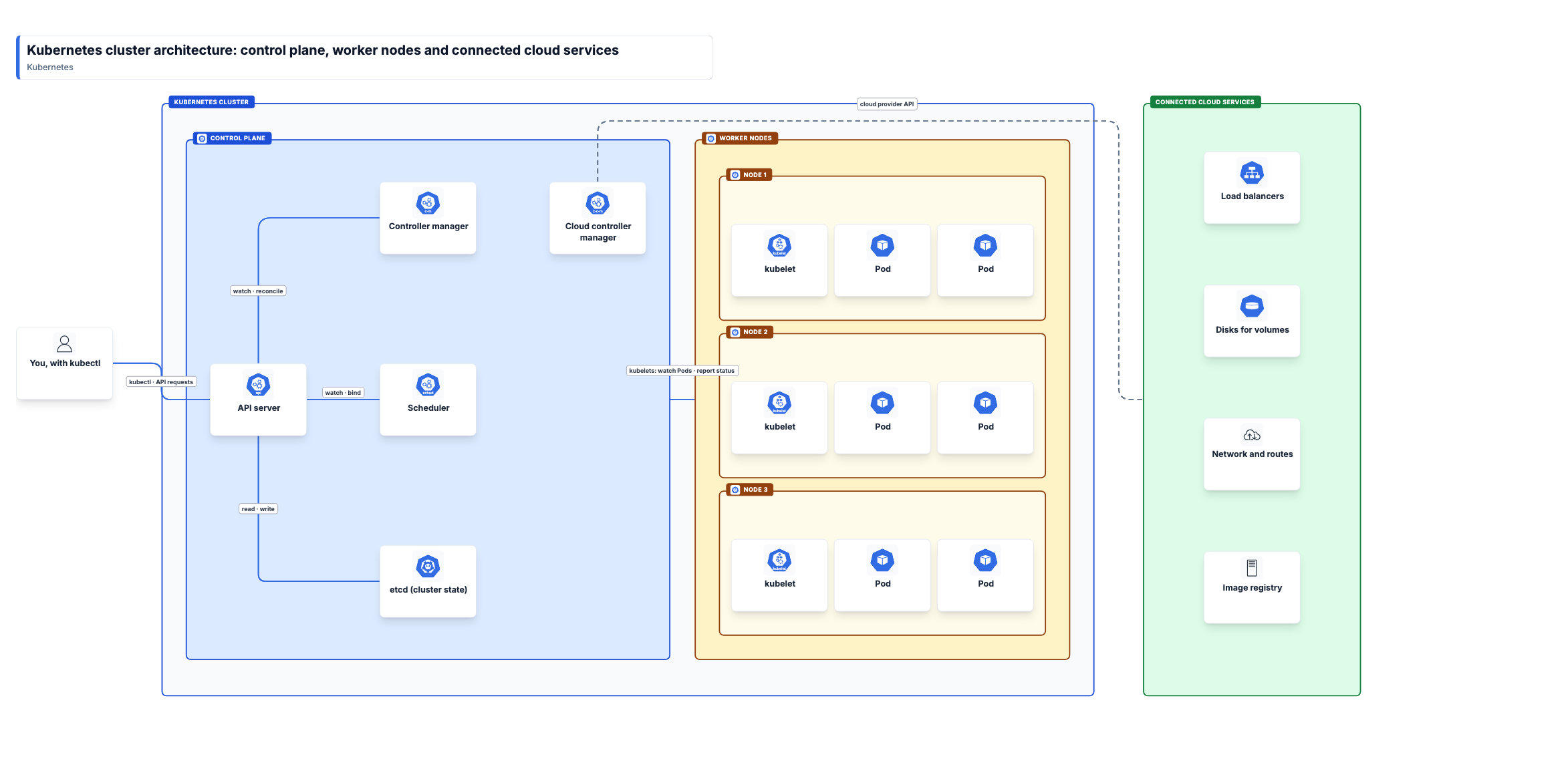
Here's the whole cluster on one diagram, in three columns. On the left, the control plane. It makes every decision. On a managed service, like Google Kubernetes Engine, Amazon's Elastic Kubernetes Service or the Azure Kubernetes Service, GKE, EKS and AKS for short, the provider runs it for you. In the middle, the worker nodes, where every Pod runs. They're usually yours to run, unless you pick a mode where the provider runs them too. And on the right, the cloud services the cluster leans on: load balancers, disks for volumes, the network, and an image registry. Notice the arrows. They all point at one box: the API server.
The API server, the only door
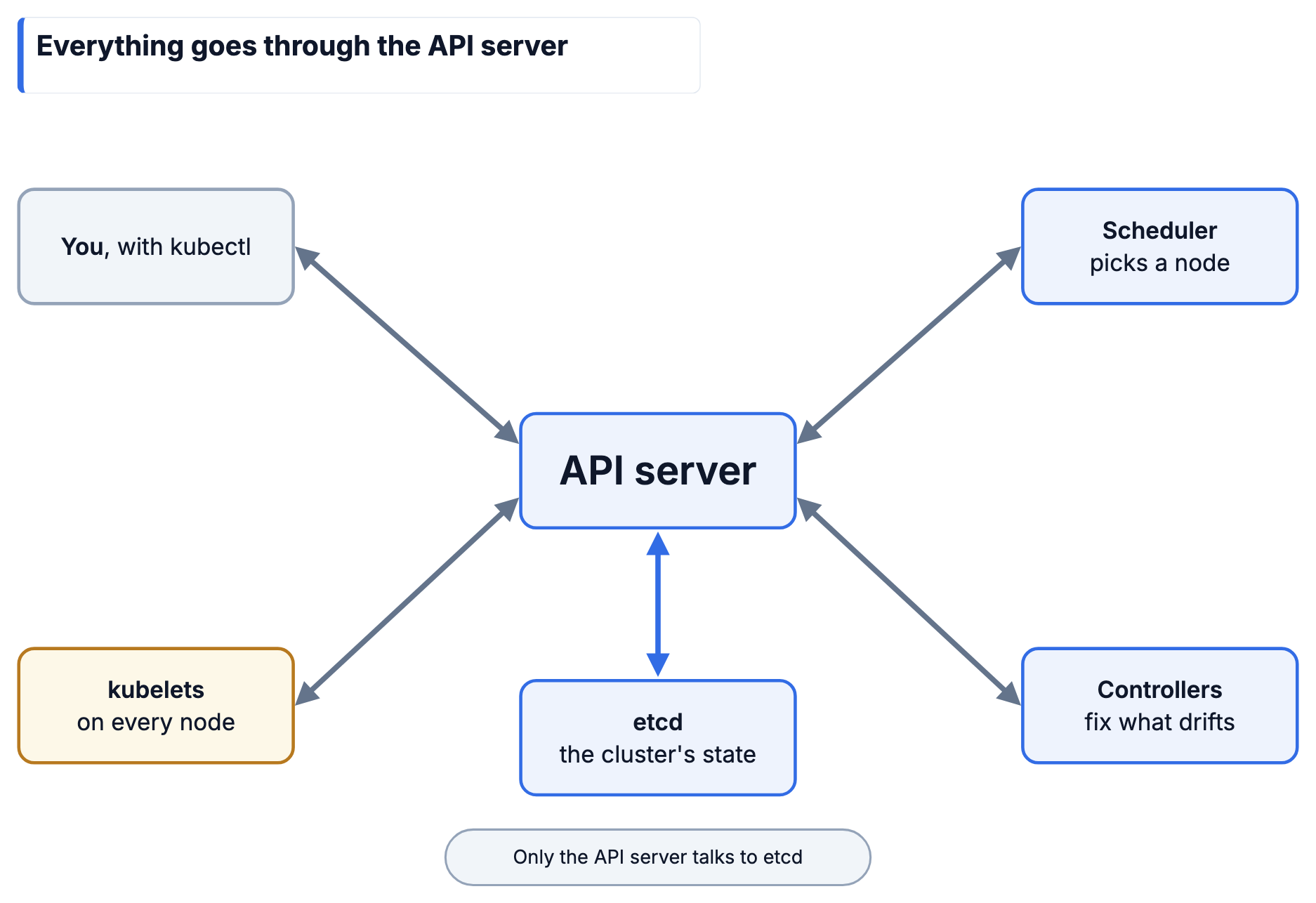
The API server is the only door into the cluster. You come in through it with kubectl. So do client libraries, continuous integration pipelines, and every other part of Kubernetes. Each request is authenticated, authorized, and checked by admission control before anything is stored. And the API is declarative. You don't send steps. You send the state you want, like three copies of this image, and the cluster works to make it true.
etcd: the cluster's state
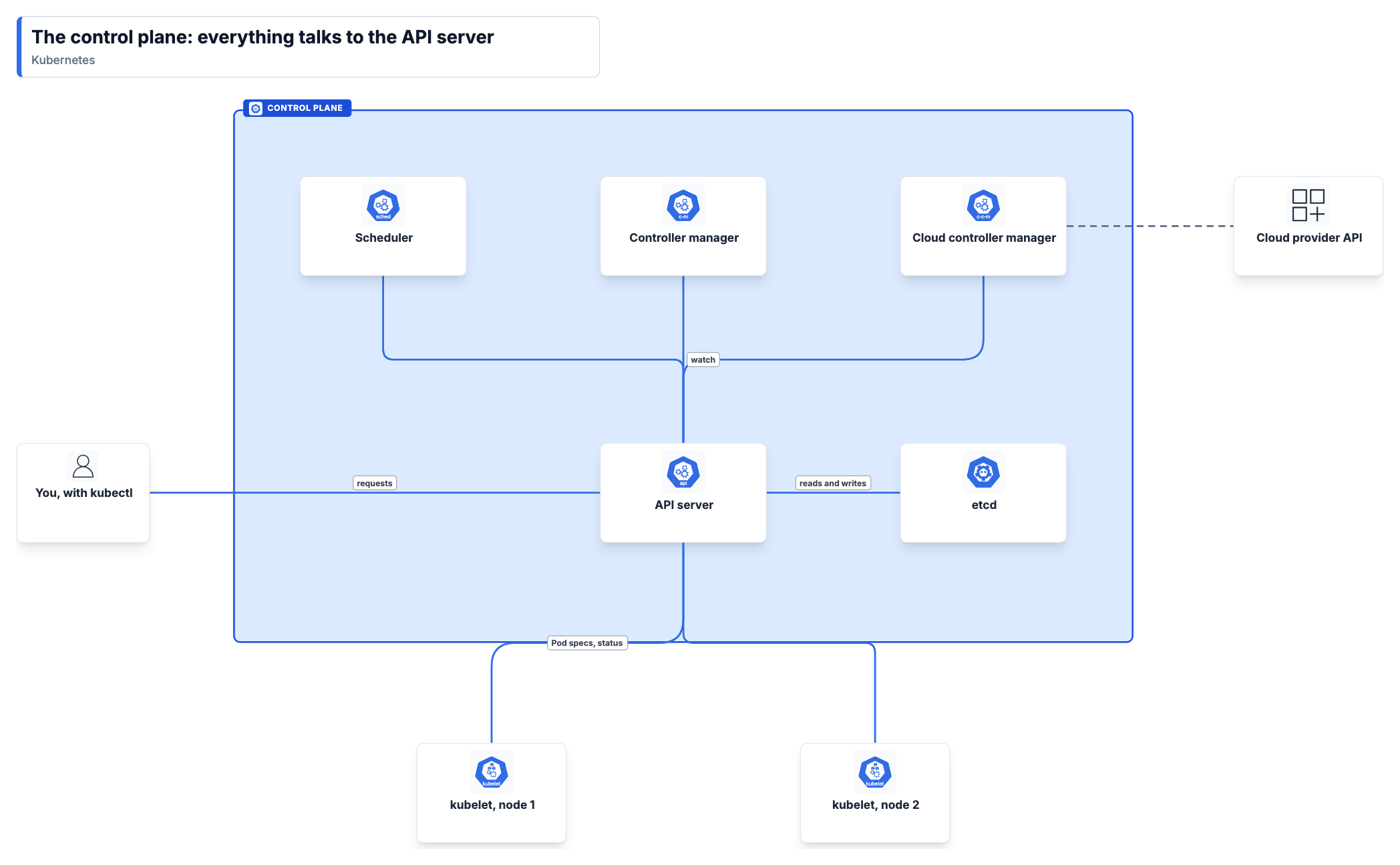
Behind the API server is etcd, a key-value store holding every object in the cluster. Pods, Deployments, Secrets, Nodes, all of it. Only the API server reads and writes it. etcd keeps its members in agreement with the Raft protocol, so you run three or five, and it keeps working while a majority is up. Not every cluster uses plain etcd. k3s can use SQLite, and GKE can use Spanner. The API server still speaks the etcd API, so nothing else changes. On a cluster you build yourself, etcd is the one thing you must back up.
The scheduler and the controllers
The scheduler watches for Pods with no node. It filters out the nodes that can't take one, scores the rest, and records its choice. It never starts a container itself. The controller manager runs the built-in control loops: Deployments, ReplicaSets, Jobs, Nodes and more. Each loop watches what's running. It compares that with what you asked for. And it acts to close the gap. The cloud controller manager is the part that talks to your cloud. It creates the load balancer for a Service, and cleans up Nodes whose machines are gone.
How the halves work together
Here's the teamwork, when you apply a Deployment of three replicas. The API server checks it and stores it in etcd. The Deployment controller creates a ReplicaSet, and the ReplicaSet controller creates three Pods, with no node yet. The scheduler gives each Pod a node. The kubelet on that node sees it, and starts the containers. Nobody calls anybody directly. Each part watches the API server and writes its results back. So when one part restarts, it just picks up where it left off.
The image registry matters
One dependency people forget: the image registry. Every container starts from an image, and so do the cluster's own parts. If the registry is down, running Pods keep running. But anything that needs a new pull fails: new nodes, upgrades, scaling out. So keep copies of the images you depend on in a registry you control, close to the cluster.
Inside a worker node
Now, inside one worker node. The kubelet is the node's agent. It runs the Pods assigned here, runs their probes, mounts their volumes, and reports their status. It drives the container runtime, such as containerd, through the CRI, the Container Runtime Interface. kube-proxy writes the node's Service rules, so traffic for a Service reaches one of its Pods. And DaemonSets add one Pod per node for the rest: the network plugin, log and metrics agents, and storage drivers.
Who runs what
The same API, kubectl and YAML work everywhere. What changes is who runs each half. On GKE Standard, EKS or AKS, the provider runs the control plane and its backups. You run the nodes. In GKE Autopilot, EKS Auto Mode or AKS Automatic, the provider runs the nodes too, and you mostly pay for what your Pods ask for. With kubeadm, it's all yours. And that's what the CKA exam, the Certified Kubernetes Administrator, uses, so learn the self-managed way first.
How a node joins
How does a new node join? It can't just announce itself, or anything could pretend to be a node. So the kubelet starts with a short-lived bootstrap token, and sends a certificate signing request to the API server. The controller manager approves it and signs it. The kubelet gets a client certificate in its own name, system colon node colon node-3, and uses it from then on. Now it creates its Node object, and renews a Lease every ten seconds. That's its heartbeat. If the heartbeats stop, the node is marked NotReady. And it can only touch its own Node and its own Pods. The Node authorizer makes sure of that.
A highly available control plane
Last, keeping the control plane up. If it stops, your apps keep running. But nothing can change: no new Pods, no scaling, no healing. So production runs three control plane machines, with the API servers behind a load balancer, and etcd spread across all three. Managed services do this for you. With kubeadm, you build it yourself.
Recap
Recap. The control plane decides: the API server, etcd, the scheduler and the controllers. The nodes run Pods, with a kubelet, a runtime and kube-proxy. Everything goes through the API server. A node joins with a certificate, registers itself, and keeps a heartbeat. And a managed service runs the control plane, so you can focus on your workloads.
Practice and what's next
The full article, with every diagram, is linked in the description. Open the diagrams in archhy and make them yours. New to Kubernetes? Kubernetes Fundamentals is free on Gazeek. Then join a node with kubeadm yourself, in a Gazeek lab, on a cluster built just for you. More videos on the channel. Alpaca Mango. I'll be there. I'm always there. Mate.
Hands-on labs
Now try it on a real cluster
A real Kubernetes cluster in your browser for every lab, checked as you go.
See the labsDraw it in archhy
Open this episode's diagram in archhy, ready to change for your own system. Free, in the browser.