OpenID Connect explained, ID tokens and sign-in
How OpenID Connect adds identity to OAuth 2.0 with a signed ID token, what is inside it, how to check it, and which token goes where.






Space Llama's narration for this lesson is being recorded. Until then it plays with captions only.
The diagrams, full size
Copy any of them into archhy, free, and change it for your own system.
After this lesson you can
- Explain what OpenID Connect adds to OAuth 2.0
- Walk an OpenID Connect sign-in step by step
- Validate an ID token before trusting it
- Keep the ID token and the access token apart
Transcript
OpenID Connect explained, ID tokens and sign-in
Space Llama here, with Architecture Ideas: one design at a time. Last time, OAuth: what an app may do for you. Today, OpenID Connect: who you are.
What OpenID Connect adds
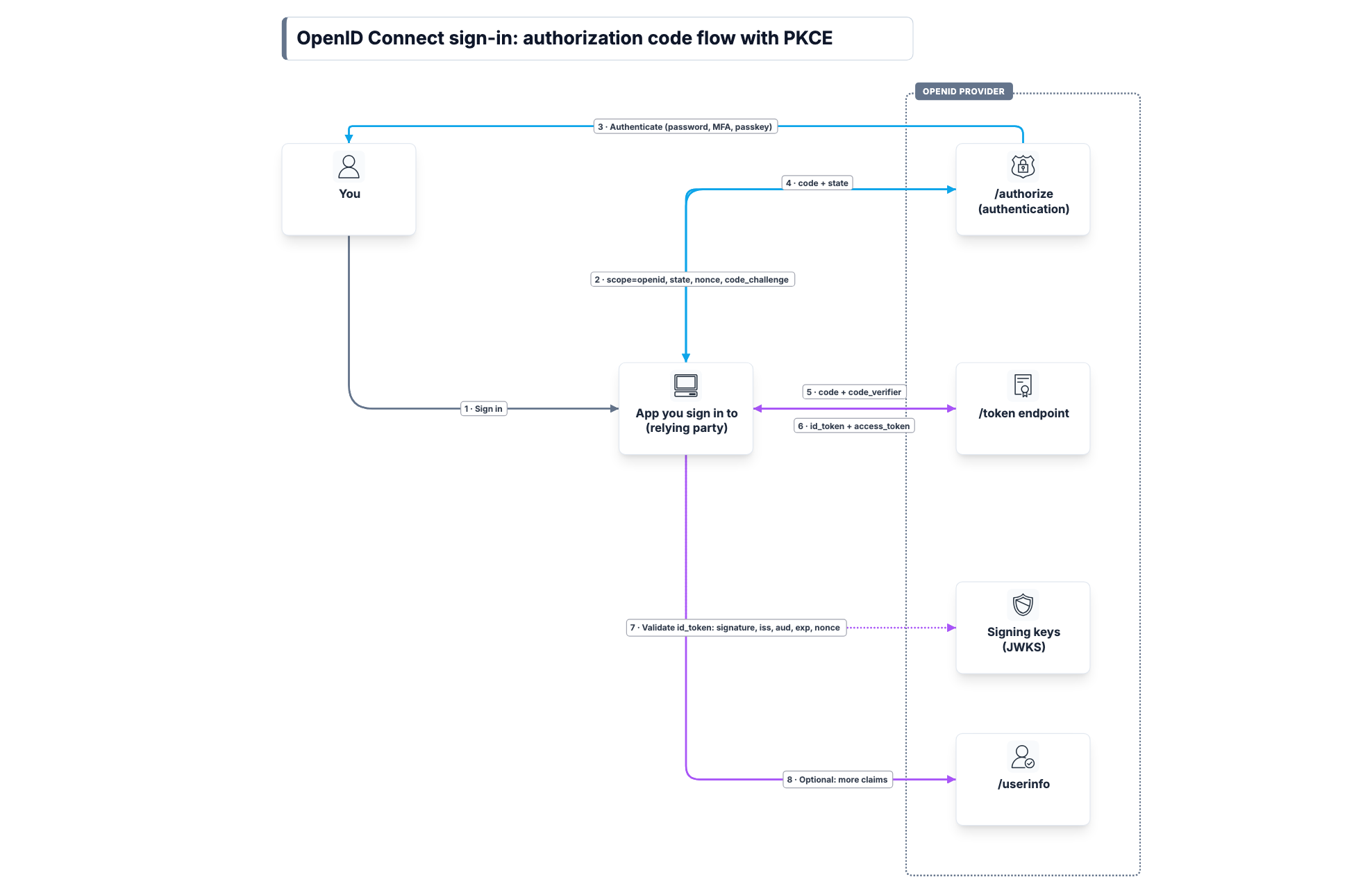
OAuth gives an app an access token for an API. On purpose, it never says who you are. OpenID Connect is a thin layer on top that adds that answer. Ask for the openid scope, and the token endpoint returns a signed ID token about the person who just signed in. Add a UserInfo endpoint for more details, and a discovery document that lists every endpoint and signing key.
Signing in, step by step
It's the same code flow with PKCE, with a few additions. One. You click Sign in. Two. The app sends you to the provider with scope openid, a state, a nonce and a code challenge. Three. The provider authenticates you: a password, a second factor, or a passkey. Four. You come back to the app with a code. Five and six. The app swaps the code and its verifier for an ID token and an access token. Seven. The app validates the ID token against the provider's published keys, then starts its own session. Eight, optionally. It calls UserInfo with the access token for more claims.
Inside the ID token
Decode an ID token and you get a small set of claims. Five are required. Issuer is the provider's exact address. Subject is a stable ID for you there. Audience must contain your app's client ID. Then two timestamps: when it expires, and when it was issued. Use issuer plus subject as the user's key. Never the email address, which can change. Ask for the profile or email scopes, and claims like name and email come along too.
Check it before you trust it
An ID token is only proof once you've checked it. Verify the signature with a key from the provider's published key set. The issuer must match exactly, and the audience must contain your client ID. It must not have expired, and the nonce must match the one you sent, so an old token can't be replayed. Use a maintained OpenID Connect library. Most mistakes here are skipped checks.
Which token goes where
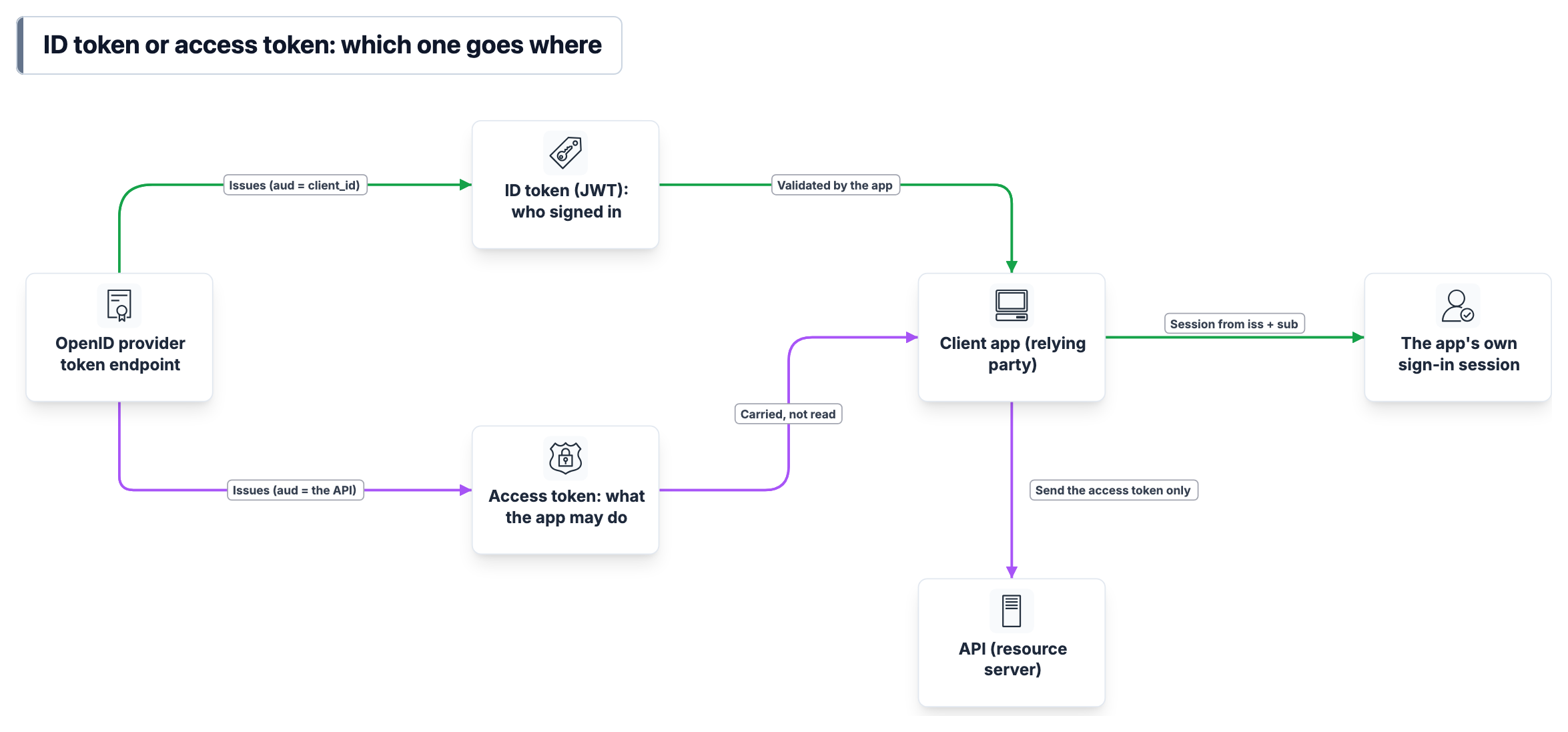
The most common mistake is mixing up the two tokens. The ID token is addressed to your app. Read it once at sign-in, then rely on your own session. The access token is addressed to the API. The app just carries it and passes it on. Never send the ID token to an API. And never treat an access token alone as proof of login.
Three flows, one to use
OpenID Connect defines three flows, picked by the response type. Use the authorization code flow with PKCE, for every kind of app. Implicit puts tokens in the URL, with the same leaks as OAuth's implicit flow. Hybrid mostly lives in older enterprise setups.
Signing out everywhere
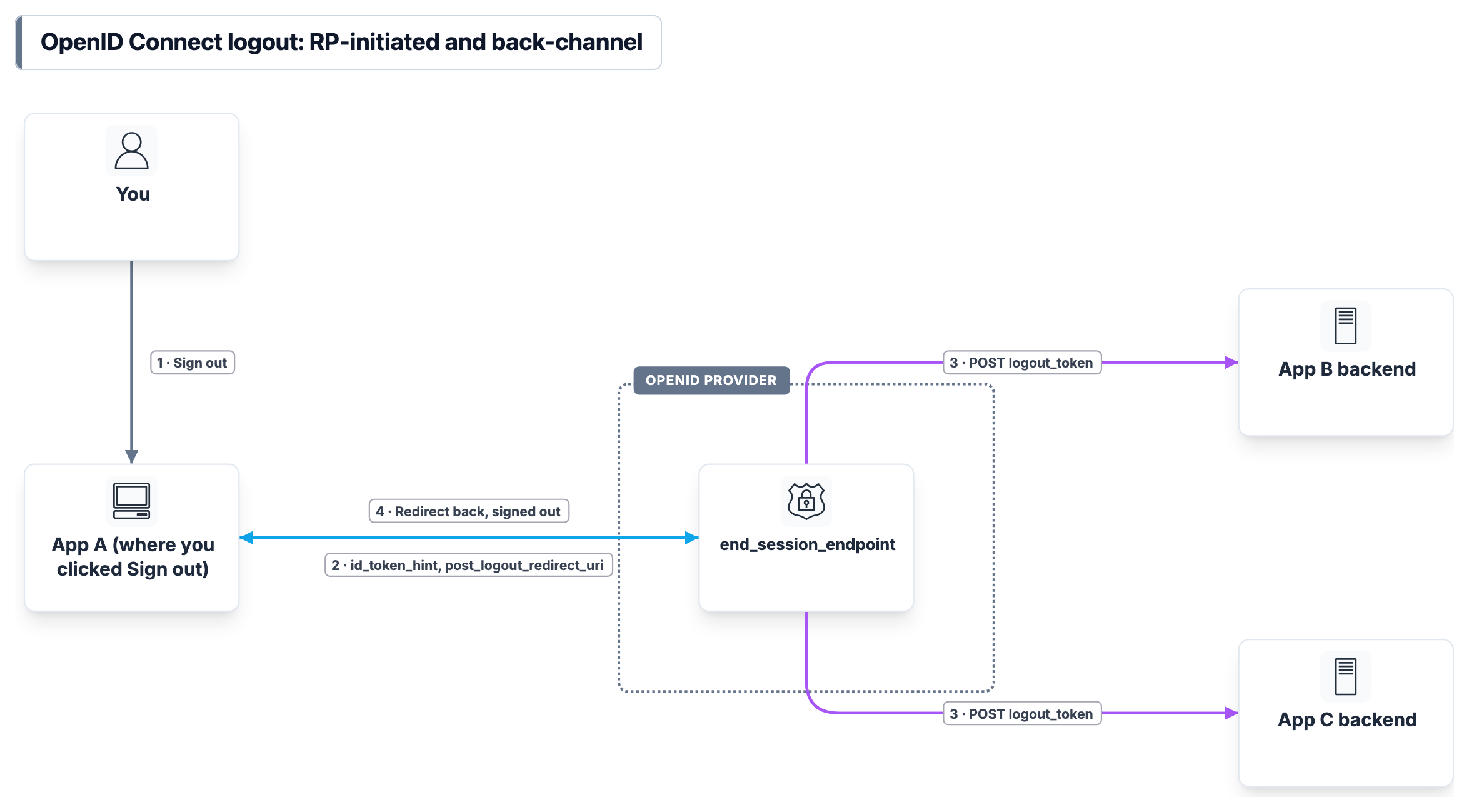
Signing out of one app doesn't end your session at the provider, or in other apps. With RP-initiated logout, the app sends you to the provider's end session endpoint. With back-channel logout, the provider then posts a signed logout token to every other app, server to server. Each app ends its own session. One sign out, every app told. The logout token names the user, or the session, so each app knows exactly what to end.
OpenID Connect, OAuth, or SAML?
So when do you use what? Signing people in to your app: OpenID Connect. An app calling an API for a user: OAuth access tokens, usually from the same sign-in. Service to service: client credentials, with no ID token, because there's no person. Enterprise single sign-on into older business apps is often SAML. New integrations usually pick OpenID Connect.
Recap
Recap. OpenID Connect adds identity to OAuth with a signed ID token. Ask for the openid scope. Validate it: signature, issuer, audience, expiry and nonce. The ID token is for your app. The access token is for the API. And back-channel logout tells every app when you sign out.
Your turn in archhy
Every diagram in this video opens in archhy, from the links in the description. Put your own provider in. Read the full article on archhy's blog. Thanks for watching Architecture Ideas. See you next time. That's the part. There's more on the channel. Alpaca Mango. Go on, then. Mate.
Draw it in archhy
Open this episode's diagram in archhy, ready to change for your own system. Free, in the browser.