Kubernetes architecture in 5 minutes
The whole Kubernetes architecture, the control plane and the worker nodes, explained on one archhy diagram in the time it takes to drink a latte. Then draw your own.





Now try it on a real cluster
The videos are free. Gazeek's hands-on labs give you a real Kubernetes cluster in your browser for every lab, with checks that tell you when you've got it right: the practice the CKA and CKAD exams need.
The diagrams, full size
Copy any of them into archhy, free, and change it for your own system.
- Drawing the picture…
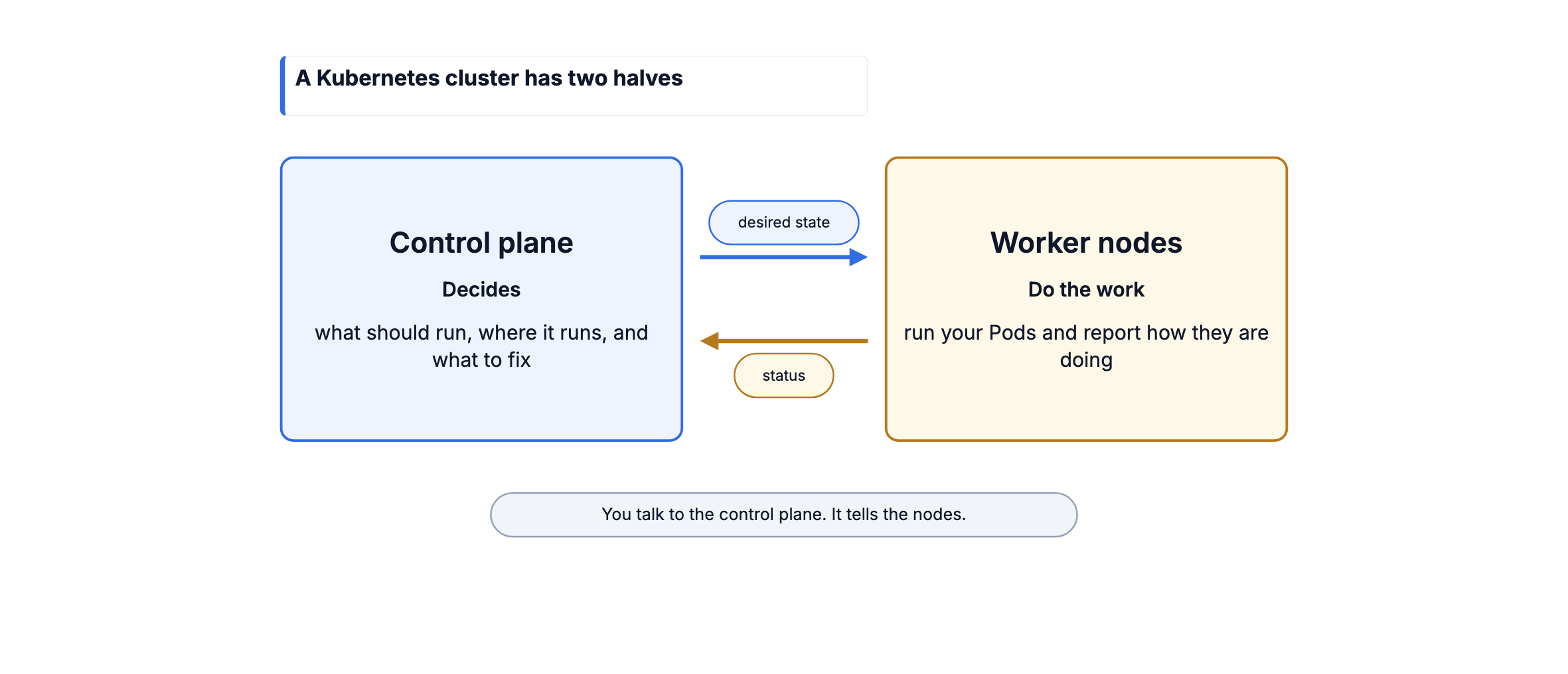 D1Two halvesAt 0:14 · Copy and edit in archhy (opens in a new tab)
- Drawing the picture…
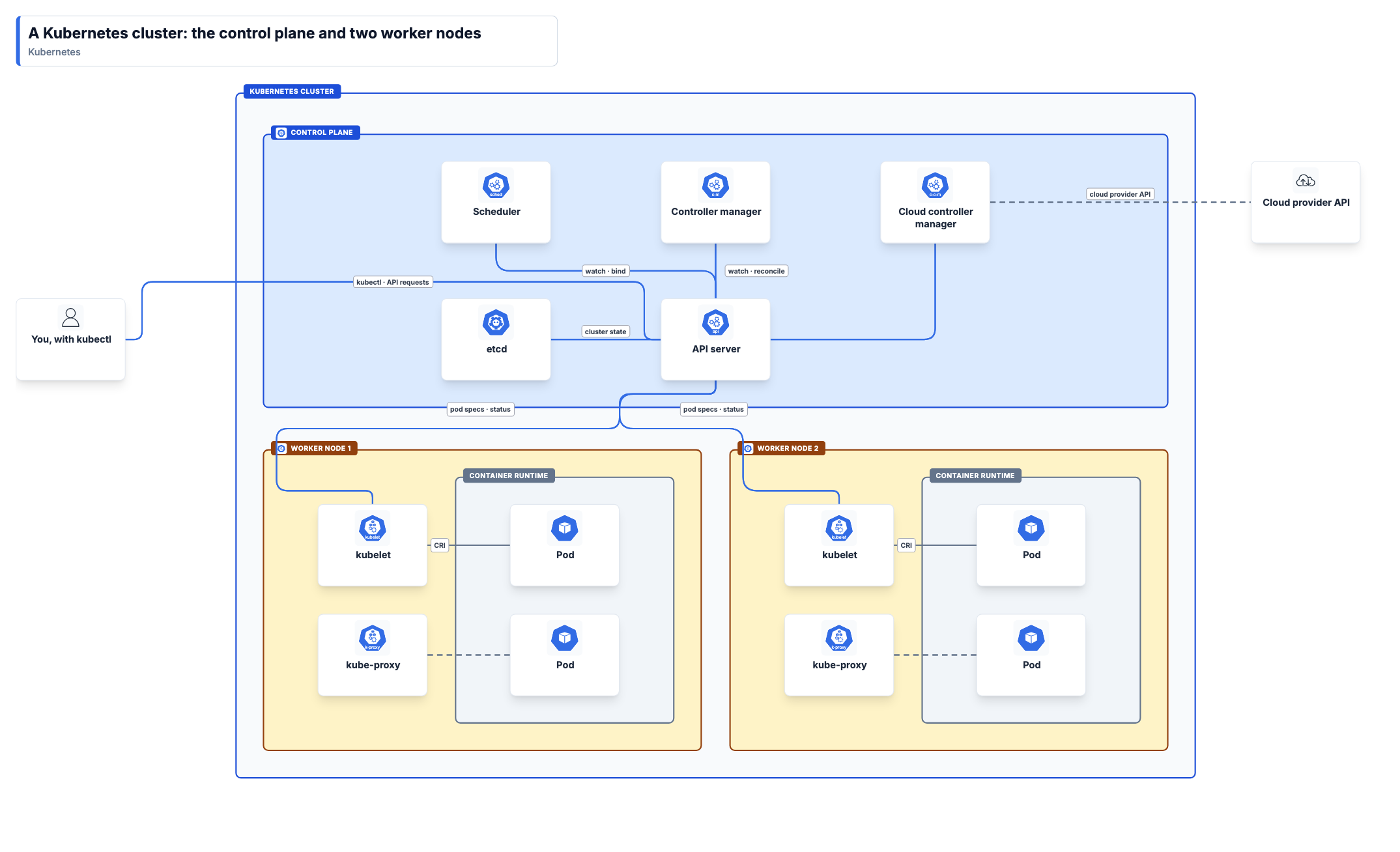 D2The control planeAt 0:39 · Copy and edit in archhy (opens in a new tab)
- Drawing the picture…
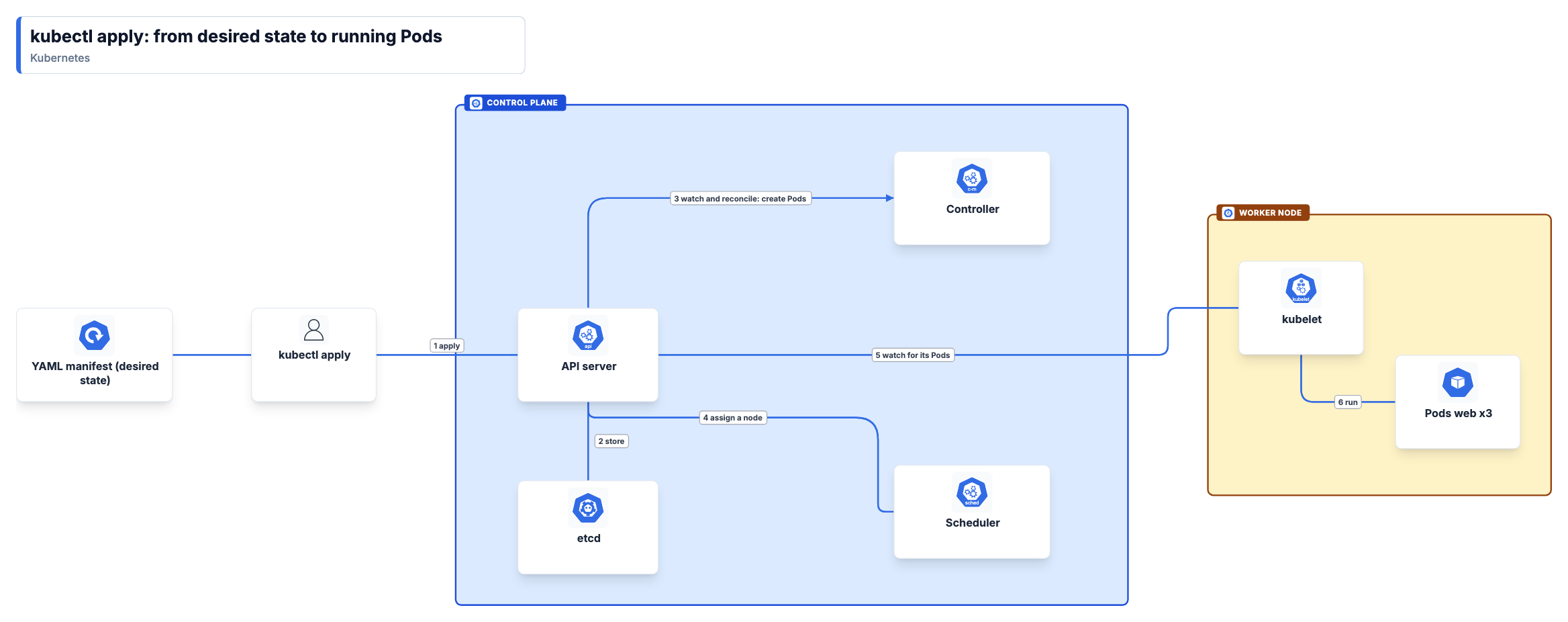 D3kubectl apply, step by stepAt 1:48 · Copy and edit in archhy (opens in a new tab)
- Drawing the picture…
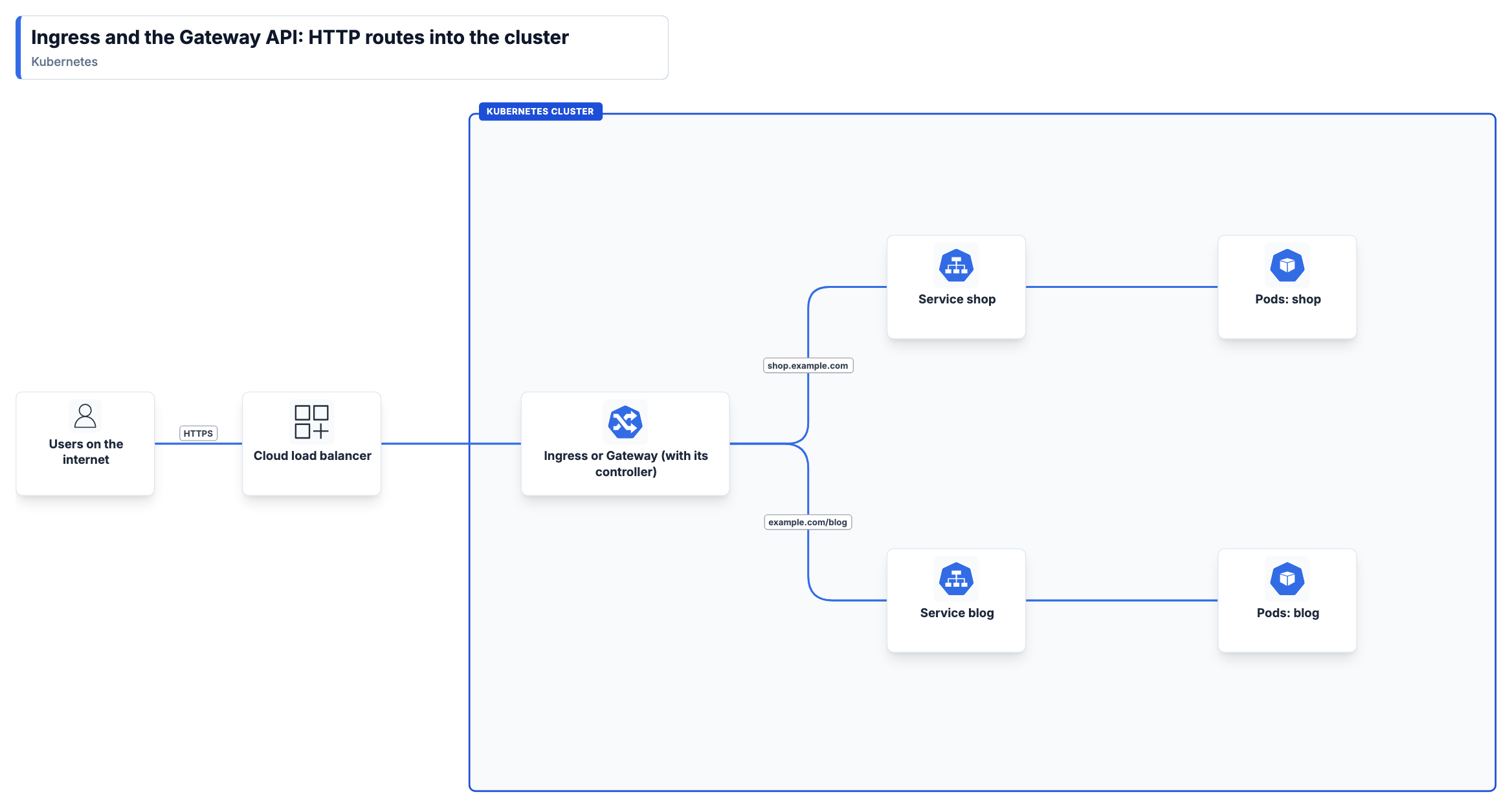 D4How traffic gets inAt 2:31 · Copy and edit in archhy (opens in a new tab)
After this lesson you can
- Name the parts of the control plane and what each one does
- Name the parts of a worker node and what each one does
- Follow kubectl apply from a YAML file to running Pods
- Draw a Kubernetes architecture diagram in archhy from its sample
Transcript
Kubernetes architecture in 5 minutes
Space Llama here, with Architecture Ideas. Kubernetes architecture, in five minutes. About the time it takes to drink your latte. One diagram, every part named, and then you draw your own.
Two halves
A Kubernetes cluster is a set of machines running your containers. It has two halves. The control plane decides. The worker nodes do the work. Your containers run inside Pods. A Pod is the smallest thing Kubernetes runs, one or more containers together. And one rule holds the whole thing together: everything talks through the API server.
The control plane
Start at the top, in the control plane. The API server is the front door. You, kubectl and every other part go through it. Behind it is etcd, a key-value store holding the whole state of the cluster. Only the API server talks to it. The scheduler picks a node for each new Pod. The controller manager runs control loops. Each one compares what you asked for with what's running, and fixes the difference. And the cloud controller manager talks to your cloud provider, for load balancers and nodes.
The worker nodes
Now the bottom half: two worker nodes. Each runs a kubelet, the node's agent. It asks the API server which Pods belong here, and keeps them running. The kubelet talks to the container runtime, such as containerd, through the CRI, the Container Runtime Interface. kube-proxy programs the node's networking, so traffic for a Service reaches the right Pods. And the Pods themselves. That's where your application lives. Need more capacity? Add another node.
kubectl apply, step by step
Let's watch it work. You run kubectl apply with a YAML file asking for three web Pods. One: the API server checks it. Two: it stores it in etcd. That's your desired state. Three: a controller notices, and creates three Pods. Four: the scheduler assigns each Pod a node. Five: the kubelet on that node sees its new Pods. Six: the runtime starts the containers. Nobody calls anybody directly. Each part watches the API server and does its one job. If a Pod dies, the controller sees two instead of three, and makes another one.
How traffic gets in
One more piece: how users reach your app. A Service gives a set of Pods one stable address, because Pods come and go. An Ingress, or the newer Gateway API, routes web traffic by host name or path to the right Service. Usually there's a cloud load balancer in front.
Draw it in archhy
Your turn. Open archhy. It's free, in your browser, no account needed to start. Choose File, New from sample, Kubernetes cluster. That's the diagram you just saw. Switch the palette to Kubernetes, for the official icons. Add an Ingress and a Service, and connect Ingress to Service to Pod. Then export a PNG for slides, an SVG for docs, or share a link. Drawing the cluster you're studying is one of the best ways to learn it.
Recap
Recap, before the latte goes cold. The control plane decides: the API server, etcd, the scheduler and the controllers. The worker nodes run Pods, with a kubelet, kube-proxy and a container runtime. And everything goes through the API server.
Practice and what's next
Open this diagram in archhy from the link in the description, and make it yours. Want the full story? Kubernetes Fundamentals is free on Gazeek. Then try it for real in a Gazeek lab, on a cluster built just for you.
Hands-on labs
Now try it on a real cluster
A real Kubernetes cluster in your browser for every lab, checked as you go.
See the labsDraw it in archhy
Open this episode's diagram in archhy, ready to change for your own system. Free, in the browser.