How OAuth 2.0 works, every flow drawn out
How an app gets a limited access token without ever seeing your password, through each OAuth 2.0 flow and when to use it.






Diagrams in this video · 5Free in archhy
The diagrams, full size
Copy any of them into archhy, free, and change it for your own system.
- Drawing the picture…
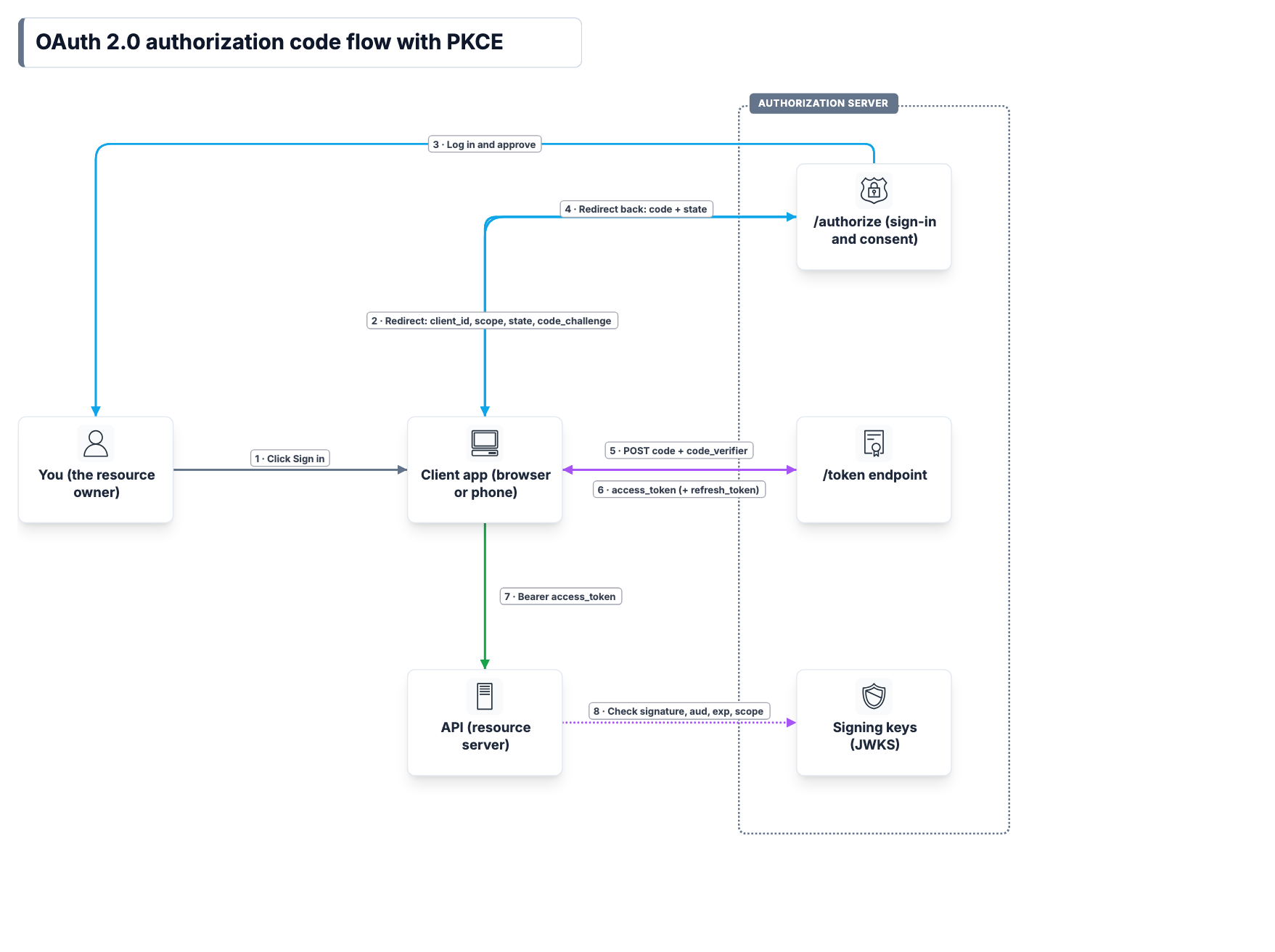 D1Four parties, every timeAt 0:11 · Copy and edit in archhy (opens in a new tab)
- Drawing the picture…
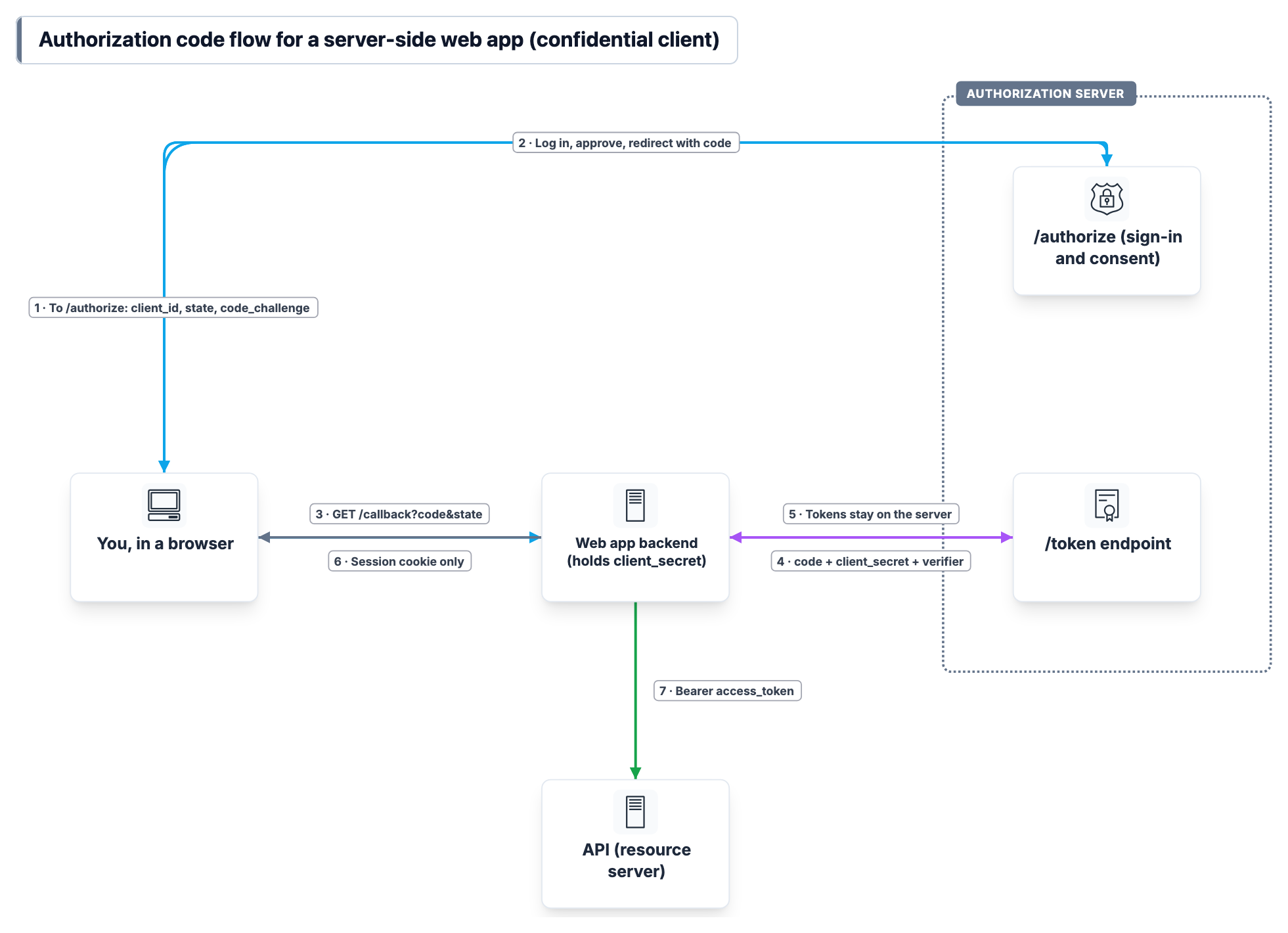 D2A web app with a backendAt 1:57 · Copy and edit in archhy (opens in a new tab)
- Drawing the picture…
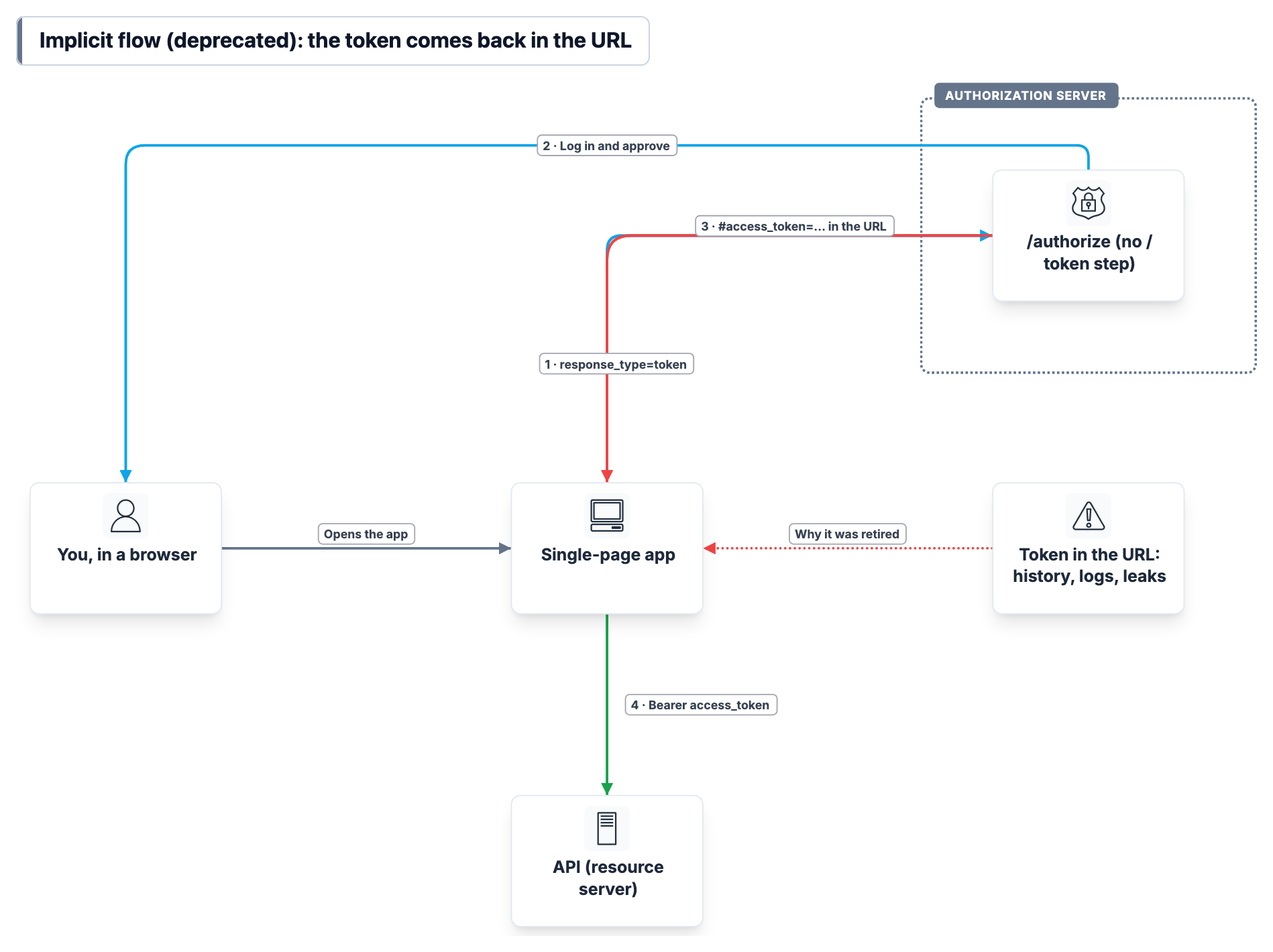 D3The implicit flow, retiredAt 2:15 · Copy and edit in archhy (opens in a new tab)
- Drawing the picture…
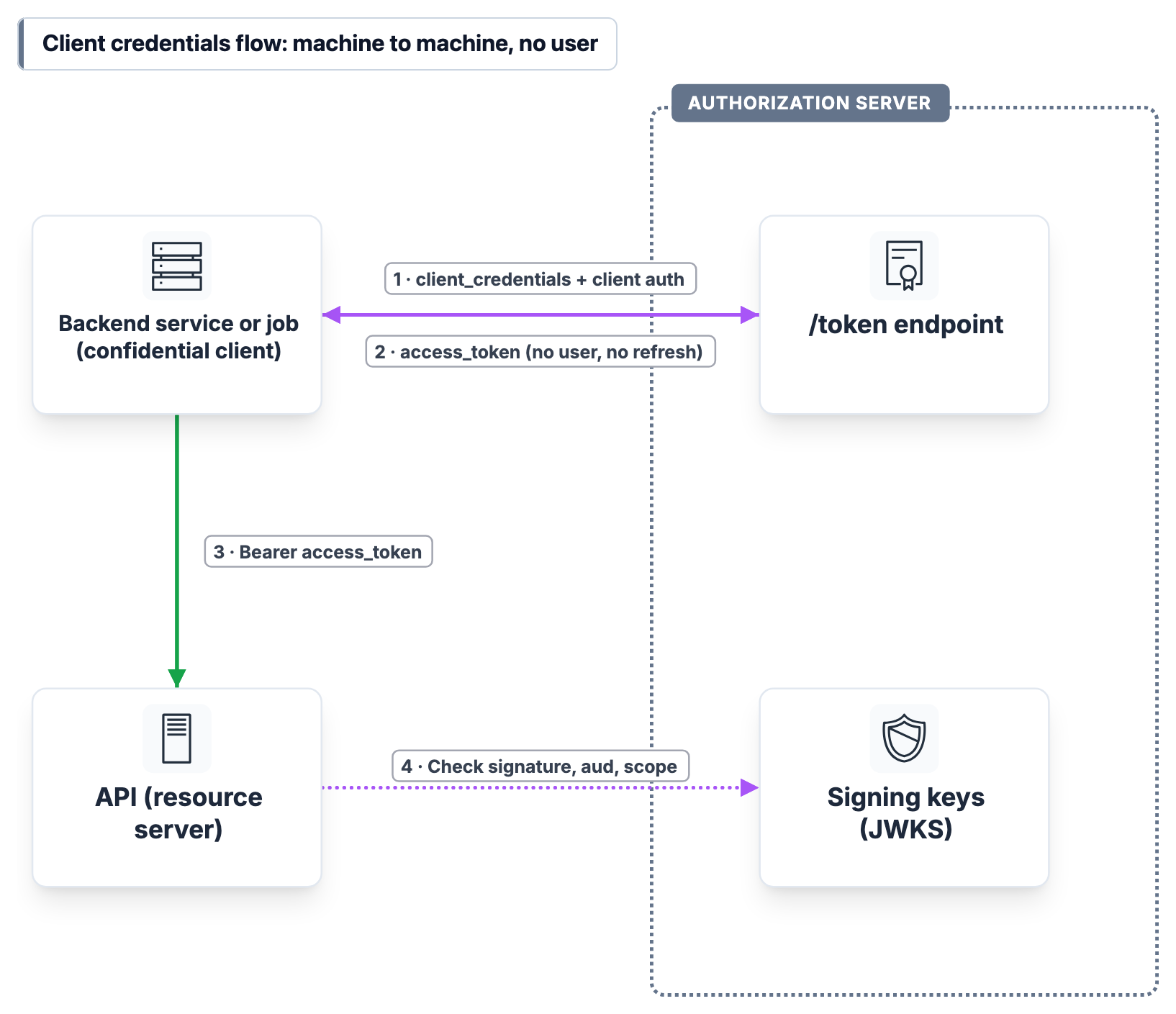 D4Client credentials, no user at allAt 2:39 · Copy and edit in archhy (opens in a new tab)
- Drawing the picture…
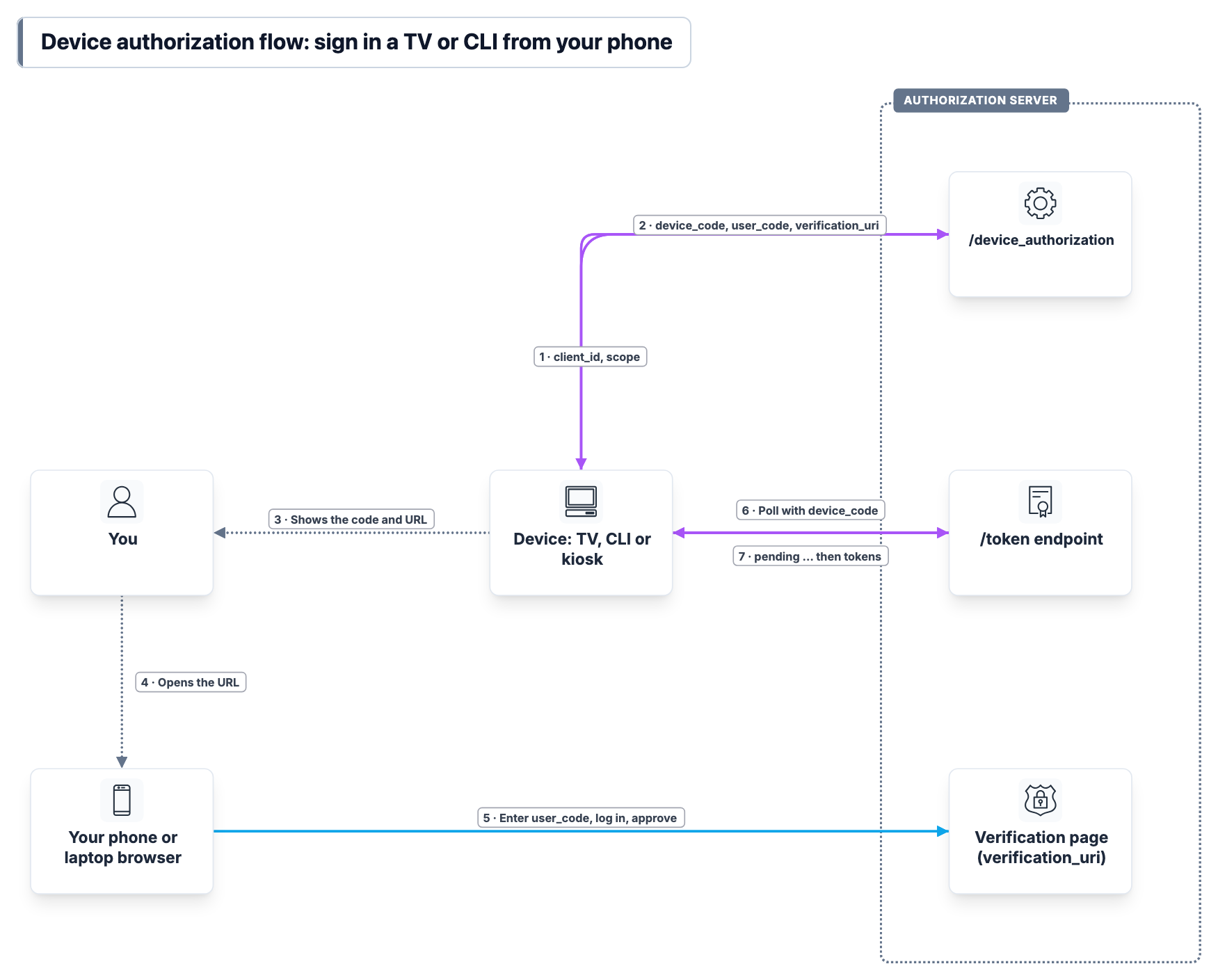 D5The device flow, for TVs and command linesAt 2:59 · Copy and edit in archhy (opens in a new tab)
After this lesson you can
- Name the four parties in every OAuth flow
- Walk the authorization code flow with PKCE step by step
- Tell confidential and public clients apart
- Pick the right flow for a web app, a service or a TV
Transcript
How OAuth 2.0 works, every flow drawn out
Space Llama here, with Architecture Ideas: one design at a time. Today, OAuth 2.0. How an app acts for you without ever seeing your password.
Four parties, every time
Every OAuth flow has the same four parties. You own the data. The client is the app that wants to use it. The authorization server signs you in, asks your consent, and issues tokens. The resource server is the API that holds your data and accepts those tokens. Blue arrows go through your browser. Purple arrows go server to server. Green is the call to the API.
Authorization code with PKCE
This is the flow to reach for first. One. You click Sign in. The app makes a random secret, the code verifier, and keeps its hash. Two. The app sends your browser to the authorize endpoint, with its client ID, the scopes it wants, and that hash. Three. You log in at the authorization server, not in the app, and approve. Four. Your browser comes back to the app with a one-time code. Five and six. The app posts the code and the original verifier to the token endpoint, and gets an access token. Seven. It calls the API with that token. Eight. The API checks the token's signature and its scopes.
Why PKCE matters
The code passes through your browser, so someone could intercept it. But only the app that started the flow holds the verifier. Without it, the code is worthless. That's why current best practice requires PKCE for public clients, and recommends it for every client.
With a secret, or without
Every client has a client ID. That's an identifier, not a secret. A confidential client runs on a server you control, so it can also hold a secret. A public client ships to the user's device, where anything can be unpacked. So it uses PKCE instead.
A web app with a backend
Here's the confidential version. Your browser goes to authorize and comes back to the web app's callback with a code. The backend swaps the code using its client secret, and the tokens never leave the server. Your browser only ever holds a session cookie.
The implicit flow, retired
Older single-page apps used a shortcut called the implicit flow. The token came straight back in the URL. Browser history, logs and referrer headers could leak it. There was no back-channel step for PKCE or a secret to protect. Best practice now says don't use it, and OAuth 2.1 drops it. Use the code flow with PKCE.
Client credentials, no user at all
When one service calls another on its own behalf, there's nobody to log in. The service proves who it is at the token endpoint, ideally with a signed key, and gets a token. No redirect, no consent screen, and usually no refresh token. It simply asks again.
The device flow, for TVs and command lines
A smart TV or a terminal has no comfortable browser, so the login moves to your phone. The device shows a short code and a web address. You open it on your phone, enter the code and approve. Meanwhile the device keeps polling the token endpoint, until the answer is yes.
Two more rules
First, the password grant, where an app collects your username and password. Best practice says it must not be used. Second, keep access tokens short-lived. A refresh token gets a new one without another login. Refresh tokens live longer, so for public clients they must be rotated, or bound to a key the app holds.
Which flow should I use?
So which flow? Any app with a user: the authorization code flow with PKCE. Add a secret when it runs on your server. Service to service: client credentials. A TV or a command line: the device flow. And to sign people in, add OpenID Connect on top. That's our next episode.
Recap
Recap. Four parties: you, the client, the authorization server, and the API. Any app with a user uses the code flow with PKCE. The client ID is never a secret. Implicit and the password grant are retired. Client credentials and the device flow cover the rest.
Your turn in archhy
Every diagram in this video opens in archhy, from the links in the description. Swap in your own provider. Read the full article on archhy's blog. Next episode, OpenID Connect: how an app learns who you are. See you there.
Draw it in archhy
Open this episode's diagram in archhy, ready to change for your own system. Free, in the browser.