Retrieval-augmented generation with Amazon Bedrock
How Amazon Bedrock Knowledge Bases index your documents in S3 and answer questions from them, and the permission, freshness and quality decisions that matter more than the diagram.





Diagrams in this video · 1Free in archhy
The diagrams, full size
Copy any of them into archhy, free, and change it for your own system.
After this lesson you can
- Describe the indexing and answering flows of a RAG design on AWS
- Explain what the knowledge base, embedding model, vector index and generation model each do
- Identify the permission, freshness and quality decisions a RAG system needs
- Open the diagram in archhy and adapt it to your own documents
Transcript
Retrieval-augmented generation with Amazon Bedrock
Space Llama here, with Architecture Ideas. Today, retrieval-augmented generation, or RAG, on AWS, with Amazon Bedrock Knowledge Bases. We'll walk the diagram, then the decisions that matter more than the boxes, then hand it to you.
Answers from your own documents
Staff want to ask, what did we agree with this supplier? And get an answer with its source. A general model can't know your documents. Fine-tuning one on them is slow, costly, and goes stale. RAG fetches the relevant passages when the question is asked, and hands them to the model with the question. Amazon Bedrock, AWS's foundation model service, manages most of this in Knowledge Bases.
RAG with a Bedrock knowledge base
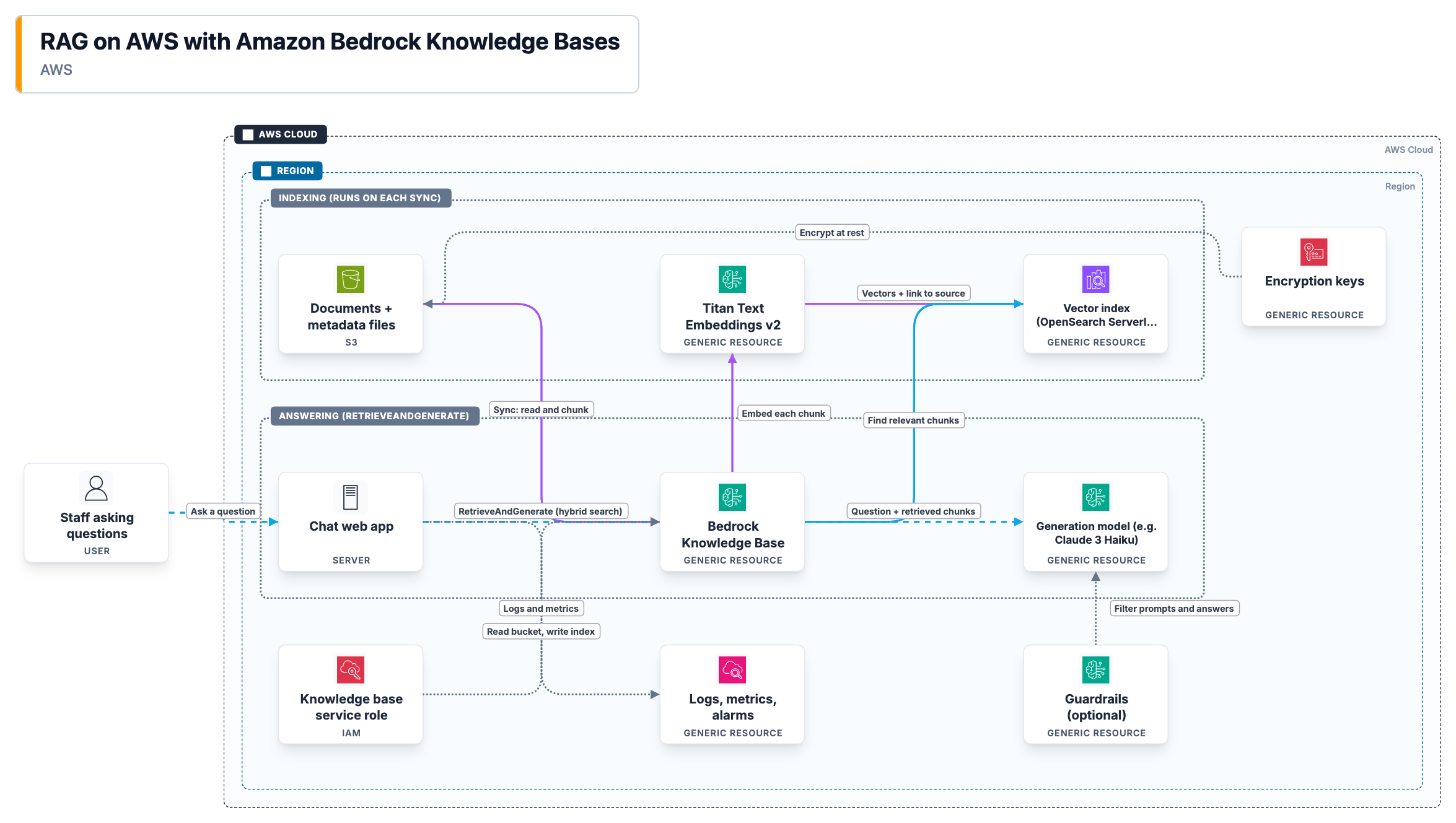
Here's the design. Two lanes in one Region: indexing, and answering. Indexing runs on each sync. Documents sit in Amazon S3, the object store, with optional metadata files. The knowledge base splits them into chunks. An embedding model, Amazon Titan Text Embeddings v2 in the AWS example, turns each chunk into a vector. Vectors go into a vector index, here Amazon OpenSearch Serverless, with a link back to their source. Now answering. Someone asks your chat app a question. The app calls RetrieveAndGenerate, here with hybrid search: meaning-based plus keyword matching. The knowledge base finds the closest chunks and sends them, with the question, to a generation model, here Claude 3 Haiku. Around it sit an IAM service role, encryption keys in AWS KMS, and Amazon CloudWatch for logs and alarms. Optionally, Amazon Bedrock Guardrails filter what goes into and comes out of the model.
Decisions that matter more
The diagram is the easy part. Permissions. The knowledge base doesn't know your users' permissions. Use separate knowledge bases, or metadata filters chosen per user. Freshness. The index only changes when you sync. Show when it last synced. Chunking. Long policies and short tickets want different chunk sizes. Test with real questions. Quality. Keep questions with known answers, and rerun them after every change. And when retrieval finds nothing, I couldn't find that beats a confident guess. Even from a llama.
Draw it in archhy
Your turn. The link in the description opens this exact diagram in archhy. It's free, in your browser. Swap the vector store or the model for yours, or add a boundary per team. Then export a PNG, or share a link. The full write-up, with cost notes and when not to use RAG, is on archhy's blog.
Recap
Recap. Two flows share one knowledge base: indexing on each sync, and answering on each question. Metadata files let you filter what's retrieved. The knowledge base doesn't know your users' permissions, so scope retrieval yourself. And plan evaluation and guardrails from the start. They're not extras.
Practice and what's next
Open this diagram in archhy from the link in the description, and make it yours. Read the full article on archhy's blog. More episodes are on the way. See you in the next one. More videos on the channel. Alpaca Mango. I'll be there. I'm always there. Mate.
Draw it in archhy
Open this episode's diagram in archhy, ready to change for your own system. Free, in the browser.