Sidecar containers
A native sidecar is an init container with restartPolicy Always that starts before the app and stops after it; its life in the Pod, git-sync beside nginx in YAML, the Docker Compose equivalent, and when not to use one.





Now try it on a real cluster
The videos are free. Gazeek's hands-on labs give you a real Kubernetes cluster in your browser for every lab, with checks that tell you when you've got it right: the practice the CKA and CKAD exams need.
The diagrams, full size
Copy any of them into archhy, free, and change it for your own system.
- Drawing the picture…
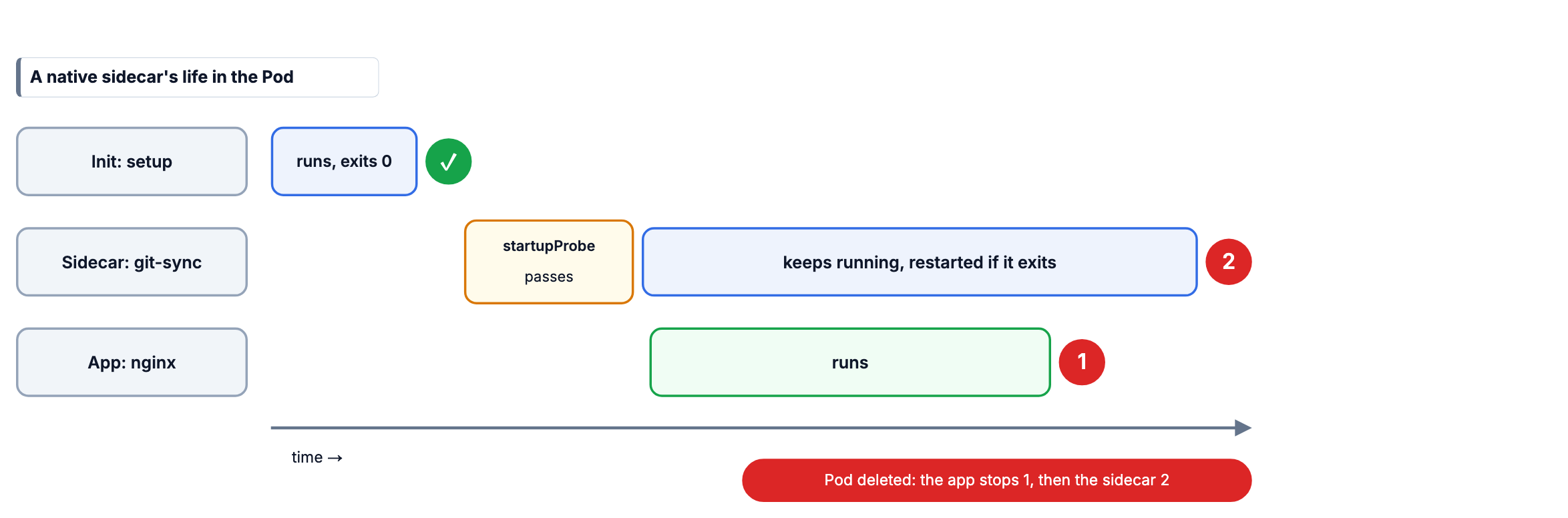 D1A native sidecar's lifeAt 0:53 · Copy and edit in archhy (opens in a new tab)
- Drawing the picture…
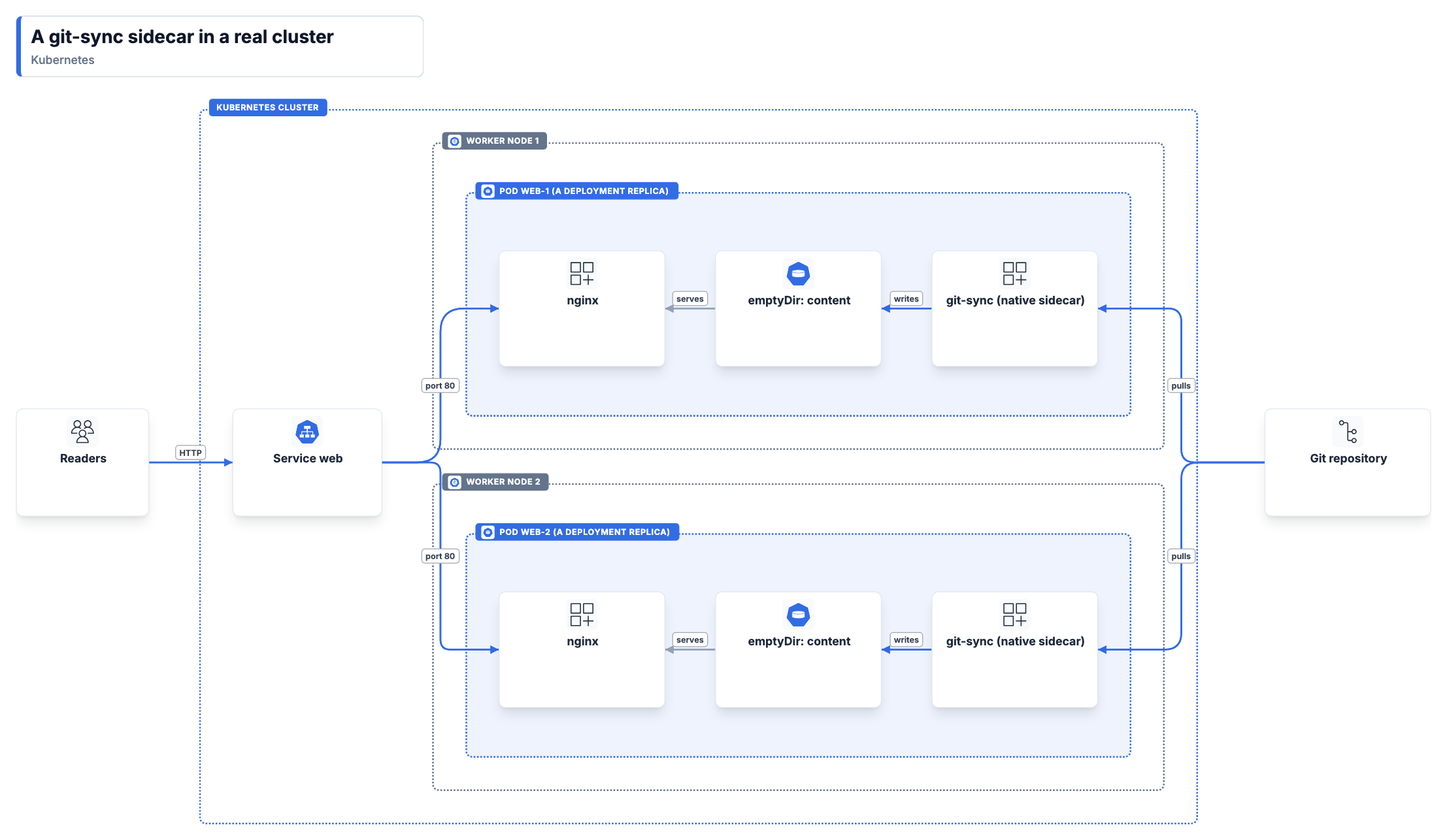 D2git-sync and nginx, in YAMLAt 1:34 · Copy and edit in archhy (opens in a new tab)
- Drawing the picture…
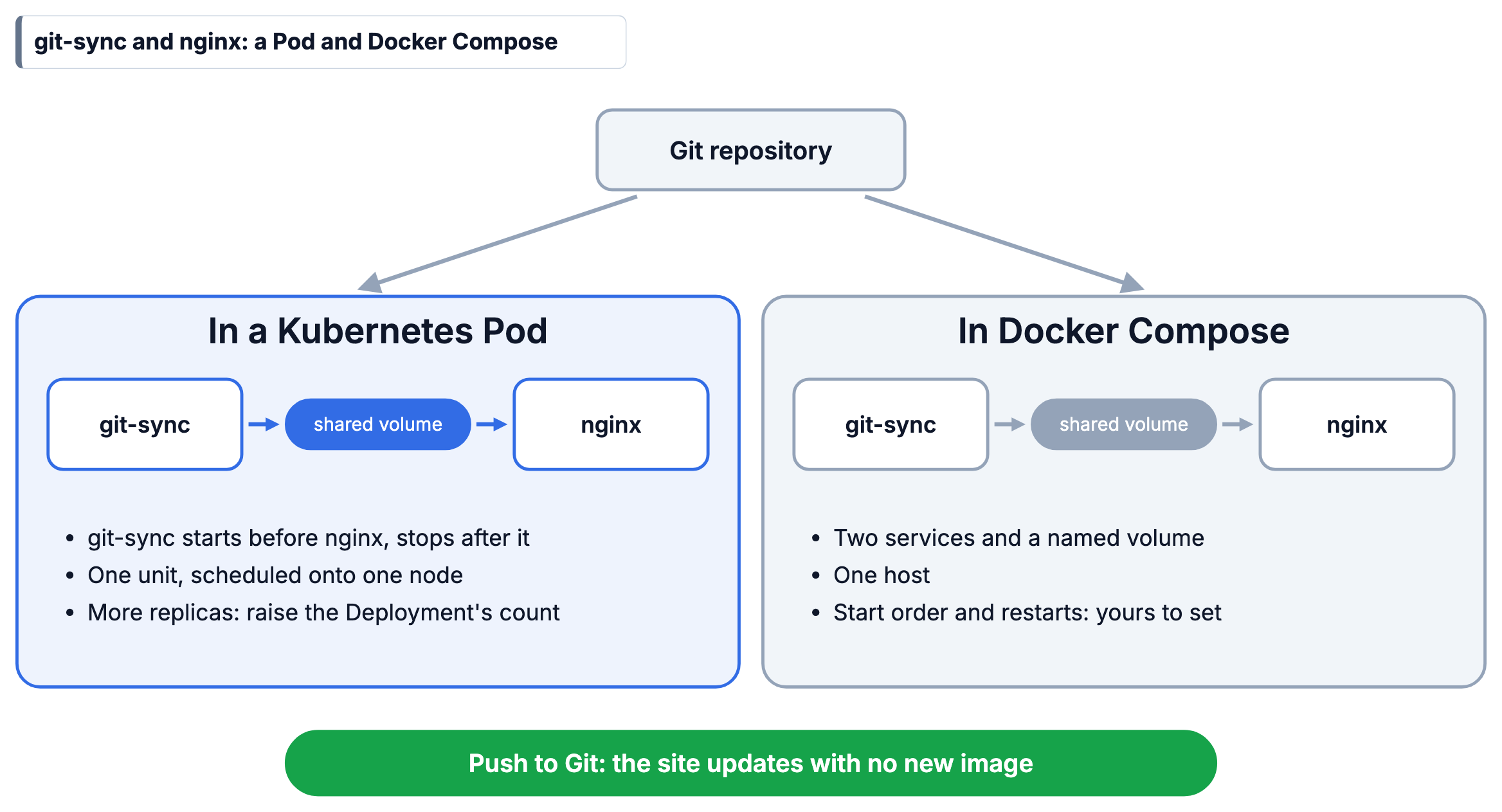 D3A Pod, or Docker ComposeAt 3:04 · Copy and edit in archhy (opens in a new tab)
After this lesson you can
- Explain what a sidecar is for and how a native sidecar is declared
- Describe a native sidecar's start, run and shutdown order
- Describe a git-sync sidecar beside nginx sharing an emptyDir
- Choose when a sidecar is not the right tool
Transcript
Sidecar containers
Space Llama here. Every good pilot needs a co-pilot, and every busy app could use a sidecar. Today, native sidecars: how they start first, stop last, and what they're for.
What a sidecar is
A sidecar is a helper container that runs alongside your app in the same Pod. The app does its work, and the sidecar adds something around it. Typical jobs: shipping logs, proxying traffic, refreshing config or certificates, and syncing files. It used to be just a second app container. Kubernetes couldn't tell helper from app, so the sidecar could start late, stop early, or keep a Job running. A native sidecar fixes that. It's an init container with restart policy Always: on by default since Kubernetes 1.29, and stable since 1.33.
A native sidecar's life
Here's a native sidecar's life in the Pod: an init container, the git-sync sidecar, and the nginx app. Ordinary init containers still run first, and still run to completion. Then the sidecar starts, and Kubernetes doesn't wait for it to exit. Careful: starting first isn't being ready first. Only a startup probe makes the app wait. The app runs beside it. If the sidecar exits, the kubelet restarts it, whatever the Pod's own restart policy says. At shutdown, the order flips. The app stops first. Sidecars get their stop signal only after the last app container has stopped.
git-sync and nginx, in YAML
Now a real pair. Git-sync, a Kubernetes project, pulls a Git repository into a folder, waits, and repeats. Its README calls it a perfect sidecar. Here it runs in a Deployment with two replicas. Each Pod has its own git-sync, and its own copy of the content. In the Pod template, git-sync goes in the init containers list, with restart policy Always. Nginx goes in containers. Both mount one emptyDir volume at the same path, so the link git-sync keeps current is exactly nginx's web root. Push a change to Git, and within one sync period both Pods serve it. No new image, no rollout. And ready shows two of two.
The Pod template, line by line
Let's read that YAML. This is the Pod spec from inside the Deployment's template. Git-sync sits in the init containers list, not in containers. That's where every native sidecar goes. And here's the line that matters. Restart policy Always. Without it, this is a plain init container, and the Pod waits forever. The arguments say which repository to pull, where to put it, the link name, and how often to sync. Nginx, the app, goes under containers, exactly as it would without a sidecar. Both containers mount the same volume, at the same path. That shared folder is how they work together. And the volume is an emptyDir. It's created with the Pod, and it disappears with the Pod.
A Pod, or Docker Compose
Coming from Docker? Here's the same pair both ways. In Docker Compose, it's two services and a named volume on one host. Start order and restarts are yours to set. In a Pod, git-sync starts before nginx and stops after it. The pair is one unit on one node, and you scale by raising the replica count.
When not to use a sidecar
The Kubernetes blog calls a sidecar generally not the preferred approach, unless the use case justifies it. It adds complexity, resources and latency. One log file? Have the app write to standard out, and let the node's agent collect it. On Kubernetes 1.37, Pod certificates can replace a certificate refresher sidecar. And a mesh proxy in every Pod now has an alternative, in episode six.
For the CKAD
For the CKAD, the Certified Kubernetes Application Developer exam, a typical task is a sidecar that shares a volume with the app and follows its log. And the classic mistake: forget restart policy Always, and the Pod hangs at Init zero of one, forever.
Remember
Let's recap. A native sidecar is an init container with restart policy Always. It starts before the app, is restarted if it exits, and stops after the app. Started isn't ready, so use a startup probe if it matters. And it doesn't stop a Job from completing.
Practice and what's next
The full article, with the YAML and debugging tips, is on the Gazeek blog. Read more from the link below. Put a sidecar beside an app in the lab in Gazeek Labs, and try the practice questions. Next episode: the ambassador pattern, a proxy on localhost. See you there.
Hands-on labs
Now try it on a real cluster
Deploy a multi-container Pod: a real cluster built for you, checked as you go.
Open the lab
Gazeek Flash · free
Exam questions on your phone
Free questions on Application Design and Build: quick-fire batches and timed exams, on the web or Android.