Init containers
Init containers run one at a time, in order, and must finish before the app starts; how they behave, a wait-for-the-database Pod in YAML, when to use something else, and how to read a Pod stuck in Init.





Now try it on a real cluster
The videos are free. Gazeek's hands-on labs give you a real Kubernetes cluster in your browser for every lab, with checks that tell you when you've got it right: the practice the CKA and CKAD exams need.
The diagrams, full size
Copy any of them into archhy, free, and change it for your own system.
- Drawing the picture…
 D1Init containers, step by stepAt 0:40 · Copy and edit in archhy (opens in a new tab)
- Drawing the picture…
 D2The Pod, in a real clusterAt 1:25 · Copy and edit in archhy (opens in a new tab)
- Drawing the picture…
 D3Wait for the databaseAt 2:40 · Copy and edit in archhy (opens in a new tab)
After this lesson you can
- Explain how init containers run, in order and to completion
- Read the Init status of a starting Pod
- Describe a Pod that waits for its database before the app starts
- Choose a sidecar, a Job or no helper when an init container doesn't fit
Transcript
Init containers
Space Llama here. Some apps assume the world is ready the moment they start. The database answers. The config file exists. In a cluster, that's a bold assumption. Today, the init container: the helper that checks before your app starts.
What an init container is
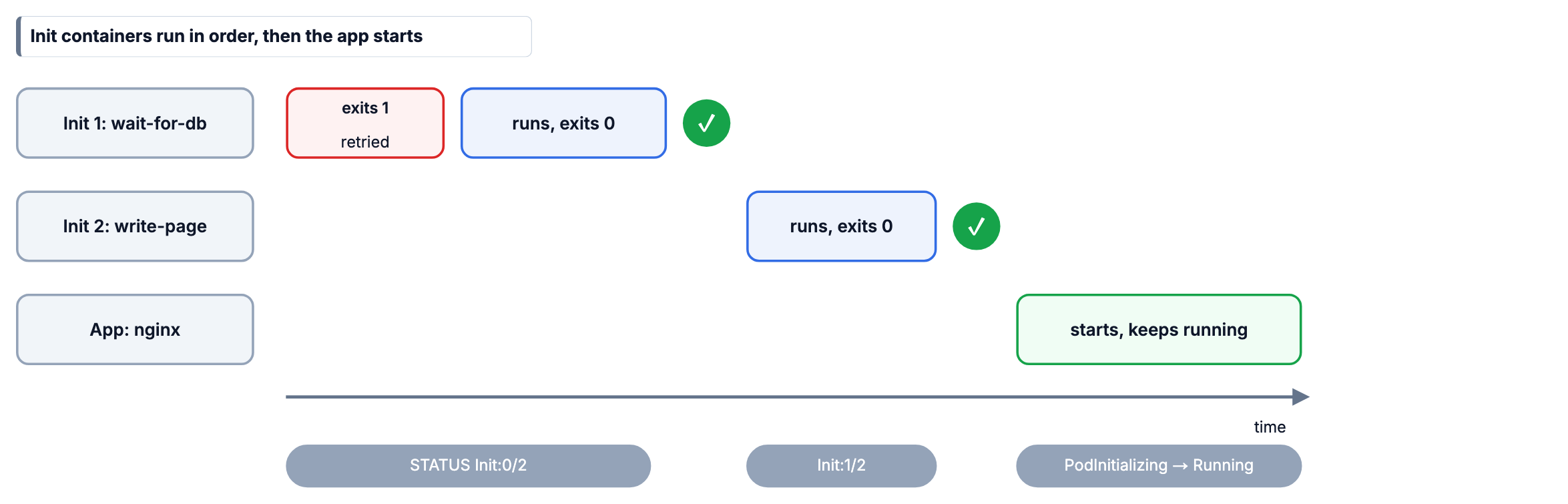
An init container runs, and finishes, before the app containers in a Pod start. They're listed under init containers in the Pod spec. They run one at a time, in order, and each must exit with status zero. Each can use its own image, with tools the app image doesn't have, and see Secrets the app can't. The app image stays small, with less to attack.
Init containers, step by step
Here's a timeline: two init containers, then the app, nginx. Time runs left to right, with the Pod's status underneath. Init one, wait-for-db, starts once the Pod's network and storage are ready. The database isn't there yet, so it fails. A failure is retried. It runs again until it exits with zero, and init two waits its turn. The status reads Init zero of two. Then init two, write-page, runs and exits. One at a time, in the order listed. Now the status is Init one of two. Only when every init container has exited zero does the app start. The status moves to Pod Initializing, then Running.
The Pod, in a real cluster
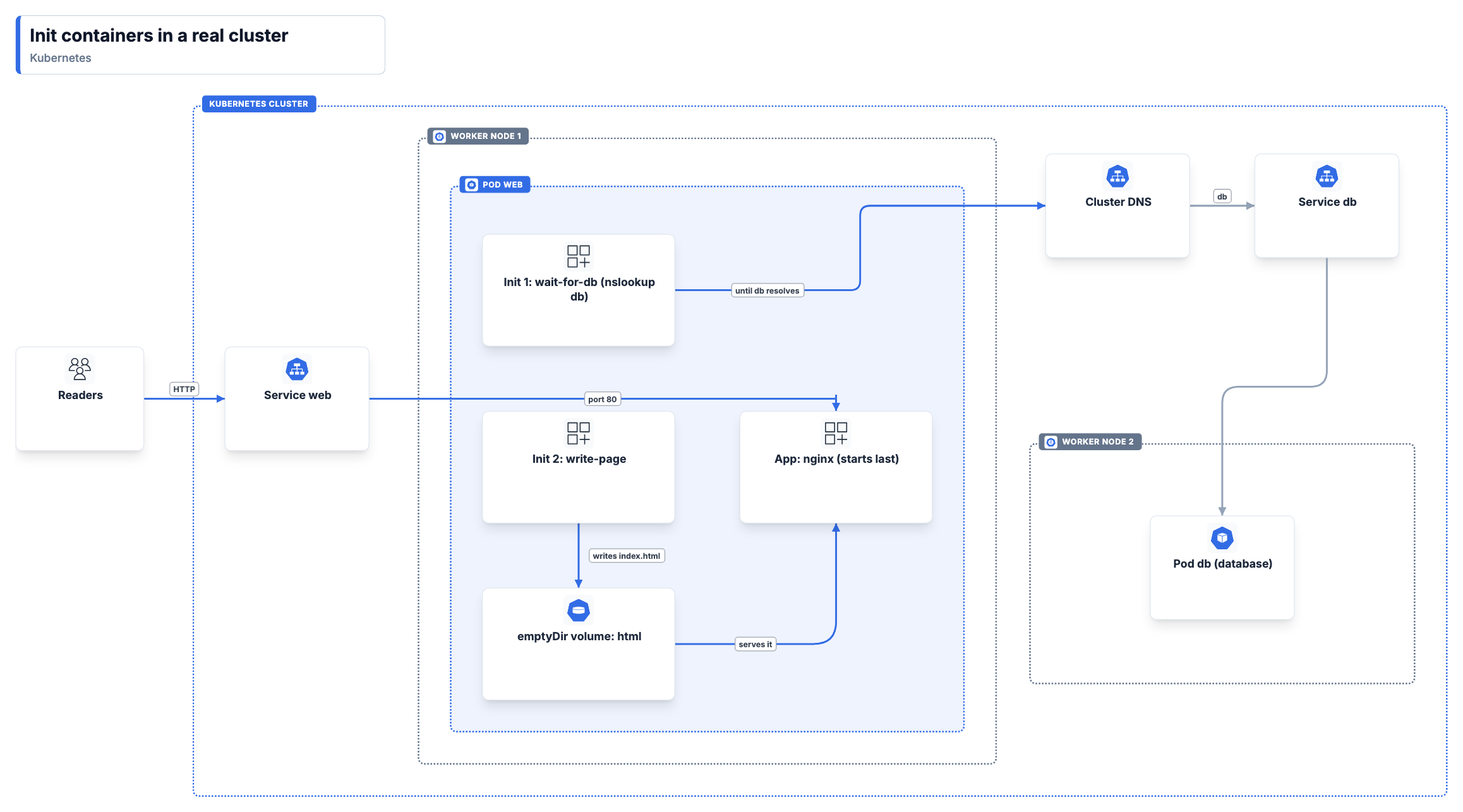
Here's that Pod in a real cluster. Two busybox init containers, and nginx as the app. Wait-for-db loops on nslookup until the cluster's Domain Name System resolves the Service called db. It never talks to the database Pod itself. Write-page leaves an index page in a shared volume, and nginx serves it once it starts. Every replica runs its own init containers, every time a Pod is created. So make them safe to repeat: idempotent, as the docs say.
The Pod, line by line
Now the YAML for that Pod. Init containers get their own list. The order you write them is the order they run. First, wait-for-db. Its command tries nslookup every two seconds, and exits with zero once the name resolves. Write-page is listed second, so it runs second. One command writes the index page, and it's done. It writes into a volume called html, mounted at slash work. Nginx, the app, goes under containers. It mounts the same volume as its web root, so it serves what the init container left behind. And the volume is an emptyDir. It's created with the Pod, and it's gone with the Pod.
Wait for the database
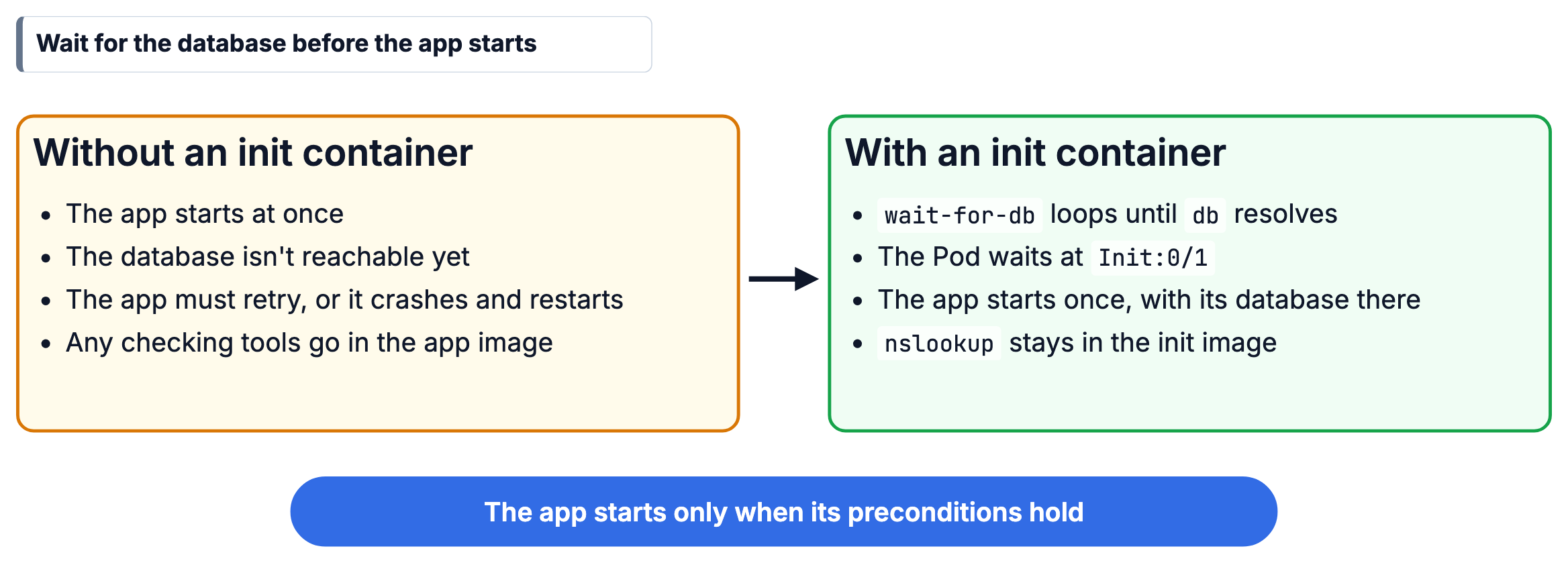
Here's why it matters. Without an init container, the app starts at once, and the database isn't reachable yet. So the app must retry, or it crashes and restarts. And any checking tools end up in the app image. With an init container, wait-for-db loops until the name resolves, and the Pod waits at Init zero of one. The app starts once, with its database there. And nslookup stays in the init image.
When not to use one
If the helper must keep running, it's a sidecar, not an init container. That's the next episode. If a task should run once per release, like a schema migration, remember every replica runs it. A Job or a Helm hook runs it once. And if the app already retries its database connection sensibly, a wait loop in front adds little. One new option: since Kubernetes 1.35, an init container can set its own restart policy to Never, and fail the Pod at once instead of retrying.
For the CKAD and CKA
For the CKAD, the Certified Kubernetes Application Developer exam, expect to add an init container that waits for a Service or prepares a file. For the CKA, the Certified Kubernetes Administrator exam, a Pod stuck in Init is a troubleshooting task. Describe the Pod, then read the init container's logs.
Remember
Let's recap. Init containers run one at a time, in order, and each must exit with zero. The app starts only when they've all succeeded. And every new Pod runs them again, so make them safe to repeat.
Practice and what's next
The full article, with debugging tips, is on the Gazeek blog. Read more from the link below. Watch a Pod start step by step in the lab in Gazeek Labs, and try the practice questions. Next episode: sidecar containers, the helpers that start first and stop last. See you there.
Hands-on labs
Now try it on a real cluster
Init containers and sidecars: a real cluster built for you, checked as you go.
Open the lab
Gazeek Flash · free
Exam questions on your phone
Free questions on Application Design and Build: quick-fire batches and timed exams, on the web or Android.