Multi-container Pod patterns
Four ways to run a helper beside your app in one Pod, init container, sidecar, ambassador and adapter, why they work, a concrete pair in YAML, and when one container is still the right answer.





Now try it on a real cluster
The videos are free. Gazeek's hands-on labs give you a real Kubernetes cluster in your browser for every lab, with checks that tell you when you've got it right: the practice the CKA and CKAD exams need.
The diagrams, full size
Copy any of them into archhy, free, and change it for your own system.
After this lesson you can
- Name the four multi-container Pod patterns and where each helper sits
- Explain what containers in one Pod share
- Describe a Pod with an init container and a native sidecar
- Decide when one container per Pod is the better choice
Transcript
Multi-container Pod patterns
Space Llama here, and welcome to Kubernetes Sidecars. Six short episodes on the helpers that ride along beside your app. Today, the big picture: four ways to put a helper container in the same Pod as your app.
One app, many jobs
A real app needs more than its own code. Its logs must reach a log store, and its metrics must be in the format your monitoring reads. Build all that into the app image, and every team re-implements it, in every language. The answer is one job per container. A log shipper written once can sit beside a Java app, a Go app and a Python app. Brendan Burns, a Kubernetes co-founder, described these patterns in 2015. In 2016, he and David Oppenheimer wrote them up in a paper.
Four places for a helper
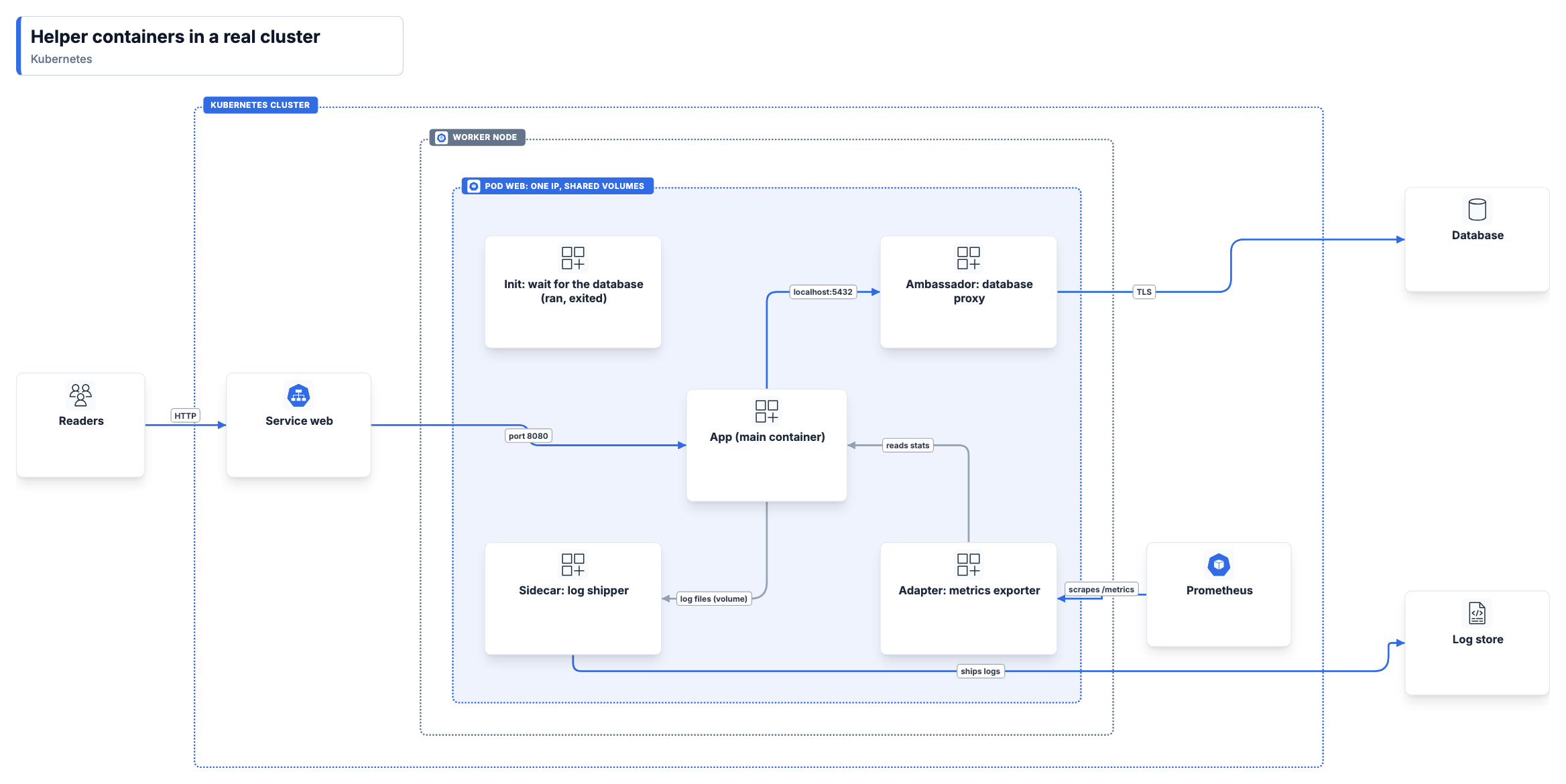
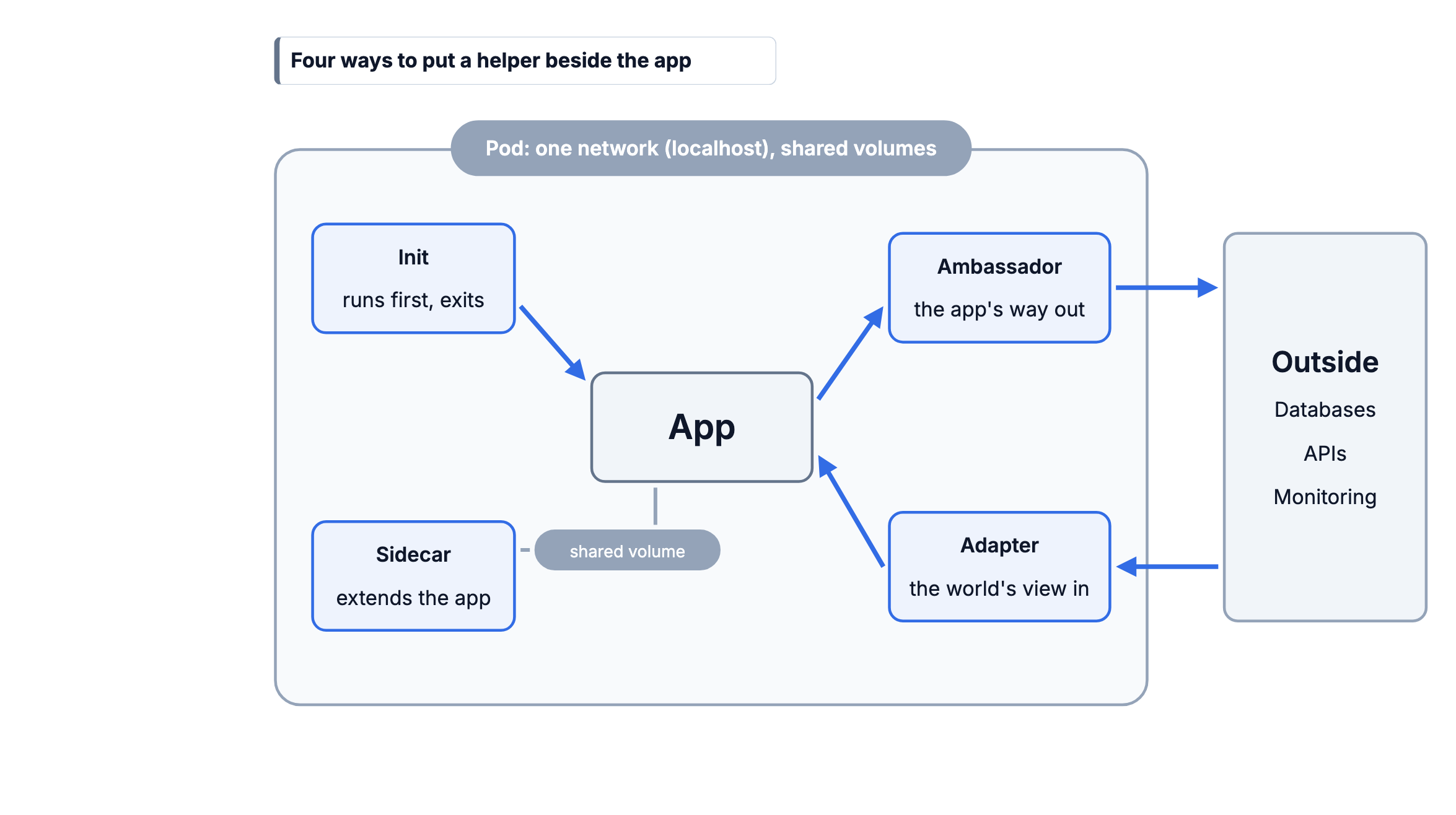
Here are all four, around one app. The big panel is the Pod. The Pod is what makes it work. Its containers share one network, so they reach each other on localhost, and they can mount the same volumes. First, the init container. It runs before the app, does its setup, and exits. The app doesn't start until it has succeeded. Next, the sidecar. It runs beside the app for the Pod's whole life, syncing files or shipping logs through a shared volume. The ambassador is the app's way out. The app talks to localhost, and the ambassador deals with the world: login, encryption or sharding. And the adapter is the world's view in. It turns what the app produces into the format other systems expect.
A concrete pair, in YAML
Now a concrete pair, in YAML. An nginx web server serves a website, and git-sync keeps its files current from a Git repository. Both helpers go in the init containers list. Kubernetes starts them in the order they're written. First, a small busybox container that loops until the database Service name resolves. It runs once, and it must exit with zero. Second, git-sync, with restart policy set to Always. That one field makes it a native sidecar, not a run-once step. Its arguments name the repository, the folder to fill, and how often to sync. Nginx, the app, goes in the ordinary containers list. Both mount the same emptyDir volume at the same path, so the files git-sync fetches are exactly where nginx looks. Apply it, and the status sits at Init zero of two until the database name resolves. Then ready shows two of two, because native sidecars count.
One real case for each
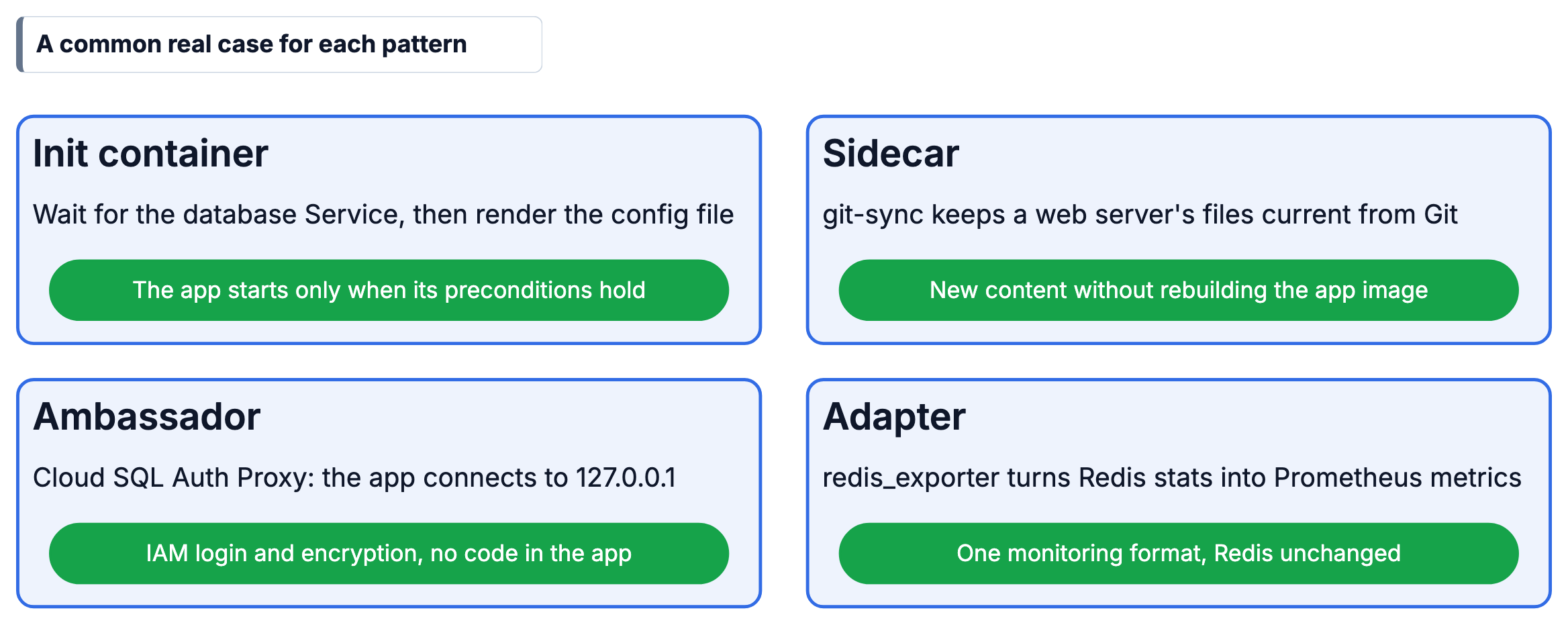
Here's one everyday case for each pattern, and what it buys you. Init container: wait for the database, then render the config file. The app starts only when its preconditions hold. Sidecar: git-sync keeps a web server's files current. New content, with no new app image. Ambassador: the Cloud SQL Auth Proxy. The app connects locally, and gets Identity and Access Management login and encryption, with no code. Adapter: the Redis exporter turns Redis stats into Prometheus metrics. One monitoring format, and Redis stays unchanged.
When not to use one
Before you add helpers everywhere: one container per Pod is still the most common case. Several containers belong together only when they're tightly coupled. And it's not how you scale: replicas are separate Pods. Every helper adds complexity, resources and latency. And containers in a Pod can't be upgraded atomically, so you test more combinations.
For the CKAD
For the CKAD, the Certified Kubernetes Application Developer exam, this sits in Application Design and Build, worth twenty percent. Expect to add an init container or a sidecar to a Pod, then check it with kubectl logs, dash c, and the container's name.
Remember
Let's recap. An init container runs first and exits. A sidecar runs beside the app for the Pod's whole life. An ambassador is the app's way out, and an adapter is the world's view in. And one container per Pod is still the normal case.
Practice and what's next
The full article, with all the YAML, is on the Gazeek blog. Read more from the link below. Build a multi-container Pod yourself in the lab in Gazeek Labs, and test what you know with the practice questions. Next episode: init containers, step by step. See you there.
Hands-on labs
Now try it on a real cluster
Deploy a multi-container Pod: a real cluster built for you, checked as you go.
Open the lab
Gazeek Flash · free
Exam questions on your phone
Free questions on Application Design and Build: quick-fire batches and timed exams, on the web or Android.