The authorization code flow with PKCE, step by step
The OAuth 2.0 flow to reach for first, in eight steps on archhy's diagram, and why PKCE makes a stolen code useless.






Diagrams in this video · 1Free in archhy
The diagrams, full size
Copy any of them into archhy, free, and change it for your own system.
After this lesson you can
- Walk the authorization code flow with PKCE in eight steps
- Explain what state and the code verifier each protect against
- Describe how an API checks an access token
- Explain why PKCE is required for public clients
Transcript
The authorization code flow with PKCE, step by step
Space Llama here. Today, the one OAuth flow you'll use most: the authorization code flow with PKCE, the Proof Key for Code Exchange. Eight steps. Let's draw them out.
Eight steps
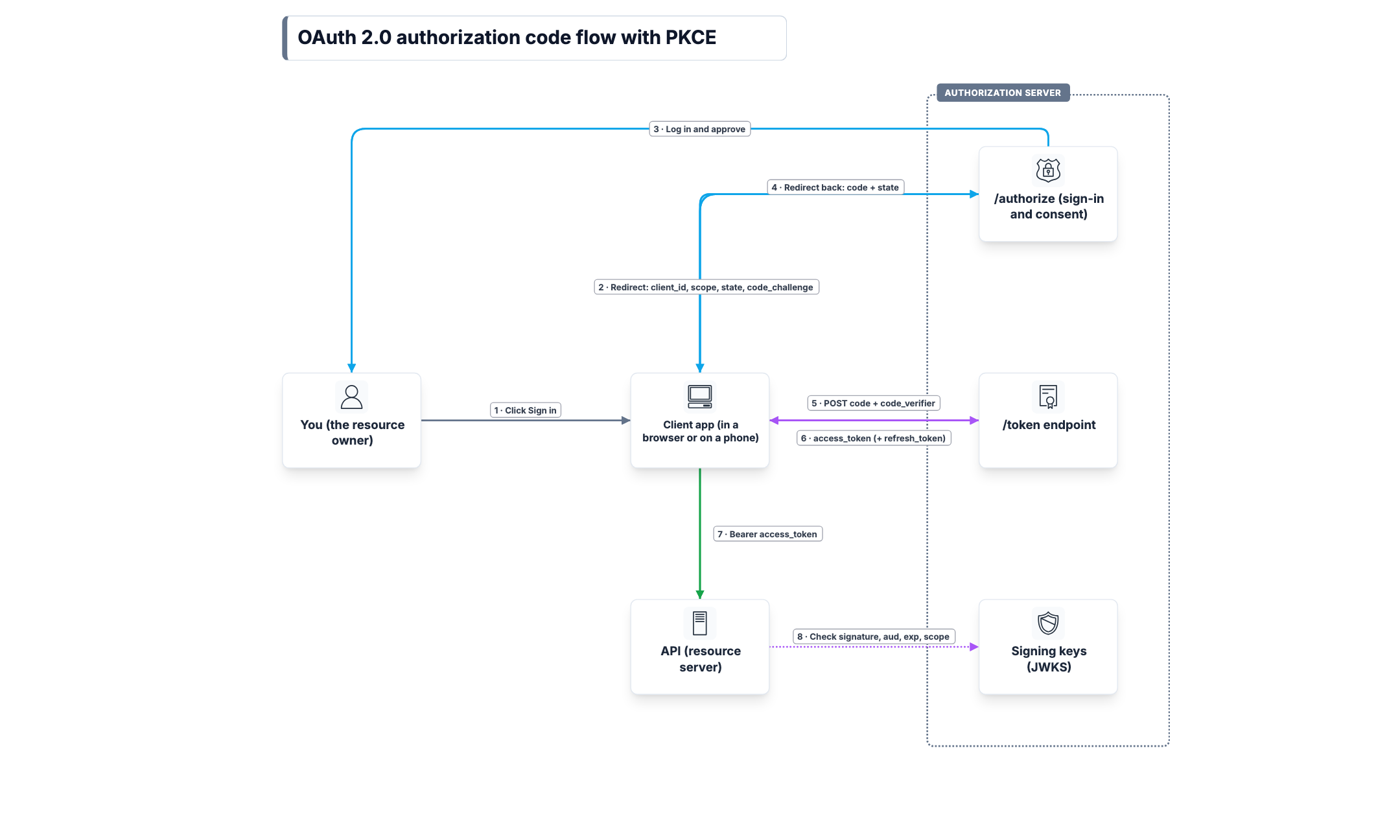
Here's the whole flow, with you, the app, the authorization server and the API. One. You click Sign in. The app makes a random secret, the code verifier, 43 to 128 characters long, and hashes it with SHA-256 into a code challenge. Two. The app redirects your browser to the server's authorize endpoint, with its client ID, the scopes it wants, a random state value, and the code challenge. Three. You log in at the authorization server, not in the app, and approve what the app asked for. Four. The server redirects back to the app's registered address with a one-time code, and the same state. The app checks that the state matches, which stops a forged callback. Five. The app posts the code, and the original code verifier, to the token endpoint, on the back channel. Six. The server hashes the verifier, checks it matches the challenge from step two, and returns an access token, and often a refresh token. Seven. The app calls the API, with the access token as a bearer token. Eight. The API checks the token: its signature, against the server's published keys, and its audience, expiry and scopes.
Why PKCE?
Why the extra secret? Look at step four. The code passes through the browser, so someone could intercept it. But the verifier never left the app. Only the app that started the flow can prove it, at the token endpoint. So a stolen code, without its verifier, is useless. That's why the current security best practice, RFC 9700, requires PKCE for public clients, and recommends it for every client.
Two values, two jobs
Two random values, doing two different jobs. State comes back with the code. If it doesn't match what the app sent, someone forged the callback. The code verifier is only ever sent to the token endpoint. It proves the app redeeming the code is the one that asked.
Not a secret
One last thing. The client ID is in every redirect address, so anyone can see it. It's an identifier, not a secret. Whether the app can also keep a real secret is next lesson's question.
Remember
Let's recap. The app hashes a secret verifier into a challenge, and sends you to log in at the server. A one-time code comes back with the state. The code and the verifier go to the token endpoint on the back channel. And the API checks every token's signature, audience, expiry and scopes.
Your turn in archhy
Open this flow in archhy and change it for your own system. The link is below, with archhy's full article. Next lesson: confidential and public clients, and why the implicit flow was retired. See you there.
Draw it in archhy
Open this lesson's diagram in archhy, ready to change for your own system. Free, in the browser.