What OAuth 2.0 is for, and the four parties
OAuth 2.0 is about what an app may do for you, without your password: the four parties, the front and back channels, and which flow to use.






Diagrams in this video · 1Free in archhy
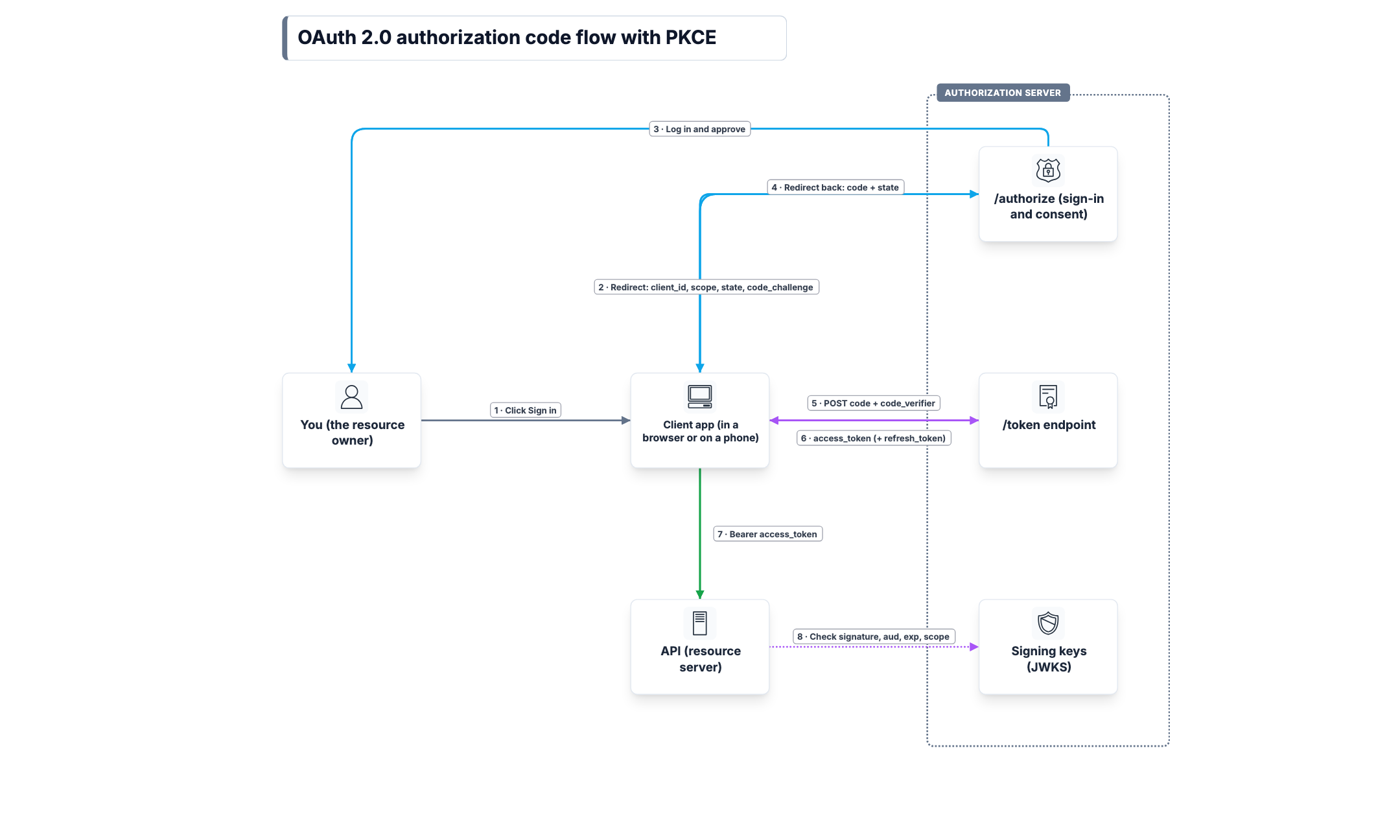
The diagrams, full size
Copy any of them into archhy, free, and change it for your own system.
After this lesson you can
- Tell authorization from authentication
- Name the four parties in every OAuth flow
- Tell the front channel from the back channel
- Know which flow to reach for first
Transcript
What OAuth 2.0 is for, and the four parties
Space Llama here, with Drawn Out: big ideas, drawn out one step at a time. This course is OAuth 2.0 and OpenID Connect. First: what OAuth is actually for, and who's involved.
Authorization, not authentication
OAuth 2.0 is about authorization. It decides what an app may do for you. Say a printing app wants your photos. With OAuth, it gets a limited token for that job, and it never sees your password. Who you are is a different question. That's authentication, and it's OpenID Connect's job. We'll get to it in lesson five.
Four parties, every time
Every OAuth flow has the same cast of four. The resource owner is you, the person whose data it is. The client is the app that wants access. It might run in a browser, or on a phone. The authorization server signs you in, asks your consent, and issues tokens. In real systems, that's often a product like Microsoft Entra ID, Okta, Auth0, Amazon Cognito or Keycloak. And the resource server is the API that holds your data, and accepts those tokens.
Two ways to travel
Messages in OAuth travel two ways. The front channel goes through your browser, as redirects. The address bar sees them. In archhy's diagrams, they're blue. The back channel is a direct, server to server HTTPS call that the browser never sees. Those are purple. Green is the app calling the API with its token. The rule of thumb: anything that could leak through a web address belongs on the back channel.
Which flow, for which app?
So which flow? For any app with a user, use the authorization code flow with PKCE, the Proof Key for Code Exchange. It works with or without a client secret. For a TV or a command-line tool, there's the device flow. For one service calling another, with no user at all, there's client credentials. And two old flows, implicit and the password grant, are retired. Don't build new apps on them. We'll see why in lesson three.
Remember
Let's recap. OAuth is authorization: what an app may do for you, without your password. Every flow has four parties: you, the client, the authorization server and the API. Keep anything that could leak on the back channel, and start with the authorization code flow with PKCE.
Your turn in archhy
Open this diagram in archhy and change it for your own system. The link is below, with archhy's full article. Next lesson: the authorization code flow with PKCE, step by step. See you there.
Draw it in archhy
Open this lesson's diagram in archhy, ready to change for your own system. Free, in the browser.