What is LangChain?
What LangChain is for: one interface over models, tools and data sources, and create_agent, a small configurable agent loop built on LangGraph. A first agent in a few lines of Python, where the abstraction helps, where it hurts, and when you don't need it.





Diagrams in this video · 2Free in archhy
The diagrams, full size
Copy any of them into archhy, free, and change it for your own system.
After this lesson you can
- Say what an AI agent is, in one sentence
- Describe what LangChain gives you, and what create_agent does
- Read a minimal LangChain agent in Python
- Decide when LangChain's breadth is worth its abstraction
Transcript
What is LangChain?
Space Llama here. Everybody's building AI agents, and half of them start by installing LangChain. So what is it, what does it actually do for you, and when do you not need it? Let's find out.
First, what's an agent?
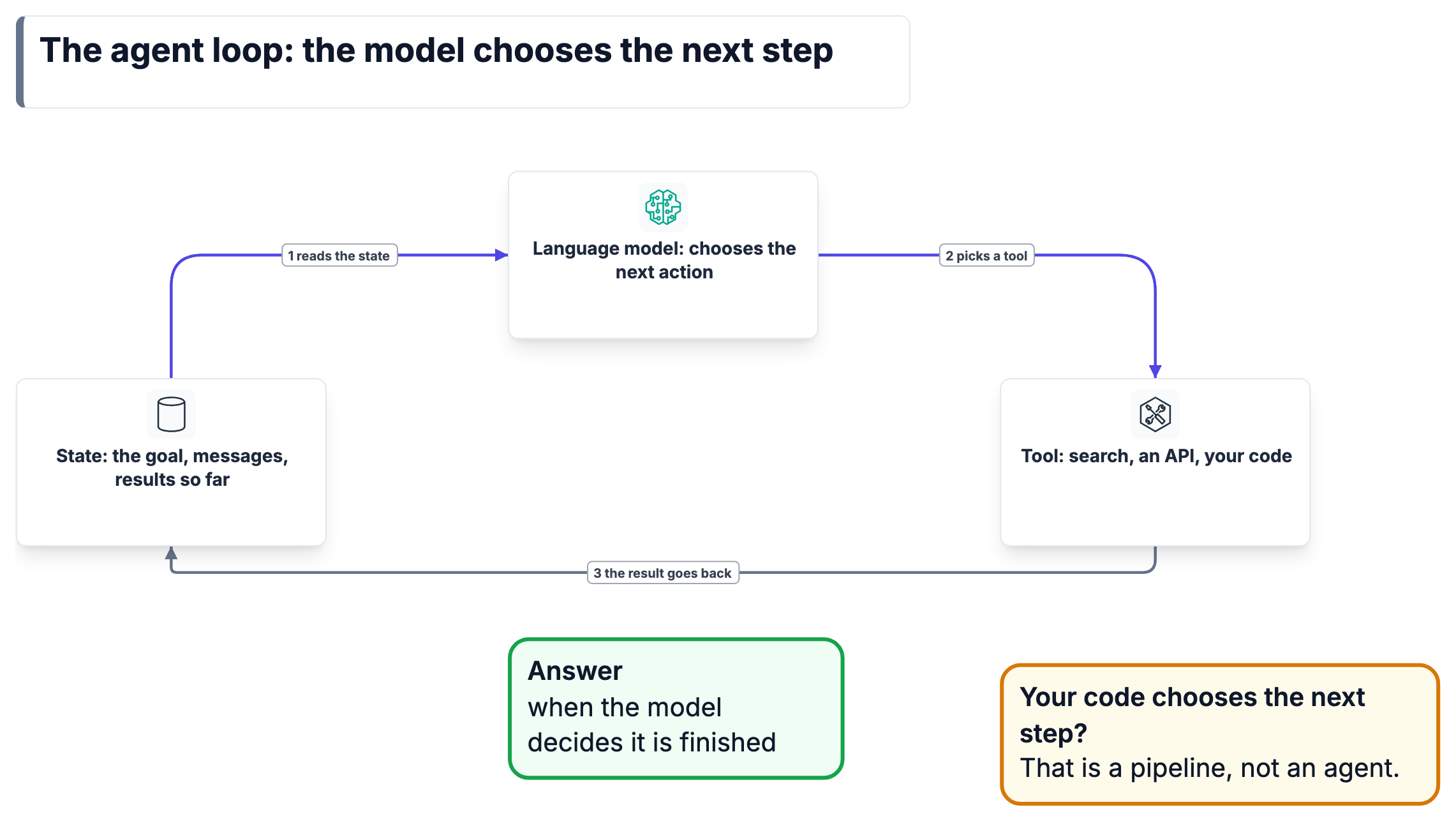
First, a working definition. An AI agent is a language model that chooses its own next action, in a loop, against a set of tools, in pursuit of a goal. The loop is always the same. The model reads the current state and picks a tool. The tool runs, and the result goes back into the state. Then the model decides whether to go again. The important word is chooses. If your code decides what happens next, and the model only fills in the text, that's a pipeline. And a pipeline is often the better engineering choice. Everything a framework adds is scaffolding around that loop. So for each framework, ask one question: what does it do to the loop?
What LangChain gives you
LangChain's value has always been breadth. It puts one common interface over many model providers, and over tools, retrievers, document loaders, vector stores and output parsers. When you need to talk to something, and you'd rather not write the client yourself, that breadth is the product. And because every model sits behind the same interface, you can switch providers with very little change to your code.
A first agent
Here's a whole agent, adapted from LangChain's own docs. Install LangChain, plus the package for one model provider. A tool is just a Python function. The docstring matters: it's how the model learns what the tool does. Then create agent. Give it a model, a list of tools and a system prompt, and that's an agent. The model is a single string: the provider, a colon, and the model name. Switching provider means changing that string and the package. Invoke it with a message. Behind the scenes, the loop runs: the model decides to call get weather, reads the result, and answers.
The harness around the model
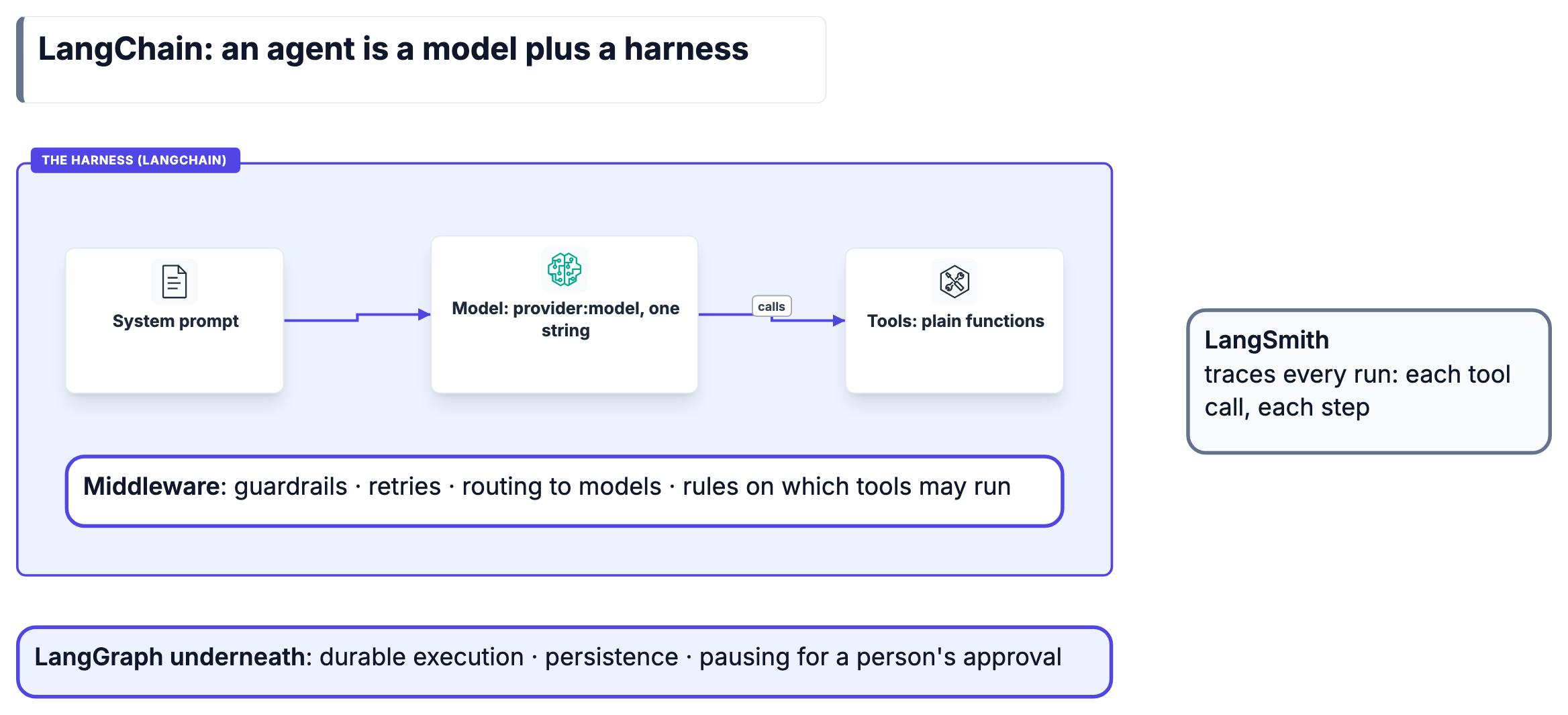
LangChain describes an agent as a model plus a harness. The harness is everything around the loop: the prompt, the tools, and middleware. Middleware is how you add behavior one piece at a time. Guardrails, retries, routing to different models, or rules about which tools may run. Under the hood, LangChain's agents are built on LangGraph. That's where durable execution, persistence and pausing for a human's approval come from. And LangSmith, from the same company, traces each run, so you can see every tool call and every step.
Where it helps, where it hurts
So where does it help? Breadth. A working agent in a few lines, and models you can swap. And the cost? The same thing, seen from the other side. Deep layers of abstraction. When a prompt goes wrong three layers down, it's hard to find. A fair criticism is that you end up reading the library's source to understand your own program. Tracing helps a lot here. But it's still worth knowing which layer you're standing on.
When you don't need it
If your control flow is genuinely linear, you need neither LangChain nor LangGraph. A few function calls will do. If you use one model provider and a couple of tools, calling the provider's own software development kit directly is often simpler to read and to debug. Where LangChain earns its keep is breadth: many models, many data sources, and integrations you'd rather not write yourself.
Remember
Let's recap. An agent is a model that chooses its own next step, in a loop, against real tools. LangChain gives you one interface over many integrations, and create agent gives you that loop in a few lines, built on LangGraph. Use it for breadth. And know which layer you're debugging when something goes wrong.
The full article, and what's next
The full article, LangChain versus LangGraph, is free on Alpaca Mango. The link is below. Next lesson: what is LangGraph? The part of the stack that decides the order things run in. See you there.
Read the article
LangChain vs LangGraph: what's the difference?: the whole idea in writing, free.
Read it ↗