Kubernetes RBAC that grants too much: red vs blue
Vinnie, on the red team, shows how one wildcard role and a mounted service account token turn a weak app into a key to the cluster's secrets; Space Llama, on the blue team, closes it with least privilege: tokens off where unused, a Role per namespace, named resources and verbs.










Diagrams in this video · 1Free in archhy
Now try it on a real cluster
The videos are free. Gazeek's hands-on labs give you a real Kubernetes cluster in your browser for every lab, with checks that tell you when you've got it right: the practice the CKA and CKAD exams need.
The diagrams, full size
Copy any of them into archhy, free, and change it for your own system.
After this lesson you can
- Explain how an over-broad role exposes Secrets
- Write a least-privilege Role and turn off unused tokens
- Check what a service account can do with kubectl auth can-i
Transcript
Kubernetes RBAC that grants too much: red vs blue
Space Llama here. Blue team. I defend the cluster. And I'm Vinnie. Red team. My nose finds the gap you forgot about. Today, permissions. Role-based access control, RBAC. My favourite. People hand out far too much of it.
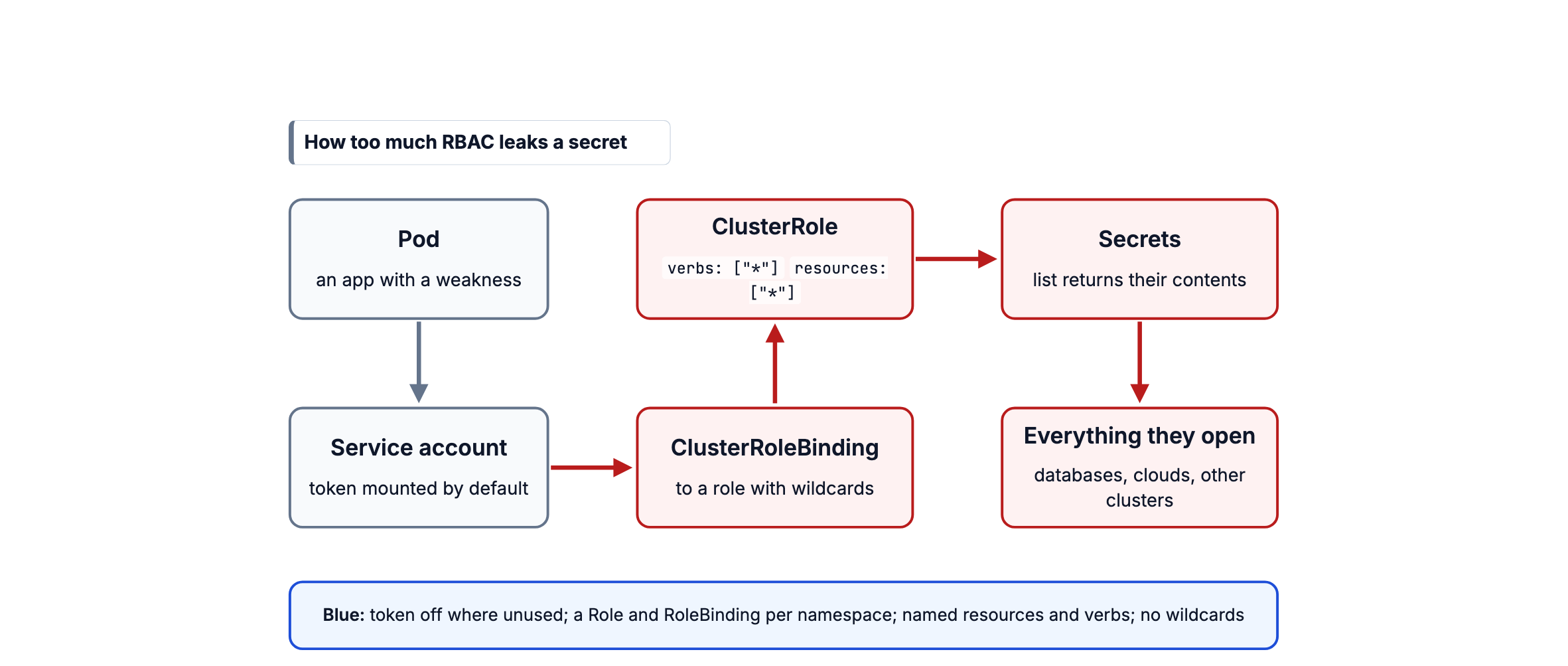
How too much RBAC leaks a secret
Here's how I see it, from the red side. One. Every Pod runs as a service account, and by default, a short-lived token for it is mounted inside the Pod. Two. Someone bound that account to a cluster-wide role with wildcards. Every verb, every resource, every namespace. Easier than working out what it needs. Three. That role can list Secrets. And listing Secrets returns what's inside them, not just their names. Four. So one weak app, in one Pod, holds the keys to everything those secrets open. Nobody broke in. They just used what we gave them. Exactly. Why pick a lock, when someone's handed you the key?
Blue closes it: the token
Blue's turn. First question. Does this app need to talk to the Kubernetes API at all? If it doesn't, turn the token off. Automount service account token, false. Here on the account, or on the Pod.
Blue closes it: least privilege
If it does, give it a Role, not a ClusterRole, so it only works in its own namespace. And name what it needs. Here, get one ConfigMap. No wildcards. No secrets. Then a RoleBinding gives that Role to the app's service account. Nothing else gets it.
Red asks, blue answers
Question for blue. Isn't that a lot of YAML, for every single app? It is. But a wildcard role is one line to write, and a very long weekend to clean up. Question for red. What do you sniff out first? Any ClusterRoleBinding to cluster-admin. And anyone with the escalate or bind verbs who can also create roles or bindings. Together, they let you hand yourself more.
Check your own cluster
Now check your own cluster. Ask what an account can really do. Kubectl auth can-i, with list, as that service account, in its own namespace. Look for ClusterRoleBindings to cluster-admin, and for roles with wildcards. And turn the token off wherever an app never calls the API.
Who won?
Round one to blue. If they actually do all that. We will. I'll be sniffing.
The full article, and what's next
Next time, privileged Pods. Vinnie tries to get out of his container. Try? See you there.
Hands-on labs
Now try it on a real cluster
A real Kubernetes cluster in your browser for every lab, checked as you go.
See the labs