An init container that prepares a web page
CKAD practice question 1, solved and explained: an init container writes a page that nginx serves. The fast way, the YAML line by line, the traps and the check.





Diagrams in this video · 1Free in archhy
Now try it on a real cluster
The videos are free. Gazeek's hands-on labs give you a real Kubernetes cluster in your browser for every lab, with checks that tell you when you've got it right: the practice the CKA and CKAD exams need.
The diagrams, full size
Copy any of them into archhy, free, and change it for your own system.
After this lesson you can
- Add an init container to a Pod from a dry-run skeleton
- Share a file between an init container and the app through an emptyDir volume
- Avoid the two traps that cost the marks on this task
- Check the answer the way the grader does
Transcript
An init container that prepares a web page
Space Llama here, with a practice task for the CKAD, the Certified Kubernetes Application Developer exam. It's an original task, written from the public curriculum. Not a real exam question: those are confidential.
The task
Here's the task. Create a Pod called init-demo, in the namespace apps. An init container, using busybox 1.36, writes the word hello into slash work, slash index dot html, on an emptyDir volume. The main container, nginx 1.27, mounts the same volume at slash user, slash share, slash nginx, slash html. Pause the video now and try it. The exam pace is about six minutes a task.
The fast way
Welcome back. Don't write the Pod from memory. If the namespace doesn't exist yet, create it. Then kubectl run, with dry run client and output YAML, writes the skeleton for you: the name, the namespace and the nginx container. kubectl run can't add an init container or a volume, so open the file and add those two by hand. Then apply it.
The YAML, line by line
Here's the finished Pod. The name and the namespace are what the grader looks for first. Init containers get their own list, beside containers, not inside it. The init container, setup, runs busybox. One shell command writes hello into the index page, and it exits with zero. It mounts the volume called html at slash work, so the file lands on the volume. Nginx mounts the same volume at its web root. Two different paths, one volume, so nginx serves what setup wrote. And the volume is an emptyDir. It's created empty with the Pod, and it's deleted with the Pod.
Why it works
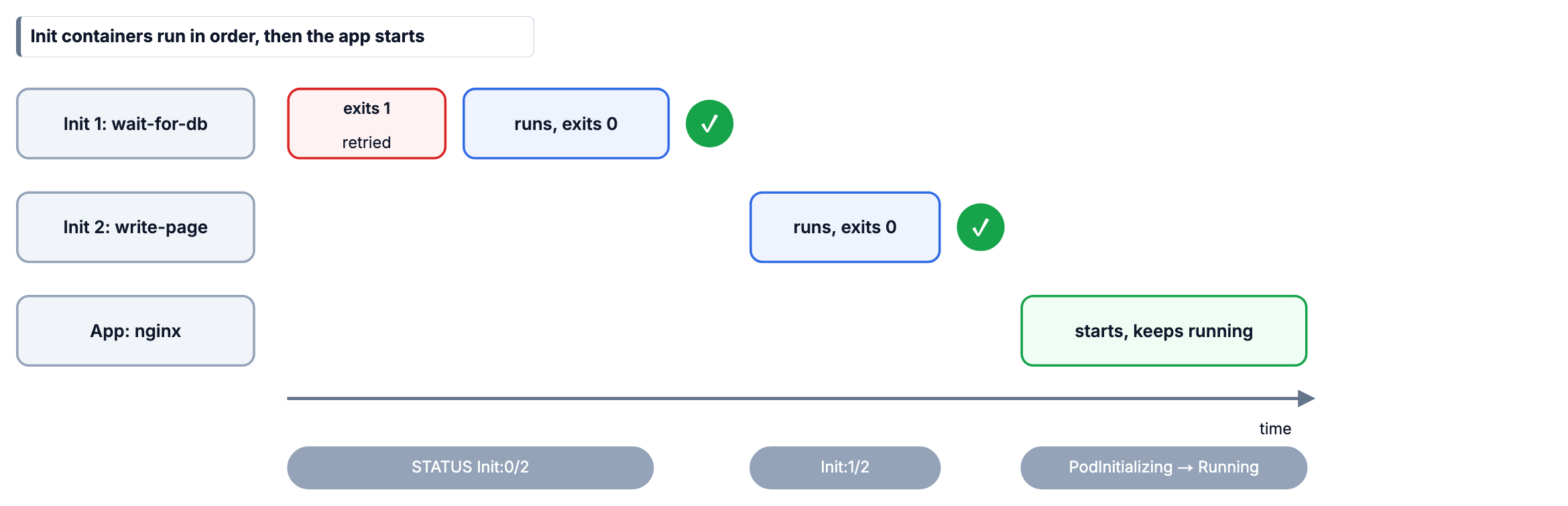
Why does nginx find the page? Init containers run one at a time, in order, and each must exit with zero. Only when every init container has finished does the app start. So the page is always there before nginx serves its first request.
The traps
Two traps cost the marks here. First, putting the busybox container under containers instead of init containers. Then it runs beside nginx, not before it. Busybox exits, the Pod restarts it, and you get CrashLoopBackOff. Second, a typo in nginx's mount path. The page lands in a folder nginx doesn't serve, and nginx serves its own default page. The Pod is Running, nothing looks broken, and the grader still marks it wrong. That's why you check the file itself.
Check your work
Always check. Get the Pod in the apps namespace: it should be Running, one of one ready, with no restarts. While setup runs, you'd see Init zero of one. Then exec into the nginx container and read the file through nginx's own path. If it says hello, the task is done.
Remember
Let's recap. Use a dry run for the skeleton. Init containers are their own list. Both containers mount the same volume, at their own paths. And check the answer through the app's path, in the right namespace.
Practice and what's next
All fifteen practice tasks, with answers, are free on the Gazeek blog. The link is below. Try this one hands-on in Gazeek Labs, and keep the field names fresh with the practice questions in Gazeek Flash. Next time: probes on a Deployment. See you there. You watched all one. Suspicious. There's more on the Alpaca Mango channel. Mate.
Hands-on labs
Now try it on a real cluster
Init containers and sidecars: a real cluster built for you, checked as you go.
Open the lab
Gazeek Flash · free
Exam questions on your phone
Free questions on Application Design and Build: quick-fire batches and timed exams, on the web or Android.